50 2576780000/00/02-2018
Error messages
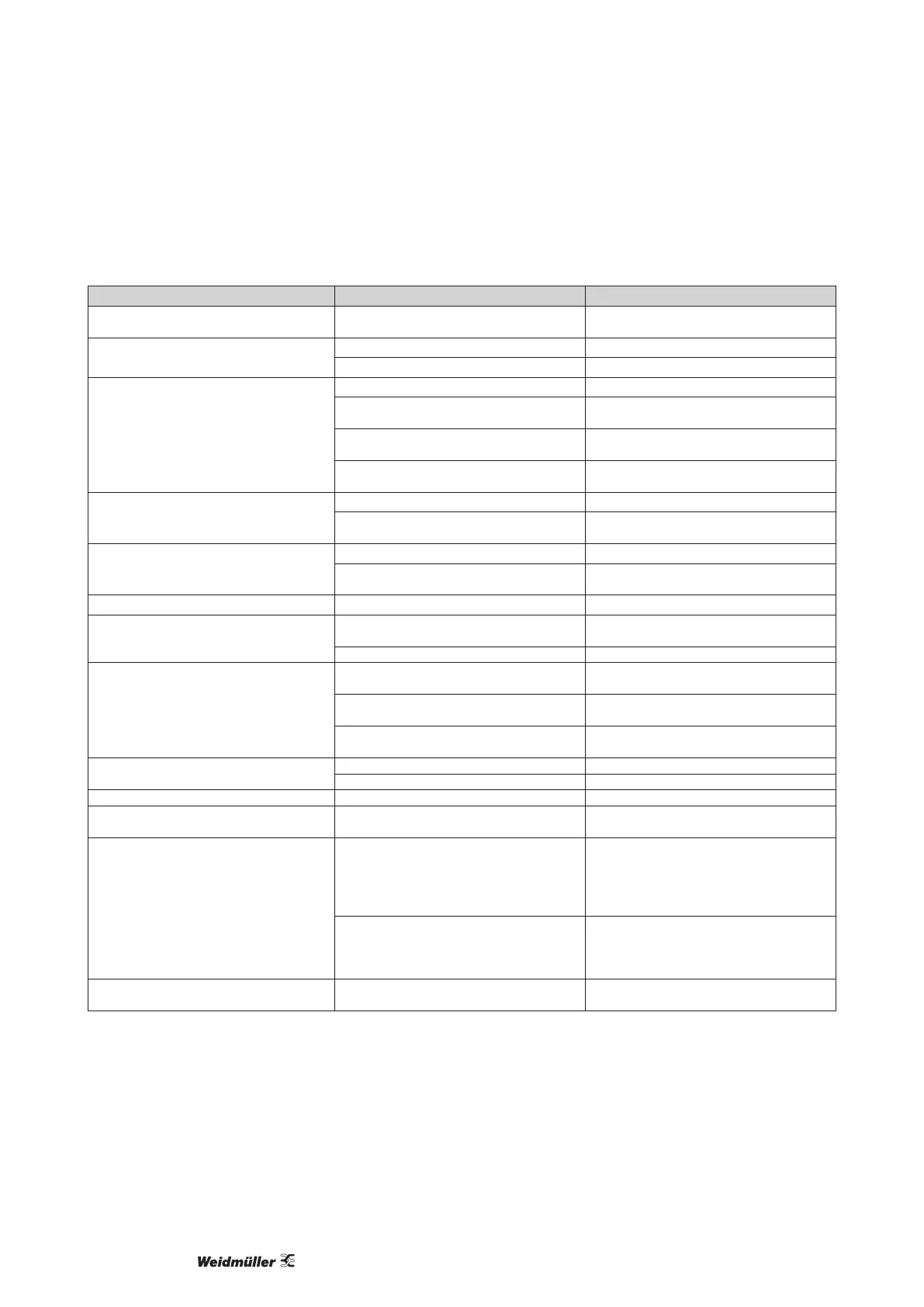
Procedure in the event of faults
Possible fault Cause Remedy
No display External fusing for the power supply voltage has
tripped.
Replace fuse.
No current display Measurement voltage is not connected. Connect the measuring-circuit voltage.
Measurement current is not connected. Connect measuring-circuit current.
Current displayed is too large or too small. Current measurement in the wrong phase. Check connection and correct if necessary.
Current transformer factor is incorrectly programmed. Read out and program the current transformer trans-
formation ratio at the current transformer.
The current peak value at the measurement input was
exceeded by harmonic components.
Install current transformer with a larger transforma-
tion ratio.
The current at the measurement input fell short of. Install current transformer with a suitable transforma-
tion ratio.
Voltage displayed is too large or too small. Measurement in the wrong phase. Check connection and correct if necessary.
Voltage transformer incorrectly programmed. Read out and program the voltage transformer trans-
formation ratio at the voltage transformer.
Voltage displayed is too small. Overrange. Install voltage transformers.
The peak voltage value at the measurement input has
been exceeded by harmonic components.
Caution! Ensure the measurement inputs are not
overloaded.
Phase shift ind/cap. A current path is assigned to the wrong voltage path. Check connection and correct if necessary.
Effective power, consumption/supply reversed. At least one current transformer connection is mixed
up/reversed.
Check connection and correct if necessary.
A current path is assigned to the wrong voltage path. Check connection and correct if necessary.
Effective power too large or too small. The programmed current transformer transformation
ratio is incorrect.
Read out and program the current transformer trans-
formation ratio at the current transformer.
The current path is assigned to the wrong voltage
path.
Check connection and correct if necessary.
The programmed voltage transformer transformation
ratio is incorrect.
Read out and program the voltage transformer trans-
formation ratio at the voltage transformer.
An output is not responding. The output was incorrectly programmed. Check the settings and correct if necessary.
The output was incorrectly connected. Check connection and correct if necessary.
EEE in the display See error messages.
EEE bAt in the display Battery capacity is too low See "Battery control function" and "Replacing the
battery"
No connection with the device. RS485
- Device address is incorrect.
- Different bus speeds (Baud rate).
- Wrong protocol.
- Termination missing.
- Adjust the device address.
- Adjust speed (baud rate).
- Select the correct protocol.
- Close bus with termination resistor.
USB
- Driver fault - Disconnect USB interface briey
- Use another USB port
- Reinstall Driver
Device still does not work despite the above meas-
ures.
Device defective. Send the device to the manufacturer for inspection
and testing along with an accurate fault description.



 To Next Page