eikon e1s
Service and repair guide
Removing the QTS assembly
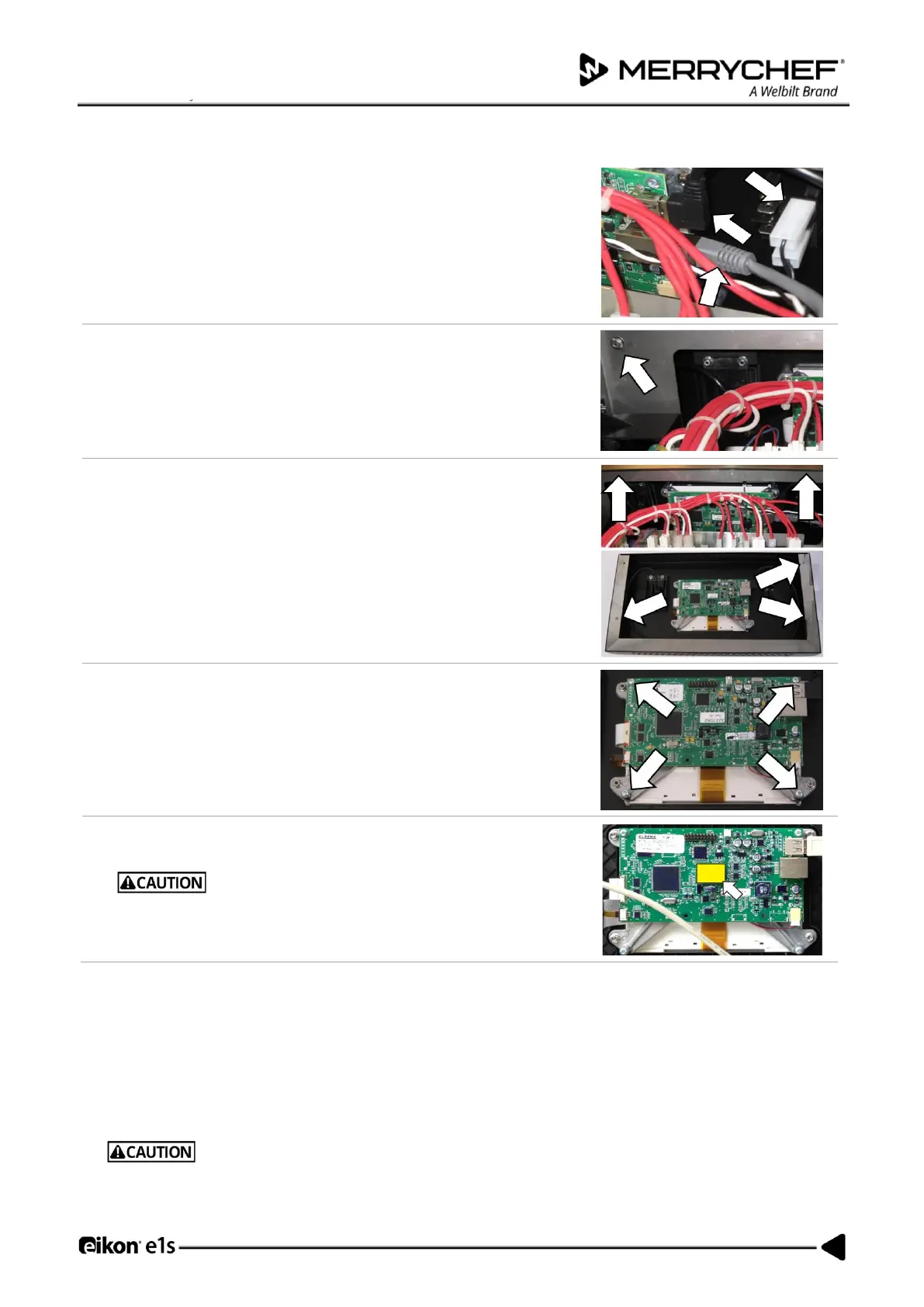
Disconnect all cables connecting the QTS assembly.
Unfasten the M5.5 hex head flange bolt that fixes the front panel to the
appliance body.
Remove the top front panel (including the touch screen and QTS assembly)
from the frame of the casing by lifting upward and towards the front of the
appliance. Note the three studs in corners of the assembly that locate and
hold the assembly to the appliance body.
Unfasten the four M5.5 hex head flange bolts to remove the QTS assembly
from the front panel.
Remove the PM (Personality Module) from the QTS and place safely aside.
Do not use tools to remove or refit the Personality Module.
Fitting the QTS assembly
• Follow the steps in the reverse order to fit the QTS assembly.
• Reconnect all electric connections to the QTS board.
Note: Fit the PM removed from the old QTS to the new QTS.
Reason: Replacement QTS units come WITHOUT Personality Modules as they store individual settings saved by the user.
For details see QTS circuit board assembly in Section 3G.
If the electric connections have not been restored properly this may lead to malfunction/damage of the oven.













 To Next Page