eikon e1s
Service and repair guide
Using a cooking profile – quick serve mode
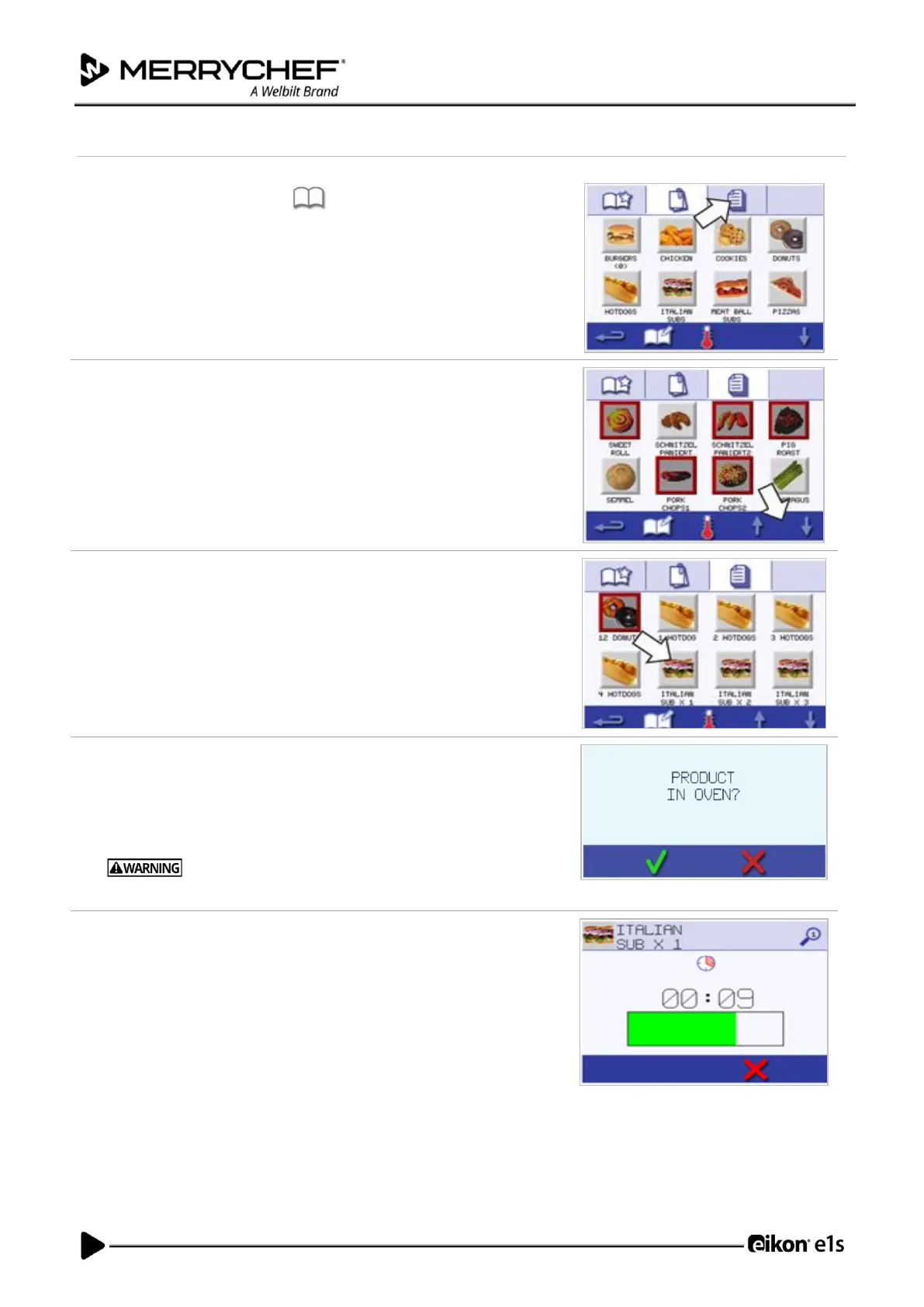
1. Select the ‘cookbook’ symbol from the main menu screen and then
select the All Menus option.
2. Use the scroll up/down arrows to find the cooking profile.
Note: If a picture has a red frame around it, this means the cavity
temperature is set too high or too low for that cooking profile. The cavity
temperature will need to be changed to use that option. See Changing
cavity temperature.
3. Select the required cooking profile to start cooking. For example:
‘ITALIAN SUB x 1’.
4. Follow any instructions on the screen, if displayed, and press the green
checkmark to start the cooking process.
Note: If food has not been placed in the oven, at this stage open the oven
door and place it on the cook plate and then press the green checkmark.
Hot surfaces at the door and in the cavity.
5. The cooking time counts down for each stage. When the cooking profile
ends, a red bar is displayed usually with an audible sound. Open the door
or touch the red ‘X’ to return to the cooking profile.
Note:
• Opening the appliance door during cooking stops the cooking profile
and displays a warning. Avoid opening the door during the cooking
process.
• Closing the door, however, allows the user to continue or cancel the
cooking profile.













 To Next Page