eikon e1s
Service and repair guide
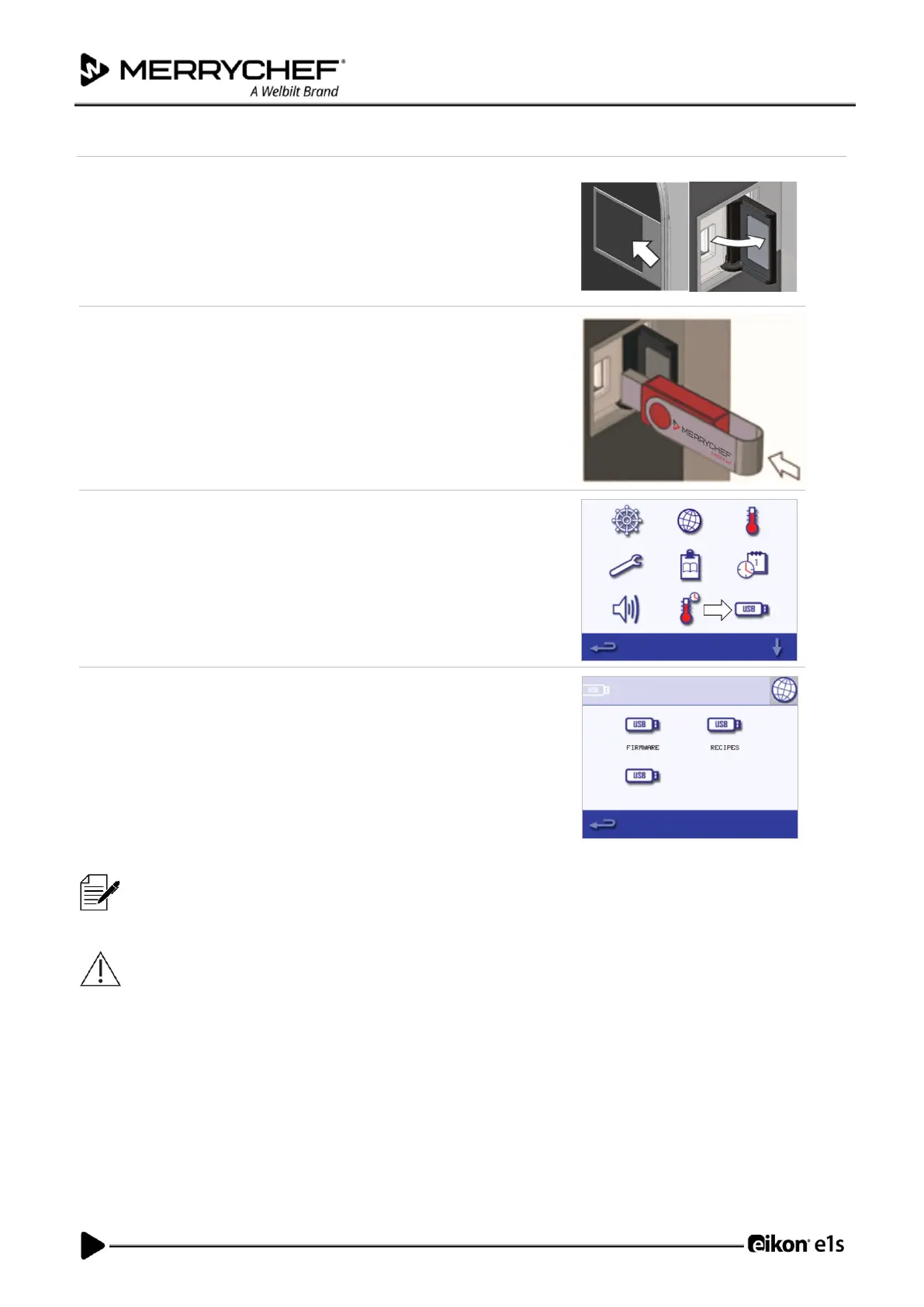
1. Switch the appliance OFF and open the cover to the USB port on the
control panel.
2. Plug in the USB memory stick and switch on the oven.
Note: If the USB memory stick is too large, use a standard commercial
adapter cable.
3. Select the ‘USB’ symbol from the settings menu.
Note: Check that the memory stick has the correct number/code for the
programs you want to load into the memory (one ‘.cbr’ file and
‘autoupdate’).
4. Select the type of file you are downloading (firmware or recipes). The files
will now automatically download from the USB memory stick showing the
progress and confirmation screens for the update.
IMPORTANT: Downloading from a USB memory stick will clear all the existing programs in the memory of the
appliance.
The USB cover protects the USB port so that no water vapor can get into the control electronics. During cooking and
cleaning, there must not be a USB memory stick inserted and the USB port must be closed by the cover.













 To Next Page