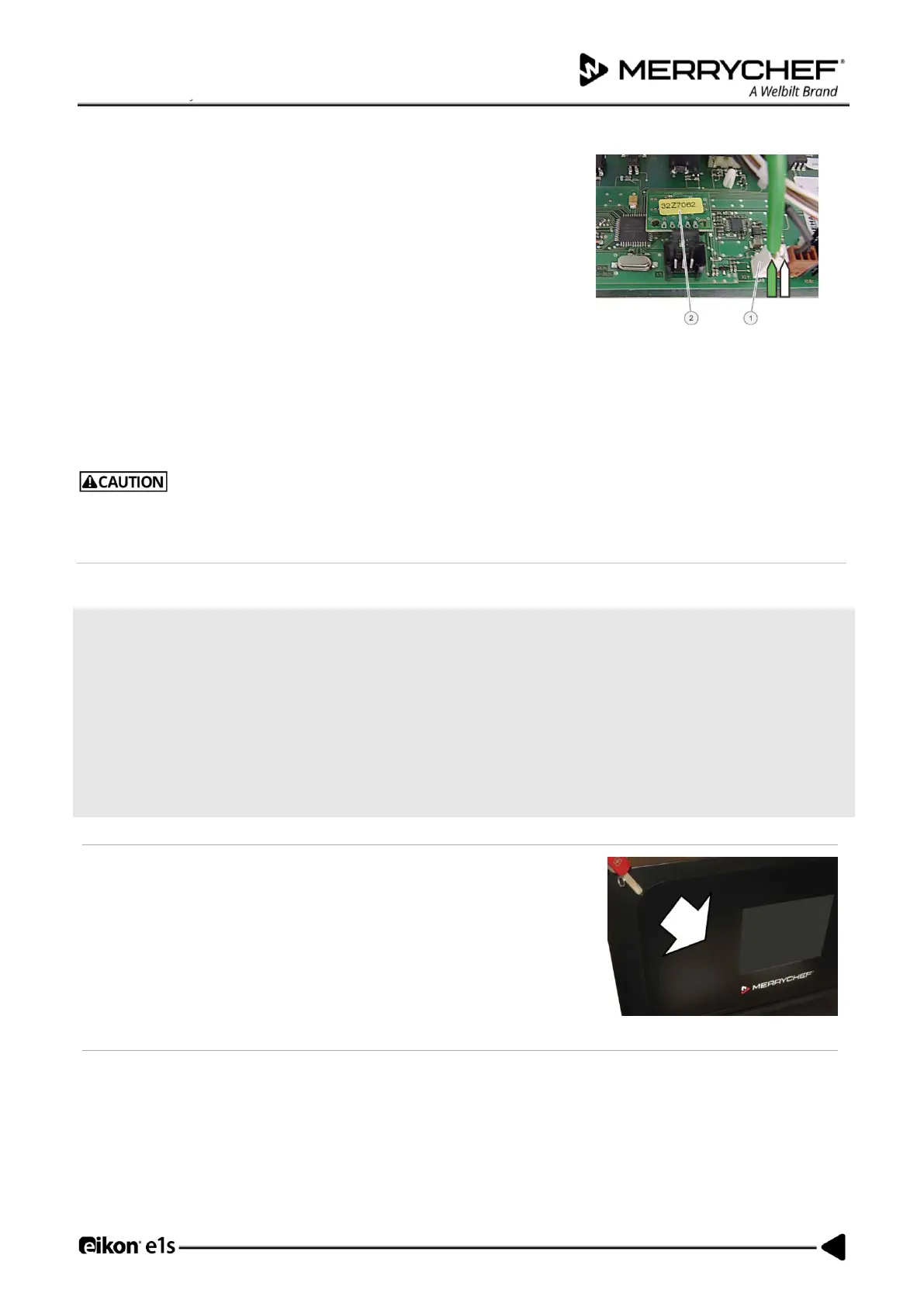
Fitting the SRB
• Follow the steps in the reverse order to fit the SRB.
• Reconnect all electric connections to the SRB.
For details see SRB circuit board in Section 3G.
Ensure the thermocouple negative (-) connection (white) and positive (+) connection (green) are fitted the correct way
round or the oven temperature readings will be wrong.
Note: Refit the Personality Module (PM) removed from the old SRB to the new SRB.
Reason: Replacement QTS / SRB units come WITHOUT Personality Modules as the PMs store individual settings saved by the
user.
If the electric connections have not been restored properly this may lead to malfunction/damage of the oven.
Replacing the touchscreen overlay
Requirements and tools
Check that the following requirements have been met:
• The appliance has been disconnected from the power supply and protective measures have been taken to ensure
the power cannot be switched on again.
• The appliance is cool.
• The top and side panels of the casing of the appliance have been removed.
• The high voltage capacitors are discharged before commencing work.
• Anti-static precautions have been taken.
Tools required:
• Flat headed screw driver
The touch screen overlay surrounds the easyTOUCH
®
screen providing easy-
to-clean protection from electrical connections. Should it fail, it can be
removed by prising away from the front of the appliance with a flat headed
screwdriver.













 To Next Page