Appendix
44 | WOLF GmbH 3066510_202108
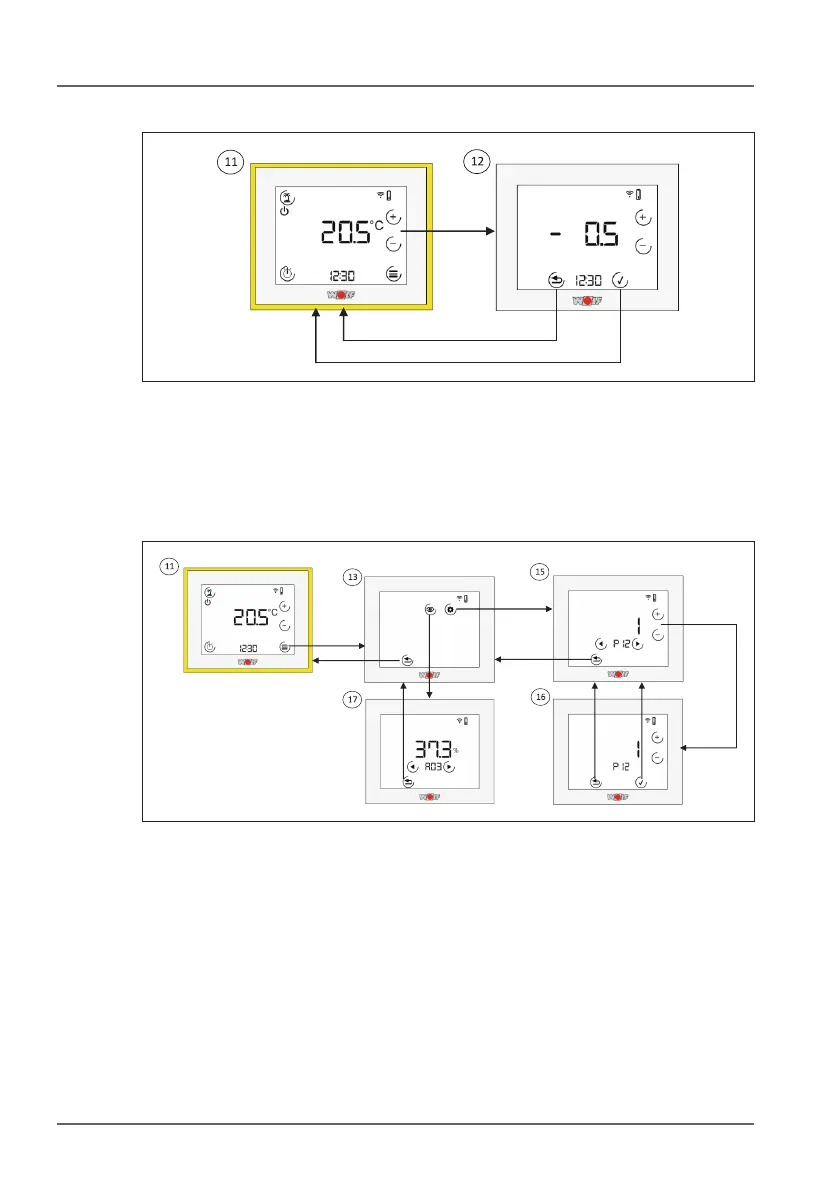
10.2.2 Adjusting the set value correction
dAdjusting the set value correction. Use the + and - keys to adjust
the set value correction. The value will ash. Use the tick key to
apply the change or the Back key to discard the change.
10.2.3 Remote control menu
1# Remote control menu. You can choose between display or
parameter values in the menu.
1% Parameter values. Use the arrow keys to switch between
parameters. Use the + or - key to switch to edit mode.
1^ Parameter edit mode. Use the + and - keys to change the
parameter. The value will ash. Use the tick key to apply the
change or the Back key to discard the change.
1& Display values. Use the arrow keys to switch between display
values if more than one value is available.



 To Next Page