Appendix
3066510_202108 WOLF GmbH | 47
10.3 Controller owchart - heating
10.3.1 Adjusting the set room temperature
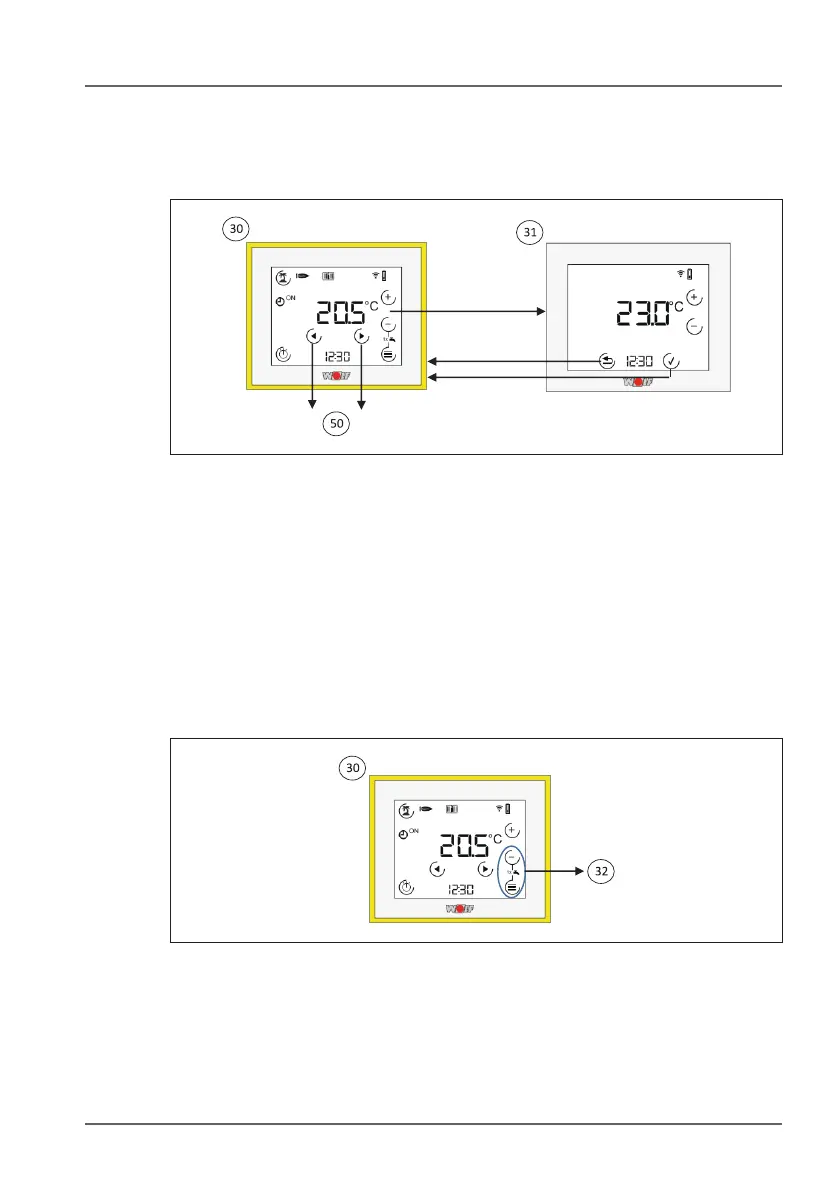
3) Standard display - controller - heating. This display provides the
current room temperature, the program selection for the heating
appliance and the status of the heating appliance. A number of
different sub-menus are available. Use the arrow keys to switch to
the standard display for ventilation (if connected) and/or the fault
page (if a fault has occurred).
3! Adjusting the set room temperature. Use the + and - keys to
adjust the set room temperature. The value will ash. Use the tick
key to apply the change or the Back key to discard the change.
10.3.2 1x DHW
3@ 1x DHW. Press and hold the - and menu keys for 5 seconds to
activate DHW heating for one hour. The symbol will ash, and the
remaining time will be displayed while it is active. Exit the mode
by pressing the two keys for ve seconds.



 To Next Page