Appendix
3066510_202108 WOLF GmbH | 53
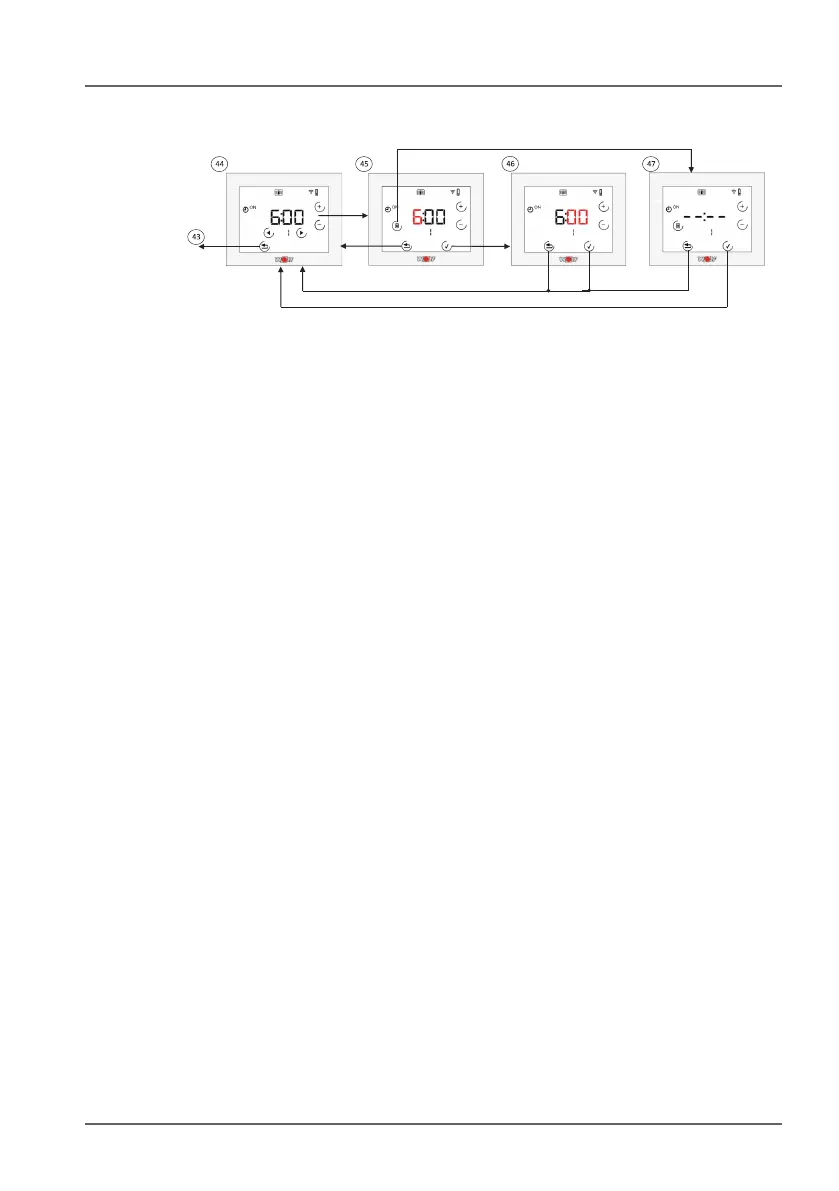
10.5.2 Day program
4$ Set time program for one day. Use the arrow keys to switch
between switching times (1, ON; 1, OFF;…3, OFF). The currently
selected switching time will ash. Use the + or - key to switch to
edit mode for the hour. Use the waste bin symbol to delete the
switching time (ON + OFF!).
4% Hour edit mode. Use the + and - keys to set the hour. The hour
will ash. Use the tick key to apply the change or the Back key to
discard the change.
4^ Minutes edit mode. Use the + and - keys to set the minutes. The
minutes will ash. Use the tick key to apply the change or the
Back key to discard the change.
4& Delete switching time. Use the tick key to delete the displayed
block or the Back key to keep it.



 To Next Page