6. XPILOT Driving
136
When ACC is enabled, it is not necessary for you to control the
accelerator pedal. Instead, ACC can have the control. If no
vehicle is detected in front, ACC will keep the set speed. If a
vehicle is detected in front, ACC will accelerate or decelerate as
required, and keep the vehicle-following distance set by you
while traveling at the set speed.
In addition, ACC will adjust the speed properly when entering
and leaving a bend.
You can accelerate at any time when driving at the set speed
in ACC status. However, when you release the accelerator
pedal, the vehicle will return to the set speed.
When following a vehicle, ACC is available during low-speed
driving. When the vehicle in front stops, ACC will control the
vehicle to stop, too. When the vehicle moves again, ACC will
restore work at the current set speed.
However, ACC enters the holding state rather than resumes
operation in the following cases, and the dashboard will
display a message to remind you to resume cruise control:
●
The vehicle is stopped for more than 90 s.
●
The ultrasonic sensor detects a close obstacle or
pedestrian in front of the vehicle.
●
The vehicle suddenly cannot detect the preceding
vehicle.
To resume ACC, please press the accelerator pedal.
Adjusting the Vehicle-Following DistanceAdjusting the Vehicle-Following Distance
─
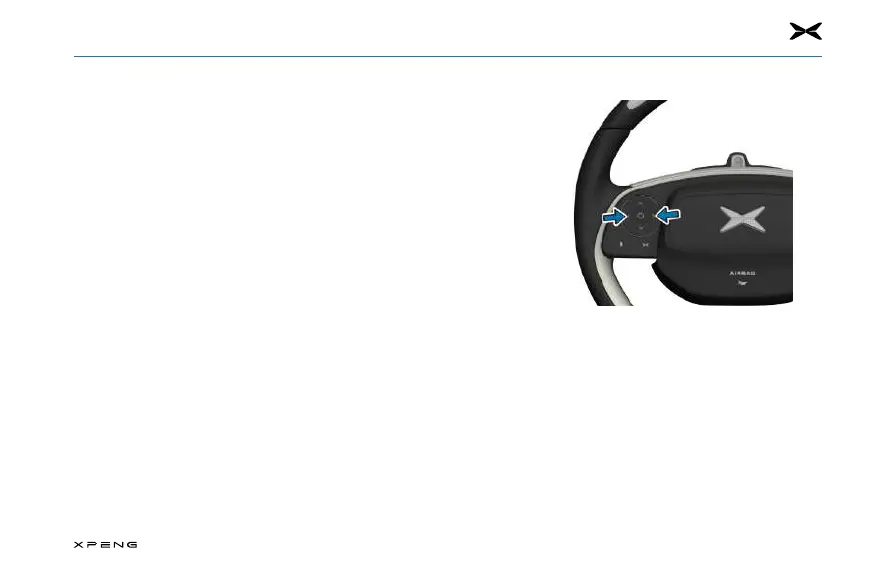
If you want to adjust your distance with preceding
vehicle, please tab the left/right button on the left of
your steering wheel. Every setting is corresponding to a
time-based distance, which represents the time required
for the vehicle to reach the rear of the preceding vehicle
starting from current position.
─
The system will memorize the driver's following distance
settings. Each time the vehicle is Ready again, the
following distance of the last time will be applied by
default.



 To Next Page