1
2
3
4
5
6
7
8
9
10
11
59
2. Preparations Before Driving (Interior)
Exterior Lights
This vehicle can automatically turn on/o the position light and
the low beam by detecting the ambient light condition with the
light sensors. You can also control the lights with the CID.
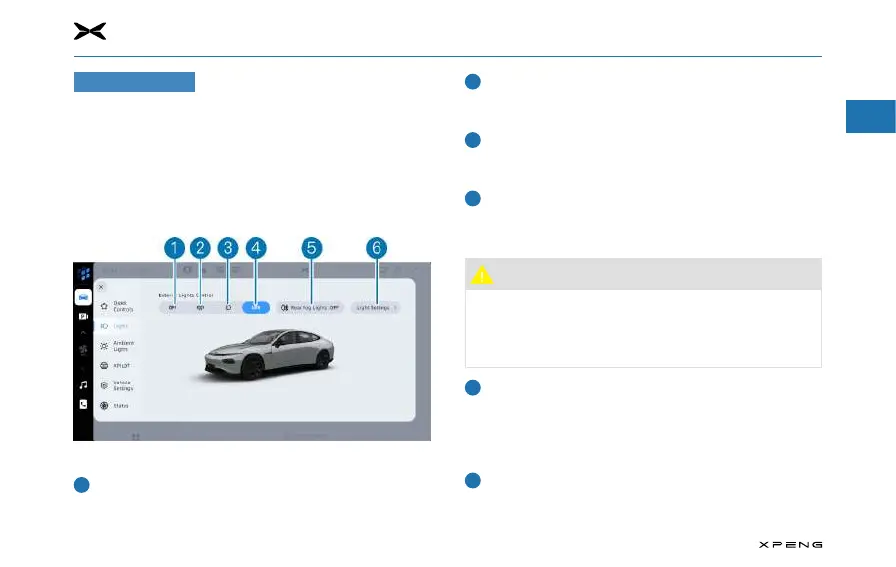
Control with CIDControl with CID
Tap "Vehicle Control
→
Lights" on the CID display to enter
the light control interface, and tap light buttons to control
corresponding lights.
Turn o all exterior lights
─
Tap this button to turn off all exterior lights; tap light
buttons to turn on corresponding lights.
Side marker lights
─
Tap this button to turn on/o position lights, license plate
lights, etc.
Low beam
─
When the position lights are not on, tap this button to
turn on/o the position lights, low beam, etc.
Automatic control
─
Tap this button to activate/deactivate the automatic
control function.
Caution
●
The automatic control function may be limited by the
external environment. When it does not work properly,
please turn on the lights manually in time according
to the road conditions.
Rear fog lights
─
When the low beam is on, tap this button to turn on/o
the rear fog lights.
─
When the position lights are o, the rear fog lights will go
o.
Light settings
─
Tap this button to activate/deactivate the Light Me Home
function and position light.



 To Next Page