7. Center Information Display (CID)
1
2
3
4
5
6
7
8
9
10
11
157
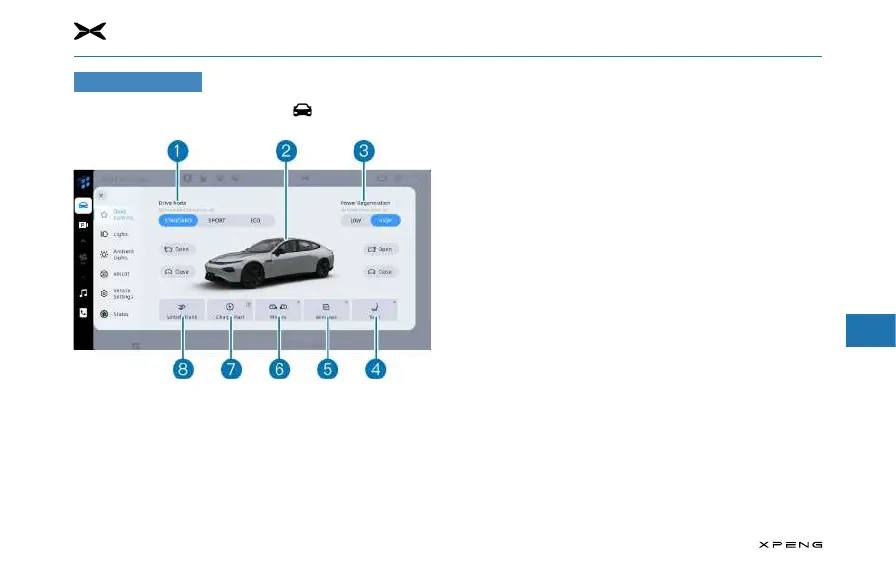
Vehicle Control
Once the vehicle is powered on, tap to enter the vehicle
control interface.
1. Driving Mode
─
The vehicle is available in three driving modes: "Standard,
Sport, Eco".
●
Standard: moderate power response with a balance
of range and driving performance.
●
Sport: faster power response for maximum
acceleration and more fun to drive.
●
Economy: smooth power response for greater range.
2. 3D vehicle models
─
Slide the vehicle model up and down, left and right to
adjust the visual angle freely.
─
The model provides realistic feedback on the status of
vehicle's front and rear lights, doors, charging cover, front
and rear trunks, and other vehicle body parts.
3. Energy Regeneration Mode
─
The vehicle offers two modes of energy regeneration,
"low and high".
─
Low: Low energy regeneration ensures a better driving
experience.
─
High: High energy regeneration gives the vehicle a longer
range.
4. Seat adjustment
─
Click the seat adjustment interface to adjust the driver
seat and the passenger seat.
5. Window adjustment
─
Tap the window adjustment interface to adjust the front
and rear windows.
6. Rear-view mirror adjustment
─
Tap to access the rear-view mirror adjustment screen to
adjust the left and right mirrors.



 To Next Page