Axiovert 40
B 46-0031 e 11/03 2Ć25
2.9 Documentation
On the Axiovert 40 C / 40 CFL microscopes, you can switch between observation and photomicrography by
means of a path selector switch. Since this is a 100%/100% selector, simultaneous observation and photogĆ
raphy is not possible. The digital adapter D 40 M37/52x0.75 and the V25 adapter for microscope cameras
1.0x, d=30 allow compact digital cameras to be mounted to the microscope. Additionally, other camera types
can be connected via special adapters (refer to the system overview in Section 1.4).
Mounting compact digital cameras
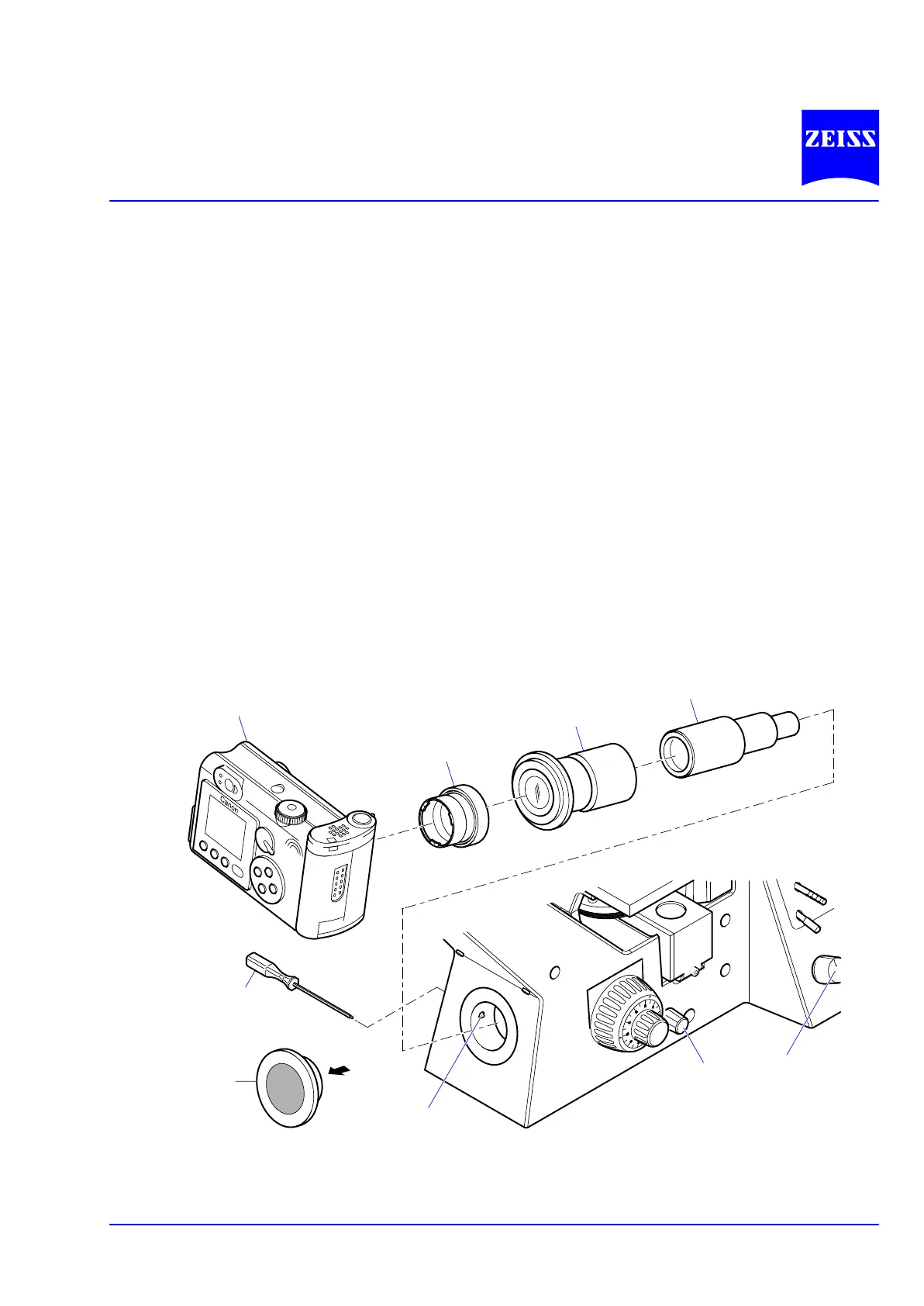
• Remove the dust-protective cap from the camera body (2Ć30ā/ā1, e.g. A 70 Canon).
• Fix the camera-specific filter adapter (2Ć30ā/ā2) to the camera body. The filter adapter is included in the camĆ
era equipment, when ordered from Carl Zeiss.
• Screw the digital adapter D 40 M37/52x0.75 (2Ć30ā/ā3) onto the adapter of the camera.
• Plug the V25 adapter for microscope cameras 1.0x, d=30 (2Ć30ā/ā4) into the digital camera adapter
D 40 M37/52x0.75 (2Ć30ā/ā3) and tighten grub screw (2Ć31/4, see next page).
• Remove dust-protective cap (2Ć30ā/ā6) from camera port and attach the pre-installed camera system to this
port. Align it horizontally and fasten it by means of the clamping screw (2Ć30ā/ā7) using the SW 3 ball-
headed screw driver (2Ć30ā/ā5).
Fig. 2Ć30 Camera system
2
3
4
5
6
8
9
1
7










 To Next Page