8.2. Accessory List
The accessory list is implemented in the user manual.
If accessories are combined, note the approved combinations and the relevant legal regulations. If third-party
accessories are used, this will result in a new medical system and the user will be solely responsible for the correct
combination or modification.
8.3. Replacement of device components
Safety Note
Do not touch modules or parts in the device when working on an open device with the power cable plugged in.
Electrical cables and wires may have a voltage up to 120V/ 240 V. Unplug power cable before opening and
closing the device
.
8.3.1. Replacement of PhySys Edition SD components
8.3.1.1. Opening the rear part of housing
Caution High voltage inside!
1. Unplug power cable from power source
2. Unplug all cables from the housing
3. Remove the rear housing, therefore
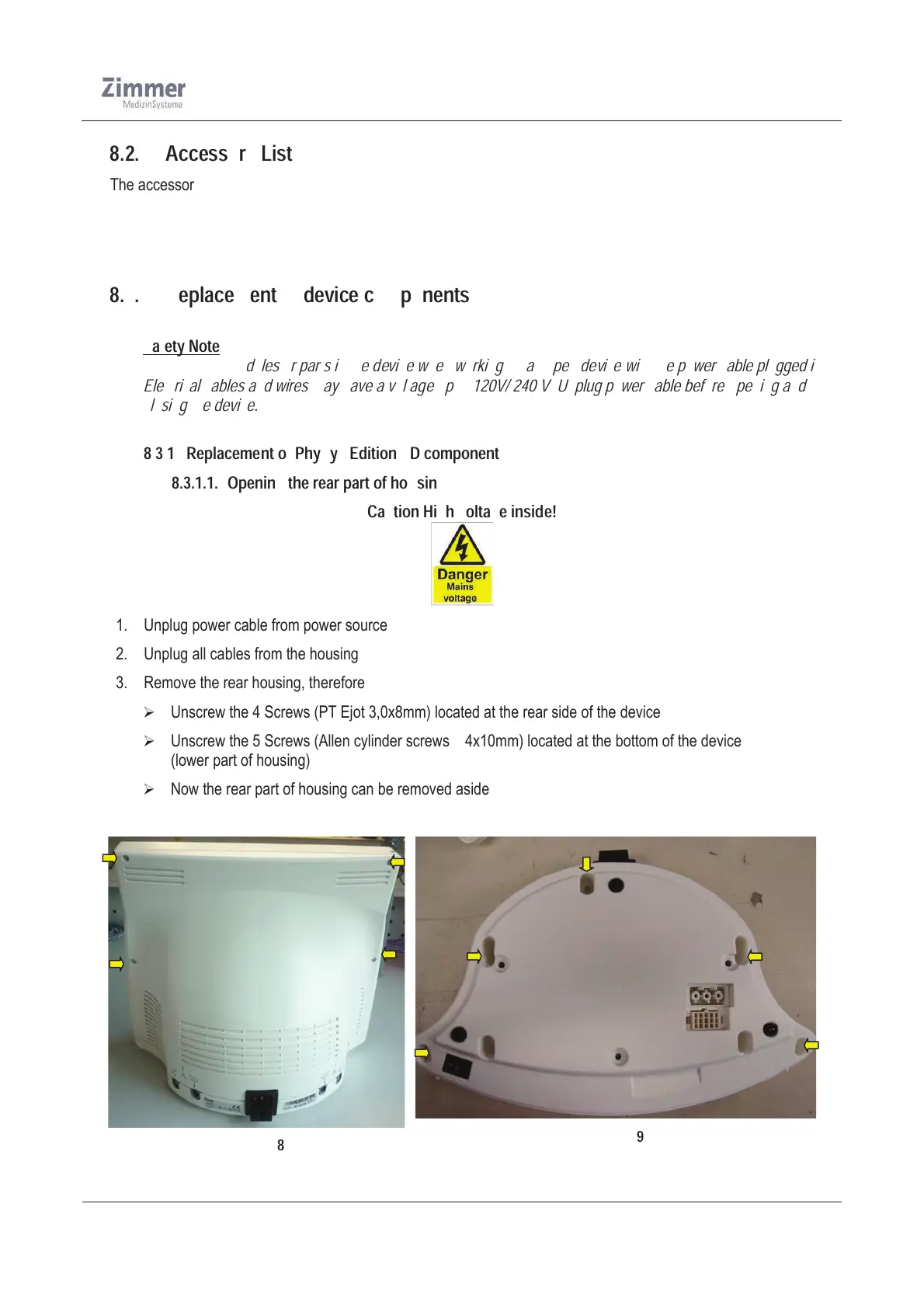
¾ Unscrew the 4 Screws (PT Ejot 3,0x8mm) located at the rear side of the device
¾ Unscrew the 5 Screws (Allen cylinder screws M4x10mm) located at the bottom of the device
(lower part of housing)
¾ Now the rear part of housing can be removed aside
Figure 18
Figure 19













 To Next Page