■
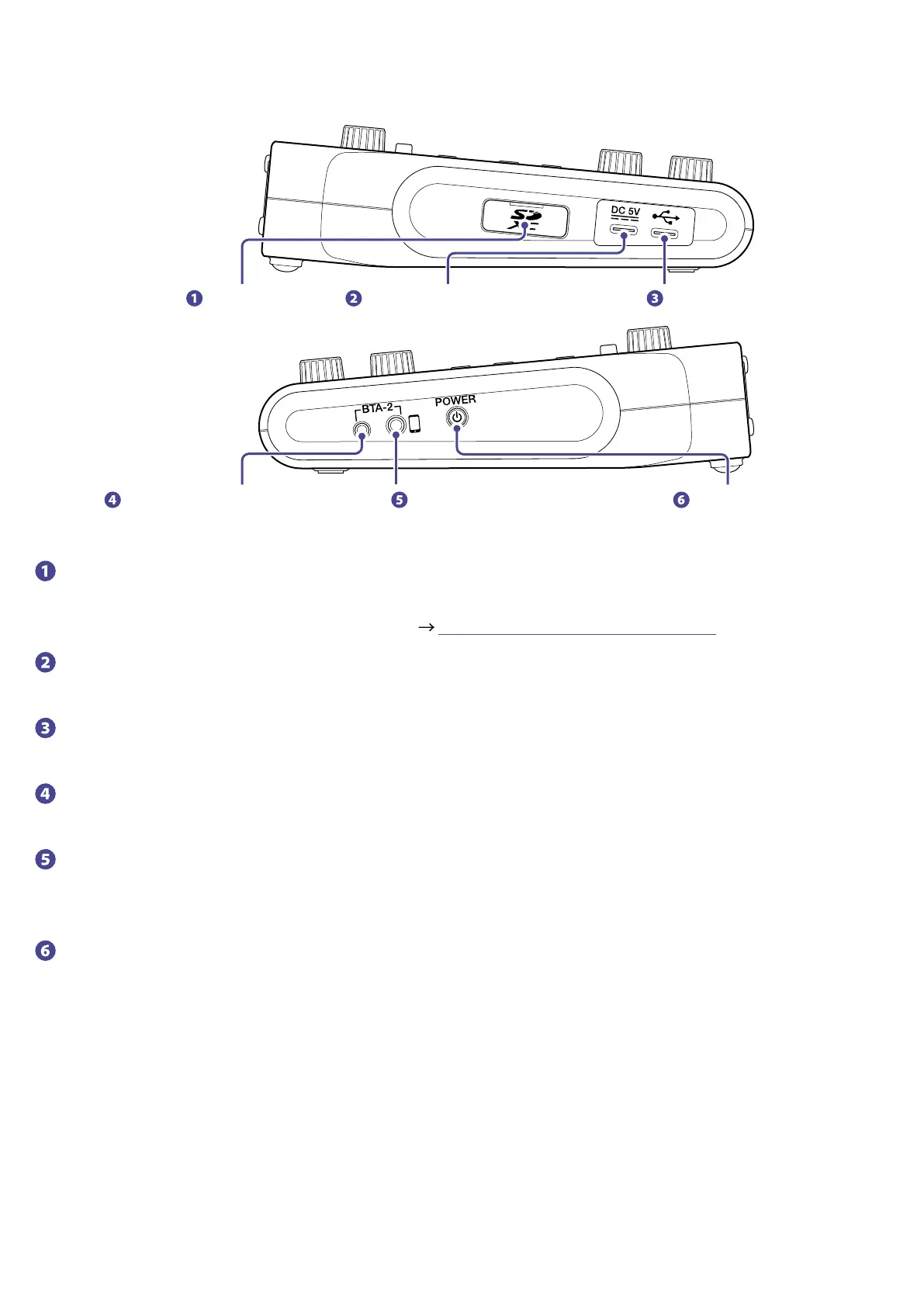
Left/Right
SD card slot Power supply USB port (Type-C) USB port (Type-C)
BTA-2 power supply connector Smartphone connection jack Power switch
SD card slot
Cards that conform to SDHC and SDXC specications are supported.
Format the SD card with the
P4
before use. ( “Formatting SD cards” on page 49)
Power supply USB port (Type-C)
This power supply USB port is for connecting an AC adapter or portable battery.
USB port (Type-C)
This USB port is for connecting with a computer, smartphone or tablet.
BTA-2 power supply connector
Use this power supply connector when connecting a BTA-2 wireless adapter.
Smartphone connection jack
By using a 4-contact mini-plug cable, the signal from a smartphone can be input on channel 3 while the
signal mixed on the
P4
(excluding the channel 3 signal) is returned to the smartphone simultaneously.
Power switch
This turns the power on and off.
8



 To Next Page