Installation Guide for the 2GIG EDGE Security Panel
36
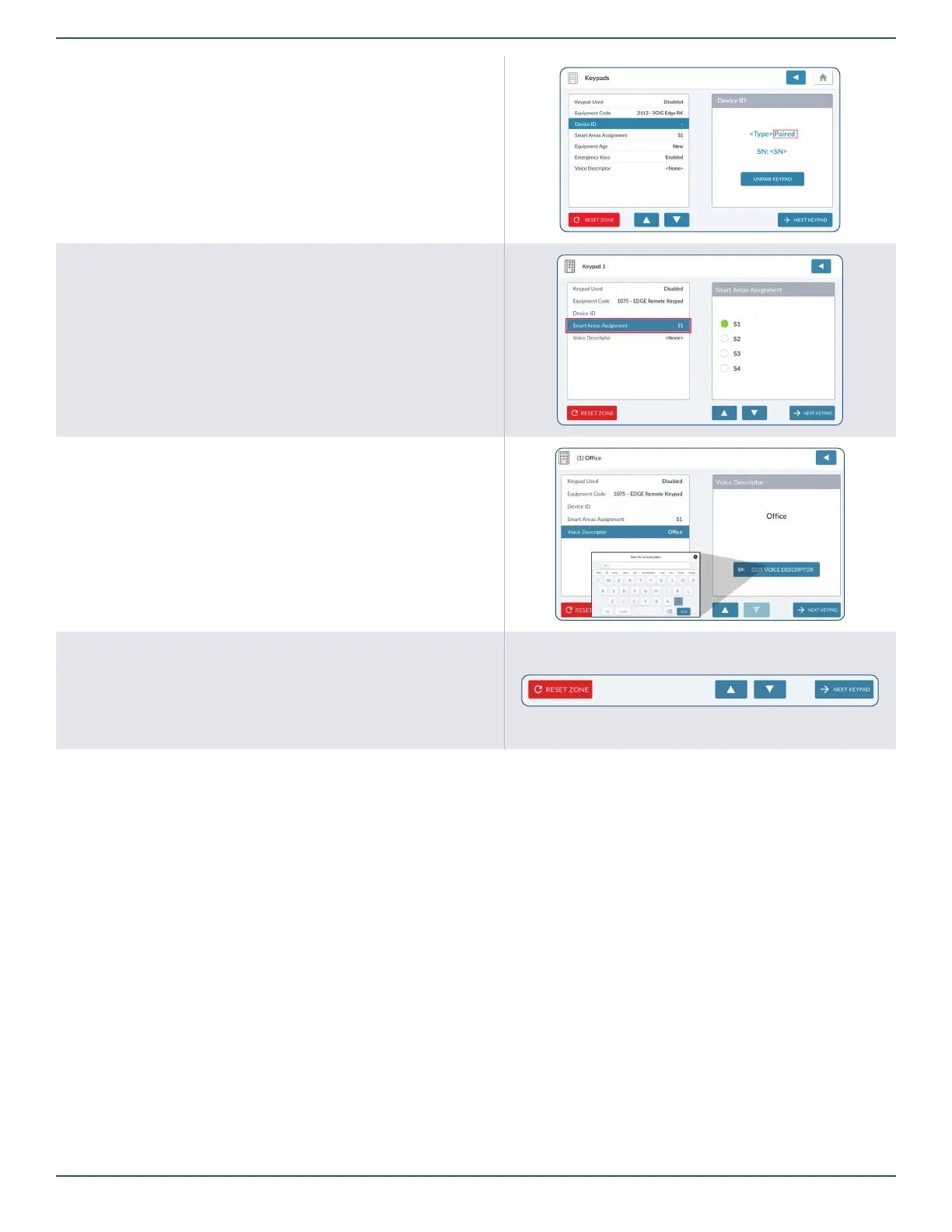
8. The panel will display the Keypad as “Paired”.
9. Tap to move to the next option.
Smart Areas Assignment
1. Highlight Smart Areas Assignment.
2. Choose a Smart Area (Partition) for the Keypad.
3. Tap to move to the next option.
Edit Voice Descriptor
1. Highlight the Voice Descriptor setting.
2. Tap ADD VOICE DESCRIPTOR to reveal the touchscreen keypad.
3. Enter the rst few letters of the desired vocabulary word.
4. Tap the matching vocabulary word above the touchscreen keypad to select it.
5. Repeat the steps above to enter the desired phrase for the keypad.
6. Tap Done.
7. Review the voice descriptor.
Reset Keypad/Next Keypad
¾ Tap Reset Zone to erase all the programmed settings for the zone.
¾ Tap NEXT KEYPAD to program another Remote Keypad.



 To Next Page