Installation Guide for the 2GIG EDGE Security Panel
38
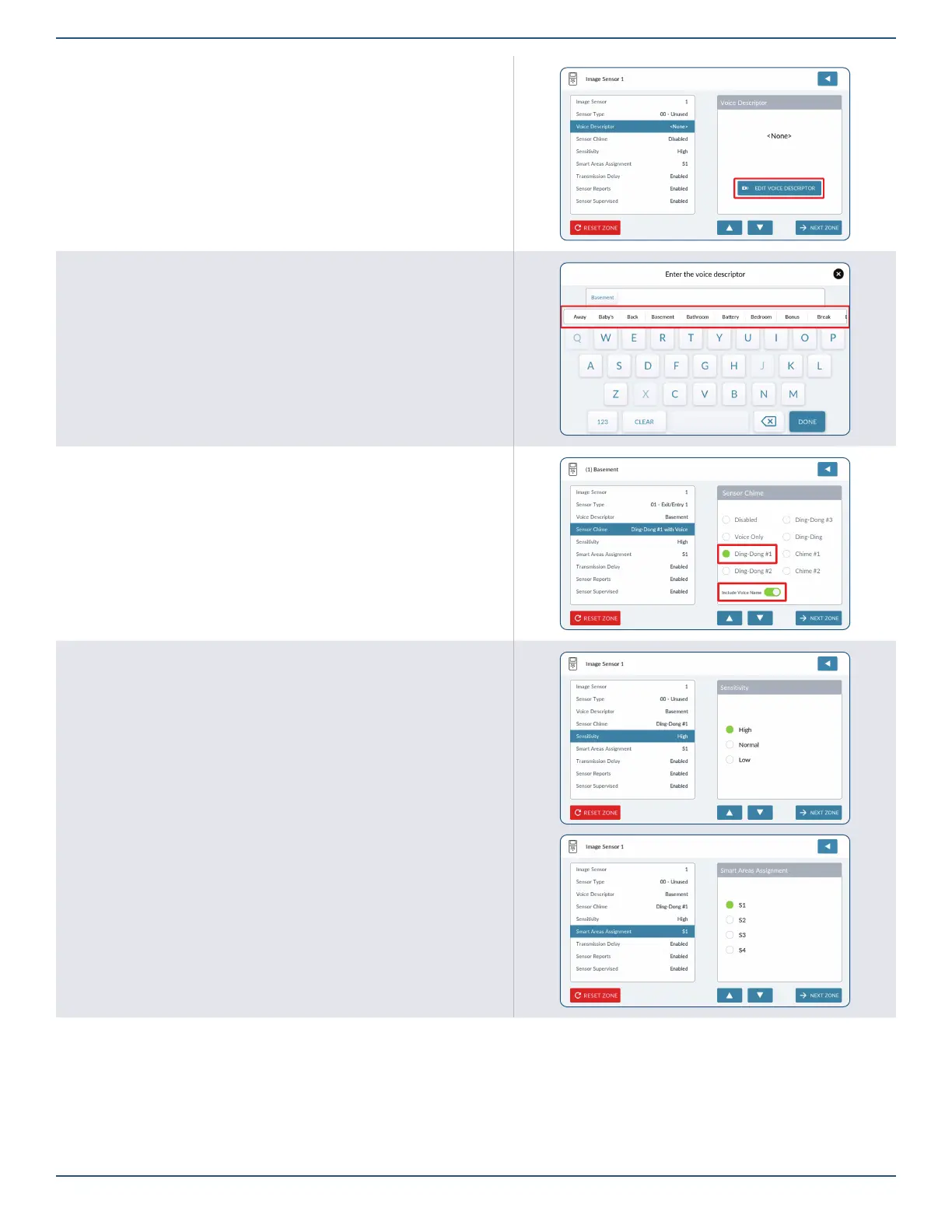
Voice Descriptor
1. Tap EDIT VOICE DESCRIPTOR.
2. Use the keypad to enter the rst few letters of the desired word.
3. Tap the matching word above the keypad.
4. Repeat the steps above to enter a phrase.
5. Tap DONE.
6. Tap to move to the next option.
Sensor Chime
1. Tap Sensor Chime to assign a sound to the Image Sensor.
2. Tap to move to the next option.
Sensitivity
1. Tap Sensitivity, then select High, Normal or Low.
2. Tap to move to the next option.
Smart Area Assignment
1. Tap Smart Area Assignment, then assign the Image Sensor to a particular Smart
Area zone (S1, S2, S3 or S4).
2. Tap to move to the next option.



 To Next Page