ZPrinter
®
350 / ZPrinter
®
450 User Manual Routine Cleaning
3dscentral.3dsystems.com 32 All Rights Reserved
10/31/12
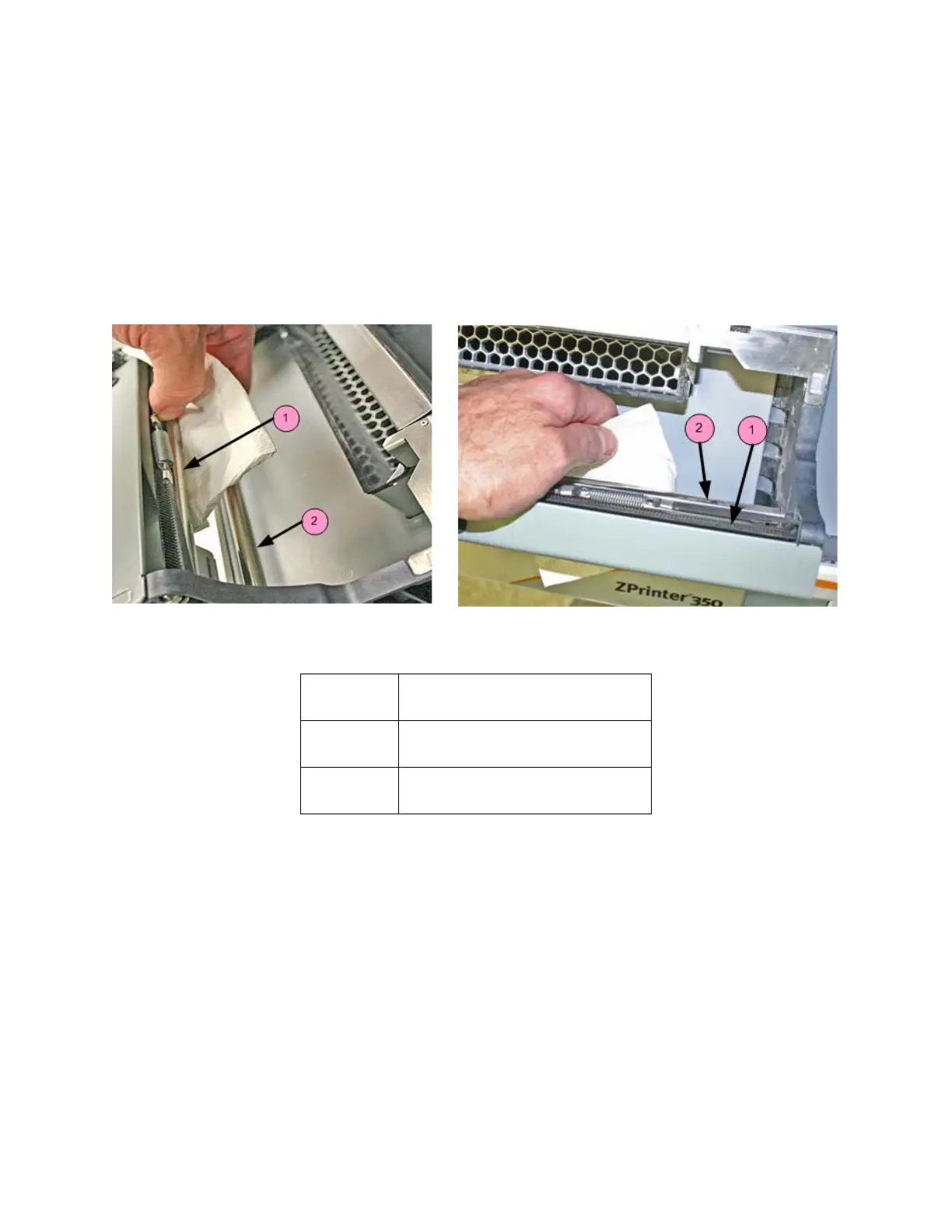
3.3 Clean The Fast Axis Rails and Carriage
Keeping the Fast Axis Rails and Carriage clean will keep the Carriage moving smoothly and thus optimize
printing accuracy.
1. Open the printer top cover and pull the fast axis forward until it stops.
2. Lay clean paper towels under the Fast Axis.
3. Using a paper towel dampened with distilled water, wipe the top and bottom Rails to remove any pow-
der. Move the Carriage back and forth as needed to clean the entire length of both rails.
4. Dry both Rails thoroughly with a clean dry paper towel.
5. Using a fresh paper towel, wipe the Carriage to remove any powder.
6. Wipe or vacuum the Build Bed and Deck as needed to remove any powder dislodged from the Rails
and Carriage.
Important: Never vacuum up water or other fluids - it will clog the vacuum system.
Number Component
1 Top Rail
2Bottom Rail



 To Next Page