User’s Manual
Enterprise Access Point ENGLISH
Copyright © 4IPNET, INC. All rights reserved.
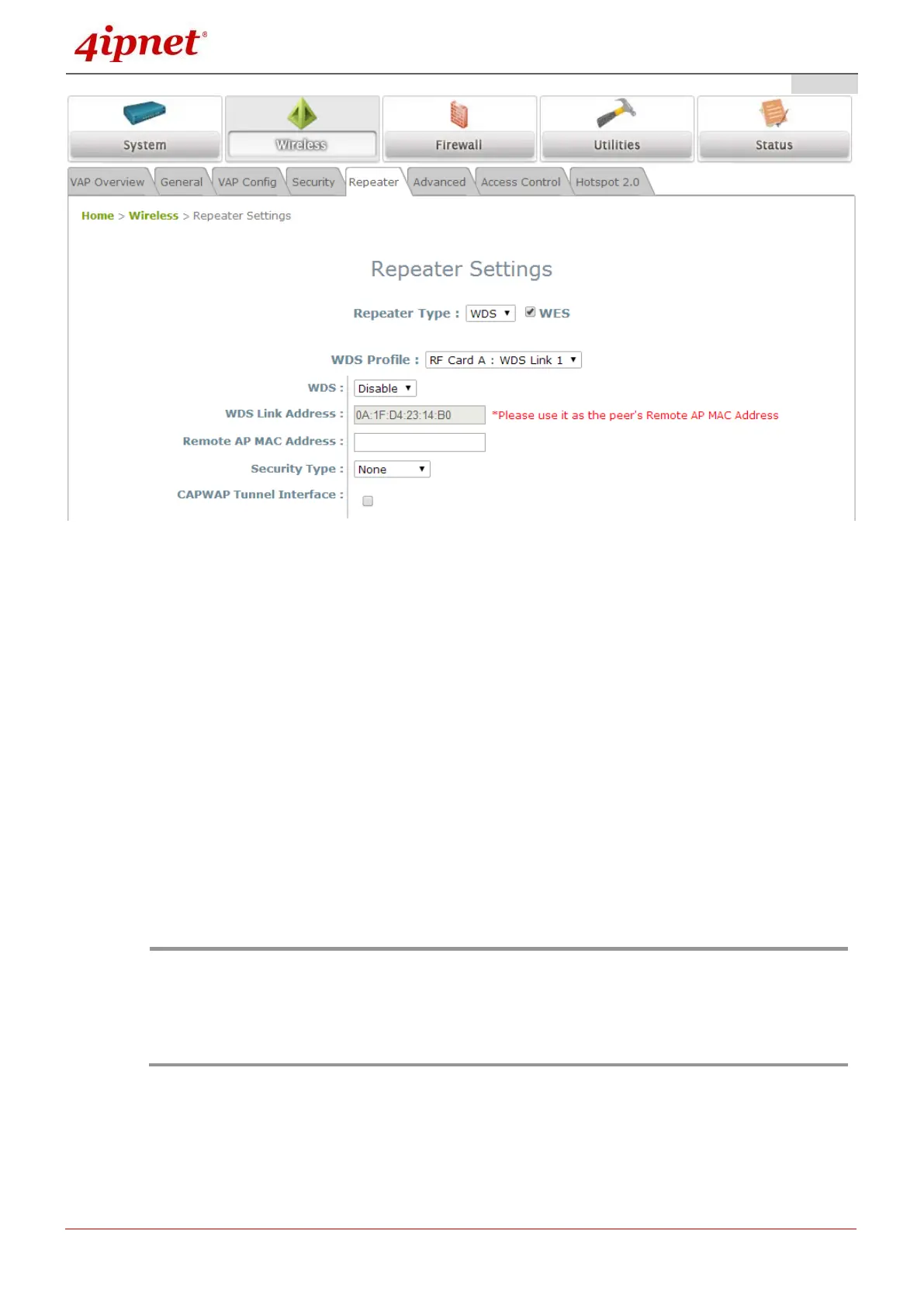
1. Click on the Wireless button on the main menu.
2. Select the Repeater Settings tab.
3. Choose WDS as the Repeater Type.
4. Choose the desired WDS profile:
(a) Enable WDS.
(b) WDS Link Address (*on selected AP Models). Use the MAC address as Peer’s Remote
AP MAC Address.
(c) Enter the MAC Address (peer AP) and then Click SAVE.
If you are using another 4ipnet APs as the peer AP, simply repeat the above-mentioned steps to
configure another peer AP(s).
- To support traffic with unlimited VLAN tags via WDS, EAP220 has to be set to Tag-Based
Mode.
- On selected APs, each WDS link interface has its own MAC address. Use the respective
MAC for each interface to create WDS links with peer APs.
- Cross brand/model WES/WDS link performance may vary with different Access Points
depending on hardware compatibility.



 To Next Page