BM series 39
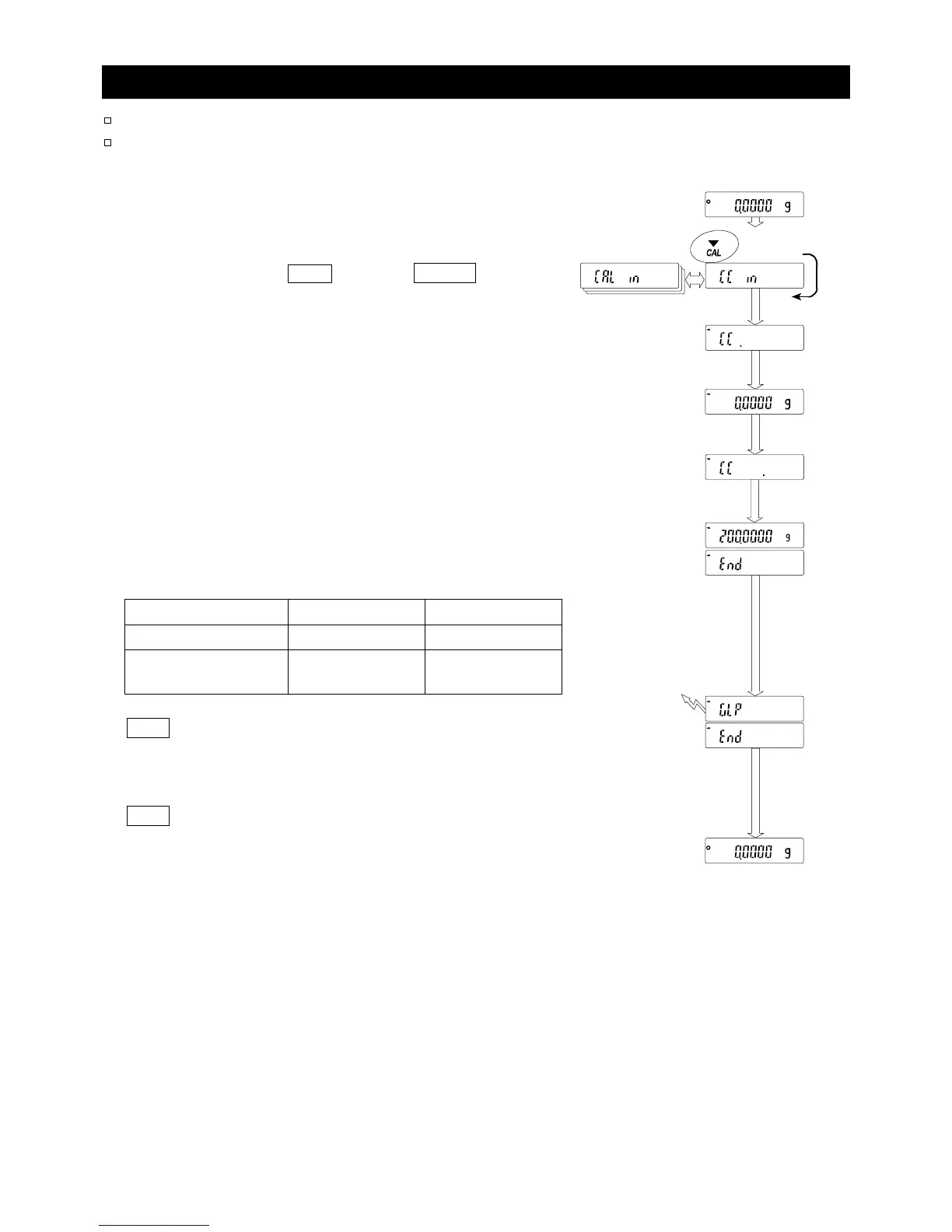
8.4. Calibration Test Using the Internal Mass
This function checks the accuracy of weighing using the internal mass.
Calibration test does not perform adjustment.
1 Connect the AC adapter and warm up the balance
for at least one hour with nothing on the weighing
pan.
2 Press and hold the CAL key until CC in is
displayed, then release the key.
3 The balance measures the zero point.
Prevent vibration and drafts to affect the balance.
4 The measured zero point data is displayed.
5 The balance measures the internal mass.
Prevent vibration and drafts to affect the balance.
6 The value of the internal mass is displayed.
The normal range of the value is as follows:
Model Internal mass Normal range
BM-20, BM-22 20.00000 g ±0.02 mg
BM-252, BM-500
BM-300, BM-200
200.0000 g ±0.2 mg
7 glp is displayed and the calibration test report is output
to the RS-232C interface and is stored in memory. Refer to
"GLP output (info)" and "Data memory (data)" of the
function table.
end is displayed after the calibration test.
8 The balance automatically returns to the weighing mode.
Press and hold
Release
GLP outpu



 To Next Page