42 BM series
8.7. Correcting the Internal Mass Value
The balance can correct the internal mass
value within the range shown below. This
function corrects the internal mass value to
conform to an external weight. The corrected
mass value is maintained in non-volatile
memory even if the AC adapter is removed.
The internal mass value is corrected as follows:
Model Correction reference value Correction range
BM-20, BM-22 20.00000 g ±1.5 mg
BM-252, BM-500, BM-300, BM-200 200.0000 g ±1.5 mg
Example: With the BM-300, 200.0000 g is corrected by +0.6 mg (200.0006 g). When performing a
+0.6 mg correction with a 100 g external weight, the correction value will be +1.2 mg in
accordance with the reference value of 200 g.
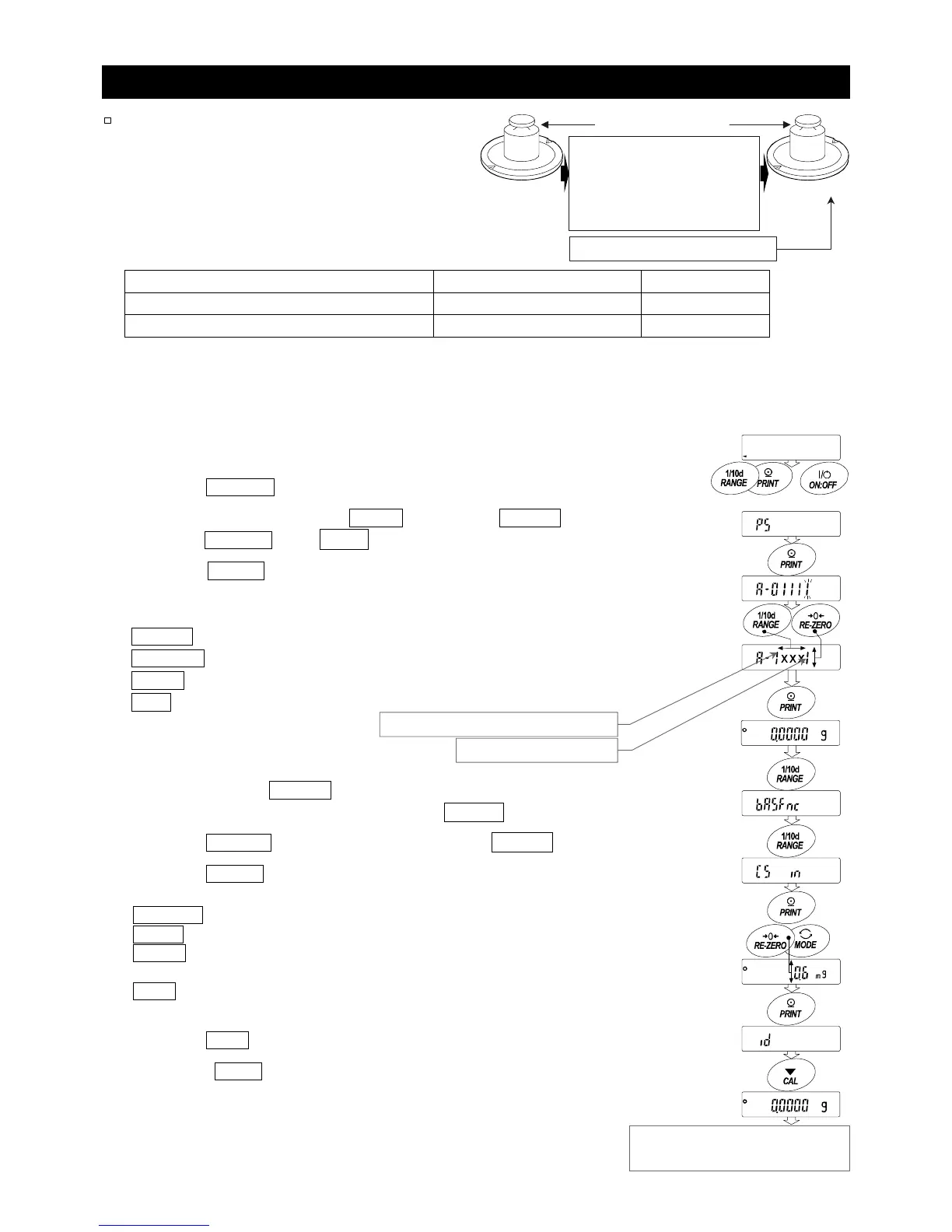
1 Perform calibration using the internal mass. Weigh an external
weight and get the correction value.
2 Press the ON:OFF key to turn the display off.
3 While pressing and holding the PRINT key and the RANGE key,
press the ON:OFF key. p5 is displayed.
4 Press the PRINT key to display the function switches. Set
the function table switch and internal mass correction switch
to "1" as shown to the right using the following keys.
RANGE key
..........
To select the blinking digit.
RE-ZERO key
.......
To change the value of the blinking digit.
PRINT key
............
To store the new value and return to the weighing mode.
CAL key
...............
To cancel the current operation.
5 Press and hold the RANGE key (for approx. 2 seconds) to enter
the function table and release the key when ba5fnc is displayed.
6 Press the RANGE key several times to display C5 in .
7 Press the PRINT key.
Correct the internal mass value using the following keys.
RE-ZERO (+)key
....
To increase the value.
MODE (-)key
........
To decrease the value.
PRINT key
...........
To store the new value and display the next
menu item of the function table.
CAL key
............
To cancel the current operation and display
the next menu item of the function table.
8 Press the CAL key to return the weighing mode.
9 Press the CAL key to calibrate the balance using the
internal mass.
10 Check that the correction has been performed properly with the
external weight. If the value is incorrect, repeat the correction.
Internal mass correction
Press and hold Press
Press and hold



 To Next Page