BM series 69
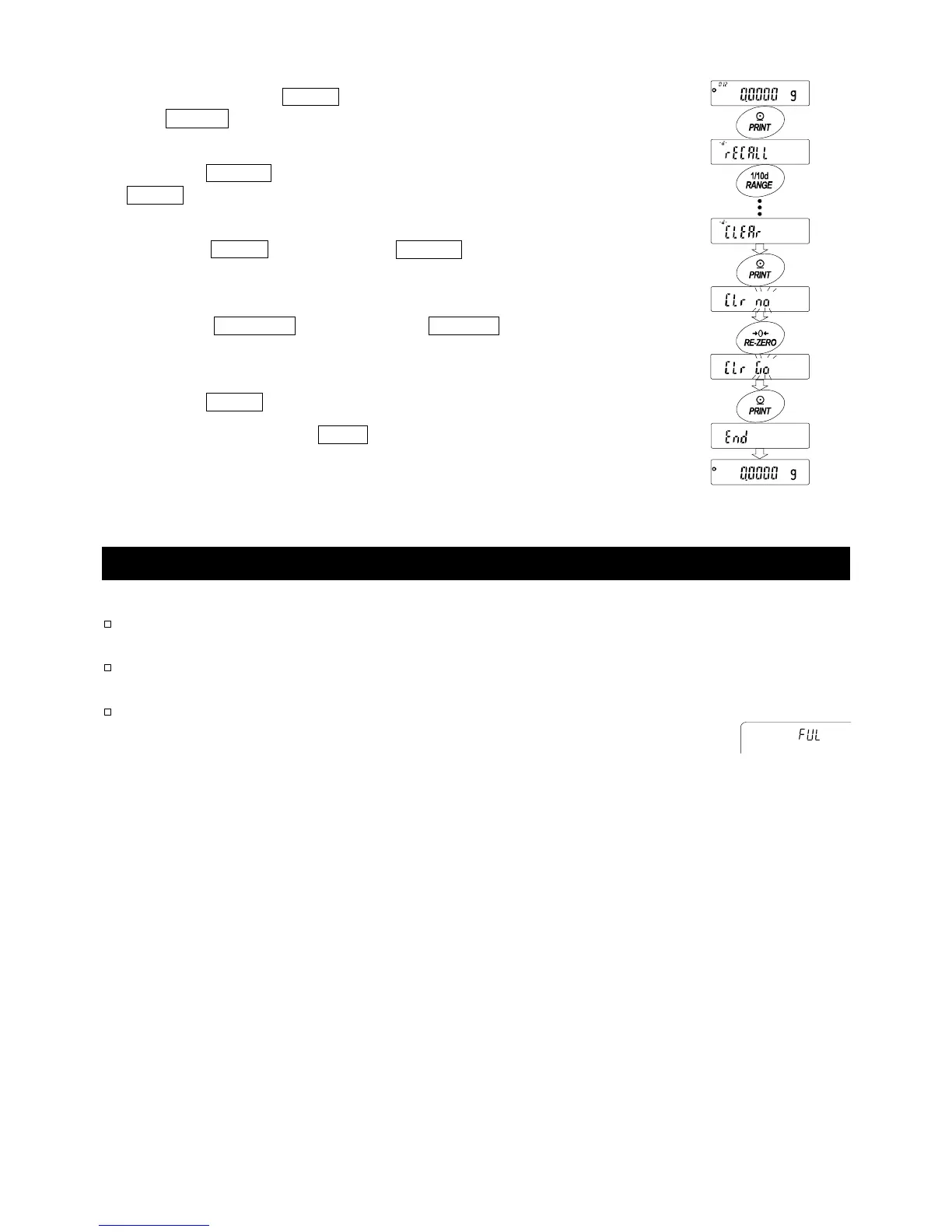
Deleting all memory data at one time
1 Press and hold the PRINT key (for approx. 2 seconds)
until reCall is displayed, and then release the key.
2 Press the RANGE key several times to display
Clear .
3 Press the PRINT key to display Clr "n"o with "no"
blinking.
4 Press the RE-ZERO key to display Clr "g"o with
"go" blinking.
5 Press the PRINT key to delete all data
5 The balance displays end and returns to the
weighing mode.
12.3. Data Memory for Calibration and Calibration Test Data
Features
Calibration data (when and how it is performed) and calibration test
data can be stored in memory.
All the data in memory is available to be output at one time to a printer
or personal computer.
Up to 50 data sets of the latest calibration or calibration test can be
stored. When the memory capacity has been reached, "fUl" is
displayed in the upper left of the display.
Storing the calibration and calibration test data
Note If "Clr" appears blinking in the upper left of the display, delete the data in memory.
Store the calibration and calibration test data as follows:
1 Set the "Data memory (data)" parameter to "2" (to store the calibration data).
2 Set the "GLP output (info)" parameter to "1", "2" or "3".
3 With the settings above, each time calibration or calibration test is performed, the
data is stored automatically.
Indicato



 To Next Page