BM series 59
11.2. GLP Report
To output the GLP/GMP compliant report to an AD-8121B printer, AD-8126 printer, AD- 8127
printer or to a personal computer, set the "GLP output (info)" parameter of the function table to
"1" (AD-8121 format), "2" (General format using the balance built-in clock data) or "3" (General
format using the external device clock data).
Notes on outputting the GLP/GMP compliant report to a printer
Refer to "16.2. Connecting to Peripheral Equipment" for connection to a printer.
With an AD-8121B printer, use MODE 3. If MODE1 is used, select temporarily the dump print mode
by pressing the STAT. key of the AD-8121B printer.
With an AD-8127 printer, use the dump printing mode.
If the external key printing mode is used, press and hold the ENT key of the AD-8127 printer (for
approx. 2 seconds) to switch between the external key printing mode and the dump printing mode.
If the time and date are not correct when the balance built-in clock data is output (info 1, 2), set the
correct time and date in "Clock (Cl adj)" of the function table.
“info 3” is available for balances with software version 1.660 or later.
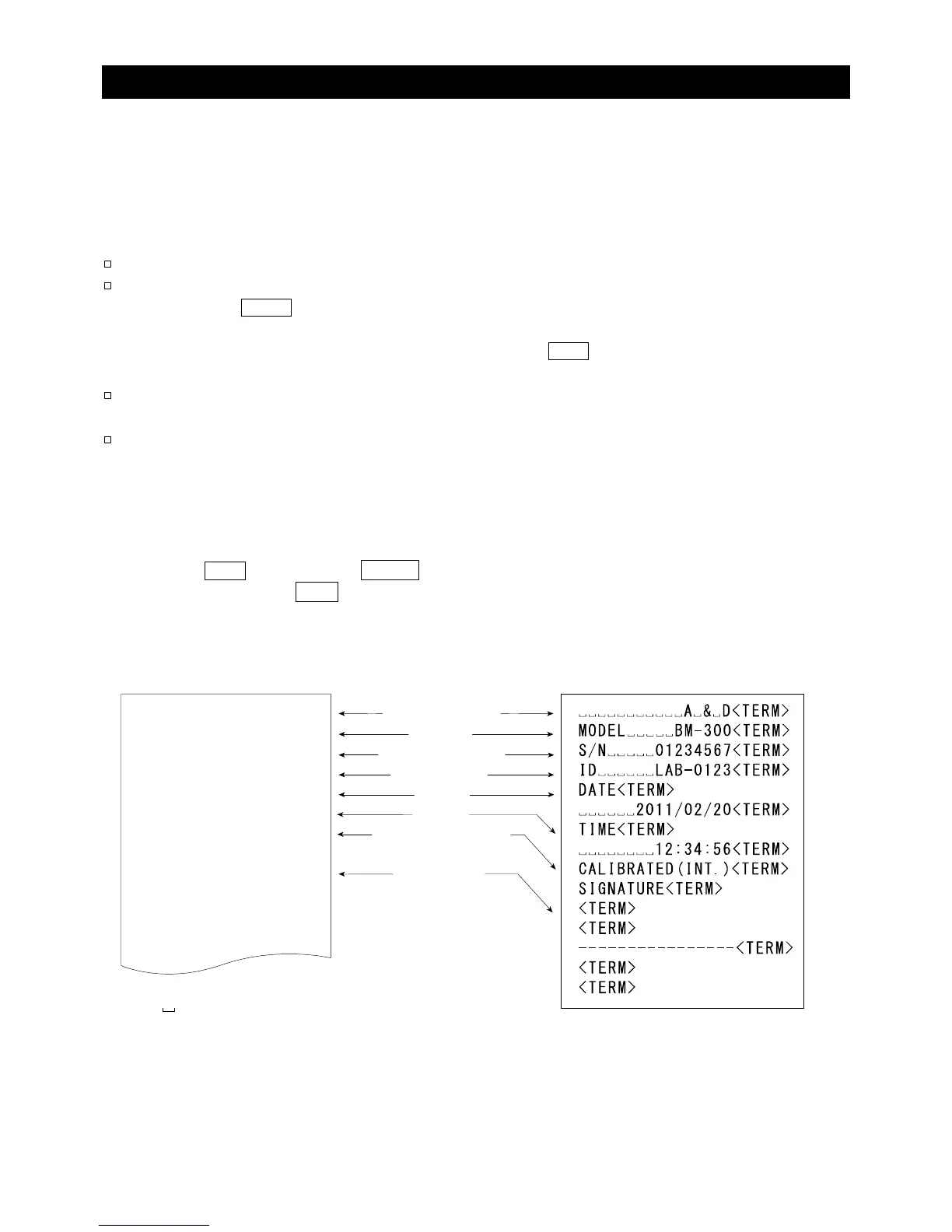
Calibration report using the internal mass
Key operation
1 Press the CAL key to display Cal in . The balance performs calibration using the internal mass.
2 If GLP output is used, glp is displayed and the calibration report is output.
3 The balance returns to the weighing mode.
Function setting "info 1" Function setting "info 2"
AD-8121 format
General format using the balance built-in clock data
Space, ASCII 20h
<TERM>
Terminator, CR , LF or CR
CR Carriage return, ASCII 0Dh
LF Line feed, ASCII 0Ah
Manufacturer
Model
Serial number
ID number
Date
Time
Calibration type
Signature
===========A=&=D
MODEL=====BM-300
S/N=====01234567
ID======LAB-0123
DATE==2011/02/20
TIME====12:34:56
CALIBRATED(INT.)
SIGNATURE
---------------



 To Next Page