BM series 77
15.3. Using the Password Function
The password function can be switched among “Not used(0)”, “Used(1)” and “Used(2)” in
“Password function (locfnc) ” of the function table.
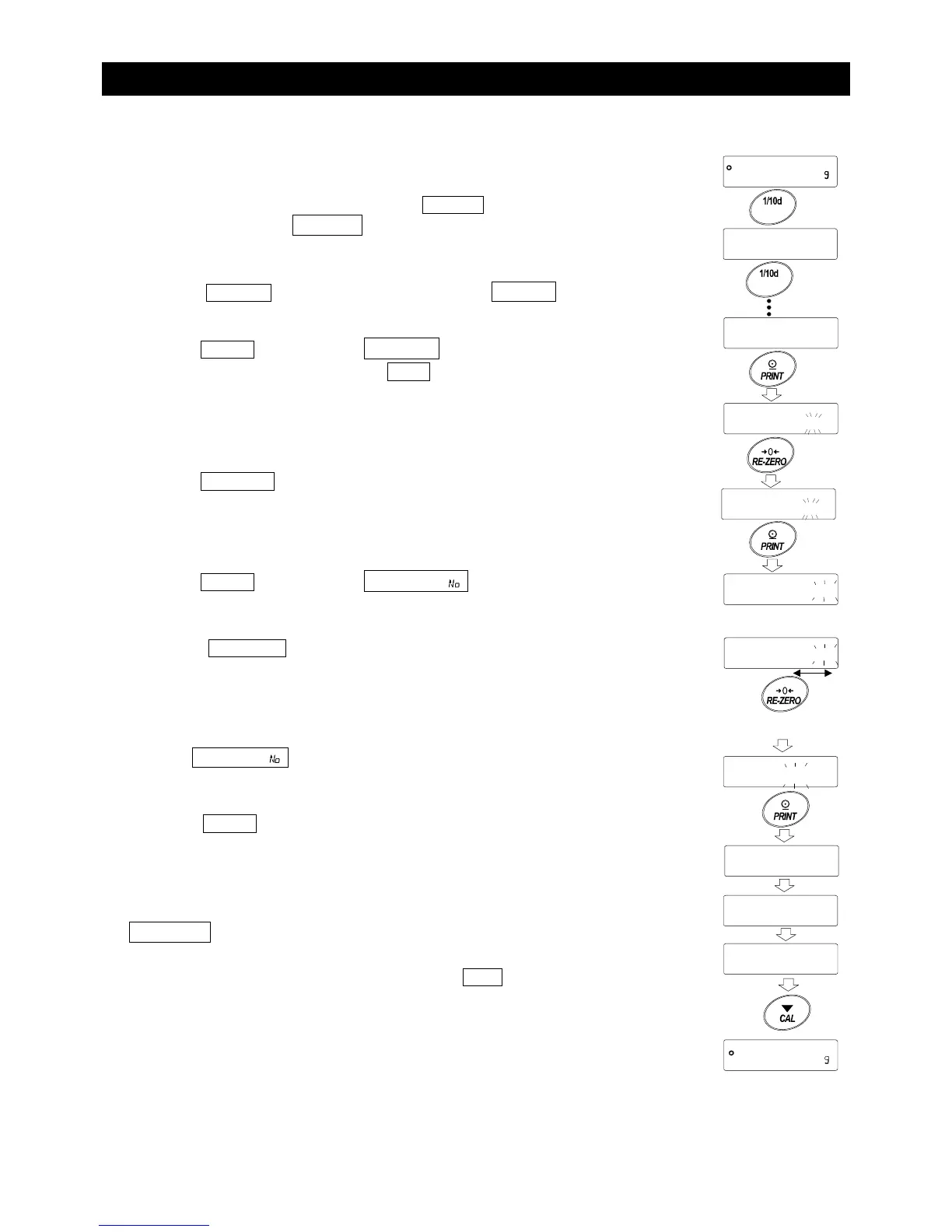
1 In the weighing mode, press and hold the RANGE key (for
approx. 2 seconds) until ba5fnc is displayed, and then
release the key.
2 Press the RANGE key several times to display locfnc .
3 Press the PRINT key to display pa55 ""0 .
To cancel the operation, press the CAL key.
4 Press the RE-ZERO key to switch the numbers. Display “1” or
“2”.
5 Press the PRINT key to display 5ure :ye5 " " with "No"
blinking (selected).
6 Press the RE-ZERO key to switch between "yE5" and "No".
7 Display 5ure :"y"e"5 with "yE5" blinking (selected).
8 Press the PRINT key to store the new setting. The password
function can now be used.
9 loc no is displayed. To store or change the password,
proceed to Step 3 in “15.6. Storing or Changing the Password”.
Not to store or change the password, press the CAL key to
return to the weighing mode.
Note When the balance software version is 1.50 to 1.64,
only “Not used(0)” or “Used(1)” is available.
RANGE
Press and hold
(approx. 2 seconds



 To Next Page