70 BM series
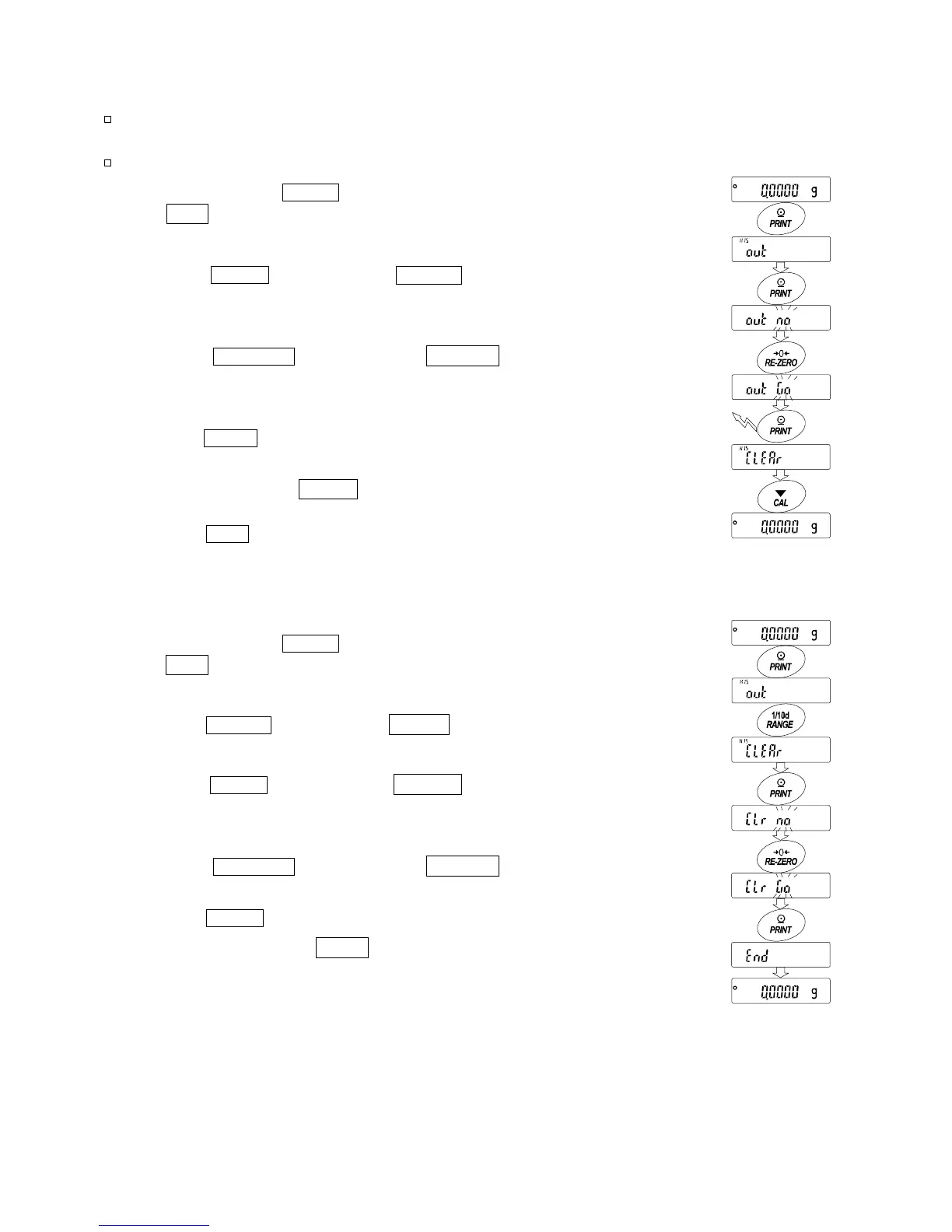
Transmitting the memory data
Notes
Confirm that the "Serial interface (5if)" parameters are set properly.
Refer to "10. Function Table" and "16.2. Connecting to Peripheral Equipment".
Confirm that the "Data memory (data)" parameter is set to "2".
1 Press and hold the PRINT key (for approx. 2 seconds)
until out is displayed, and then release the key.
2 Press the PRINT key to display out "n"o with "no"
blinking.
3 Press the RE-ZERO key to display out "g"o with
"go" blinking.
4 Press the PRINT key to transmit all memory data using
the RS-232C interface.
5 The balance displays Clear when all memory data
is output.
Press the CAL key to return to the weighing mode.
Deleting data stored in memory
1 Press and hold the PRINT key (for approx. 2 seconds)
until out is displayed, and then release the key.
2 Press the RANGE key to display Clear .
3 Press the
PRINT key to display Clr "n"o with "no"
blinking.
4 Press the
RE-ZERO key to display Clr "g"o with
"go" blinking.
5 Press the PRINT key to delete all data.
6 The balance displays end and returns to the
weighing mode when all the data has been deleted.
Press and hold
(approx. 2 seconds)
Press and hold
(approx. 2 seconds)



 To Next Page