74 BM series
Measuring the density ( specific gravity )
Note If the liquid temperature or the type of liquid is changed during measurement, input
the value of the liquid density again as necessary. The density display is four decimal
places. The minimum display cannot be changed with the RANGE key.
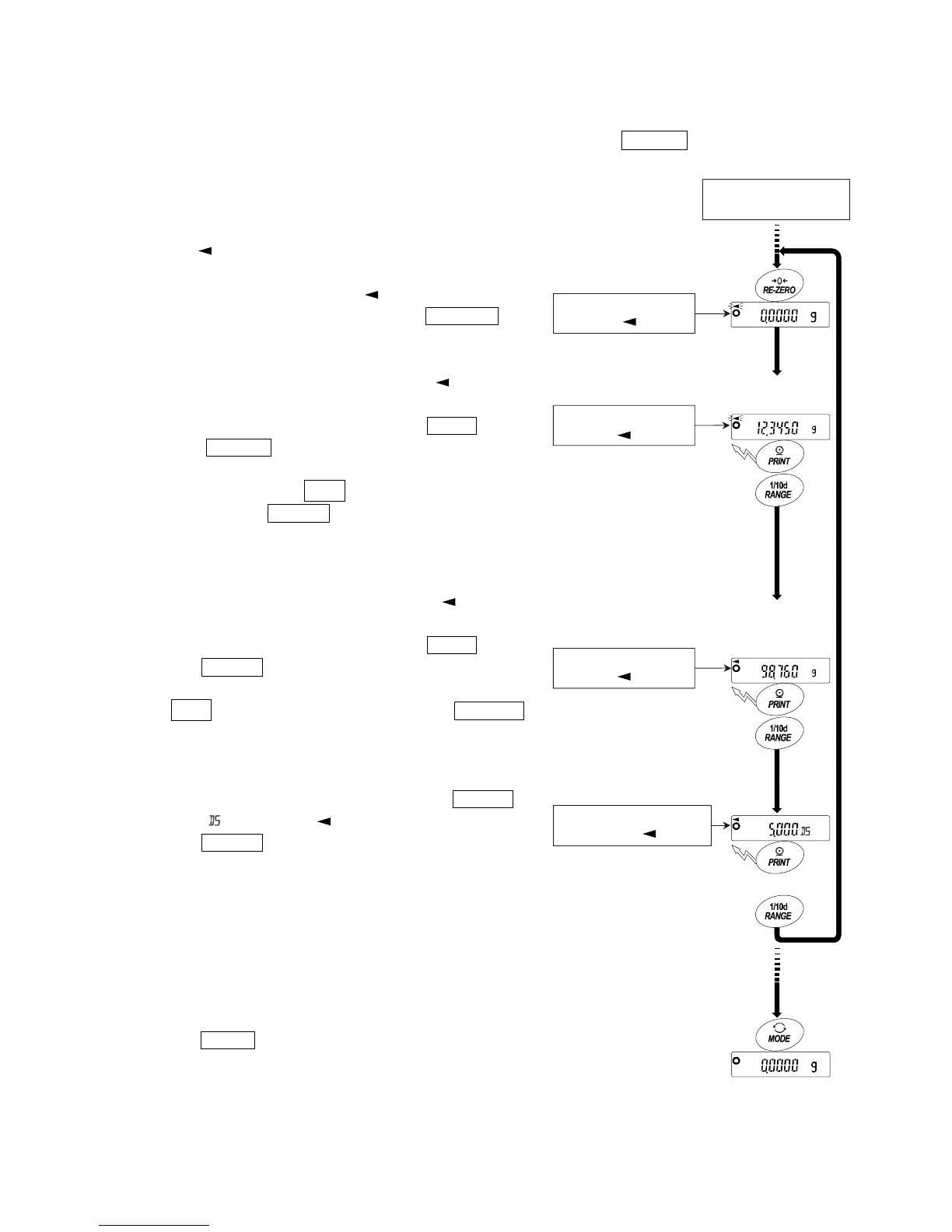
The density (or specific gravity) is displayed after "Weighing
in air" and " Weighing in liquid". The procedure of each
measurement is as follows:
g : gram. : the processing indicator
1 Enter the density mode. (g lights. blinks.)
Place nothing on both pans and press the RE-ZERO key
to display zero.
2 Place the sample on the pan in air (g lights. blinks.)
and wait for the weight value to be stable.
To store or output the weight value, press the PRINT key.
Press the RANGE key to confirm the weight value
in air and proceed to the next step.
Note If negative value or e (out of range) is
displayed, the RANGE key is inactive.
3 Move the sample to the pan in liquid (g lights. lights.)
and wait for the weight value to be stable.
To store or output the weight value, press the PRINT key.
Press the RANGE key to confirm the weight value in
liquid and proceed to the next step.
Note If e (out of range) is displayed, the RANGE
key is inactive.
4 To store or output the density value, press the PRINT
key. (Unit : . g turns off. lights.)
Press the RANGE key to measure another sample
and proceed to Step 2.
5 If the liquid temperature or the type of liquid is changed
during measurement, input the value of the liquid density
again as necessary.
6 Press the MODE key to proceed to other modes.
From "Entering the
density of a liquid"
Place sample on
the pan in air
Move sample from
the pan in air to the
pan in liquid
Remove sampl



 To Next Page