- 107 -
000904AG
7 - Operation
The IP address assigned may vary for reasons connected to the wireless home router setup
IRU H[DPSOH D YHU\ EULHI '+&3 OHDVH WLPH ,I YHUL¿FDWLRQ RI WKH DGGUHVV LV UHTXLUHG LW LV
usually possible to obtain the client list (and the corresponding IP addresses) from the wireless
router administration panel.
If the inverter loses the connection with the home wire-
less network, it is available accessing the Wi-Fi network
$%%;;;;;;;;;;;;ZKHUH³;´LVDQKH[DGHFLPDOQXPEHURIWKH
MAC Address.
The most common causes of losing connectivity might be: different wireless network pas-
sword, faulty or unreachable router, replacement of router (different SSID) without the neces-
sary setting updates.
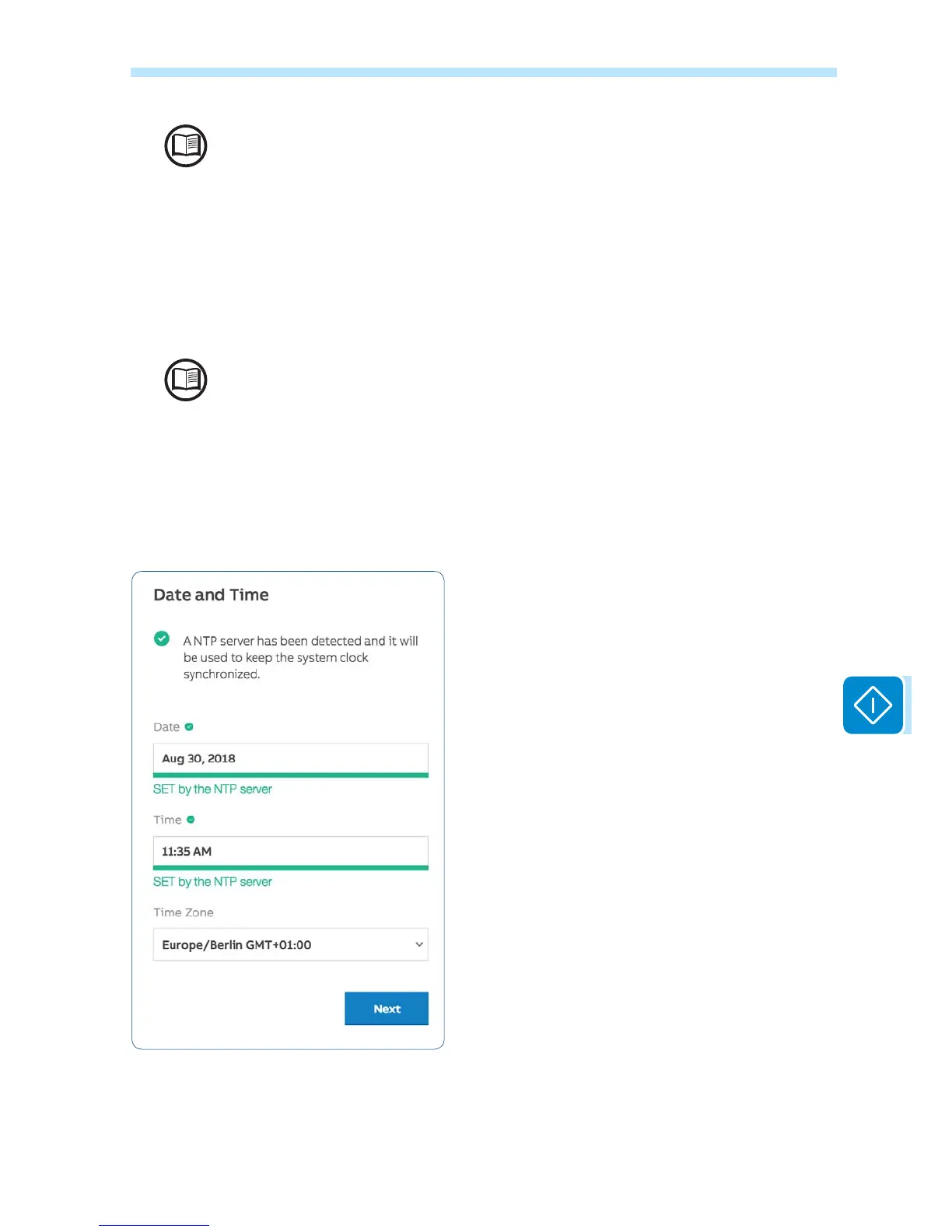
.STEP 3 - Date, Time and Time zone
Set the Date, Time and Time zone (The inver-
WHU ZLOO SURSRVH WKHVH ¿HOGV ZKHQ DYDLODEOH
When it’s not possible for the inverter to detect the time
SURWRFROWKHVH¿HOGVKDYHWREHPDQXDOO\HQWHUHG
Click on “Next” button to proceed to the next stage of the
FRQ¿JXUDWLRQZL]DUG



 To Next Page