- 97 -
000902AG
5 - Installation
E
thernet connection
The ethernet connection allows a direct data transfer to the ABB server
for monitoring purpose.
When the inverter will be powered on, network parameters are
automatically set and the inverter starts transmissing telemetry data to
the Aurora Vision
®
CLOUD platform.
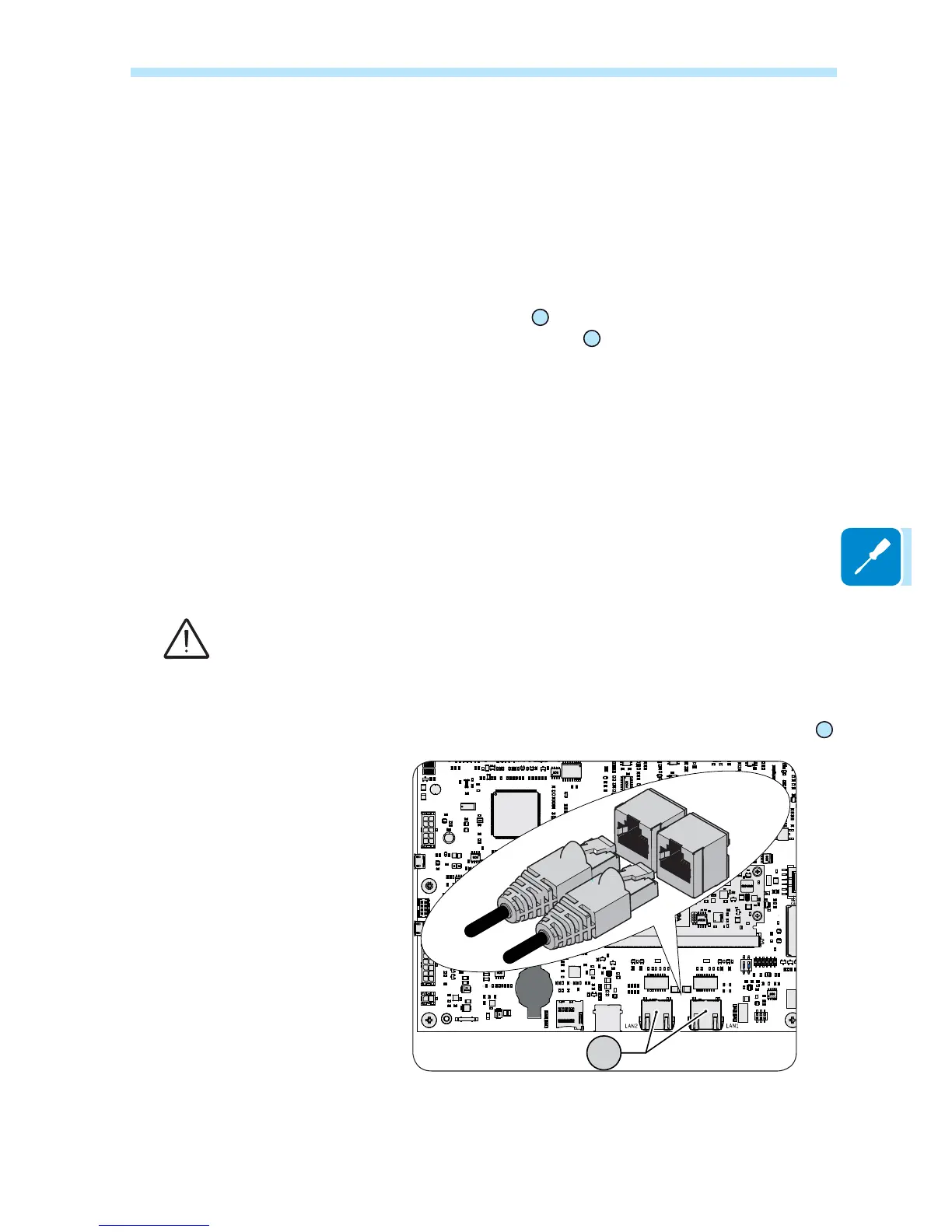
The connection of the ethernet communication cable must be made on
WKH VSHFL¿F FRQQHFWRUV
30
located on the communication and control
board inside the REACT2-UNO
02
. If the inverters of the plant need to
EHFRQQHFWHGLQGDLV\FKDLQRUULQJFRQ¿JXUDWLRQXVHERWKFRQQHFWRUV
7KHFDEOHVKRXOGEHFRPSOLDQWWRWKHIROORZLQJVSHFL¿FDWLRQ
- Cable type: Patch or Cross type, 100BaseTx, CAT5e (or higher) with
shielding STP or FTP.
- UV-resistant if used outdoors
- Type of plug: metallic shielded RJ45
- The maximum length that can reach these cables is 100 meters, and
it is always advisable not to let them pass by the power cords to avoid
interference with data transmission.
- Maximum inverters number connected over one single daisy chain is 40
In order to avoid ground loop (that could create communication issues) the shield of any
Ethernet cable must be connected to the RJ45 plug in only one side, the other side of the
VKLHOGVKRXOGEHOHDYHGÀRDWLQJ7KLVFRXOGEHJXDUDQWHHGE\FULPSLQJWKHVKLHOGRUWKHVFUHHQ
of the ethernet cable to the RJ45 connectors only at one end of each cables.
Connection of ethernet cable is made trought the two RJ45 connectors
30
.
The two RJ45 connectors LAN1 and LAN2 are equivalent to each other
and can be used interchangeably for the input or for the output of the
line in realising the connection of the inverters.



 To Next Page