- 81 -
000900AG
5 - Installation
BACKUP output connection (AC)
To connect the
BACKUP
output of the inverter, 3 connections are ne-
cessary: ground, neutral and phase. In any case, connection of the
inverter to ground is mandatory.
Any failure of the inverter when it is not connected to ground through the appropriate terminal (AC
connector) and to the metal frame (external grounding protection) is not covered by the warranty.
7KH%$&.83RXWSXWPXVWQHYHUEHFRQQHFWHGWRWKHSXEOLFSRZHUVXSSO\EXWRQO\KDYHGHGLFD-
ted loads isolated from the grid.
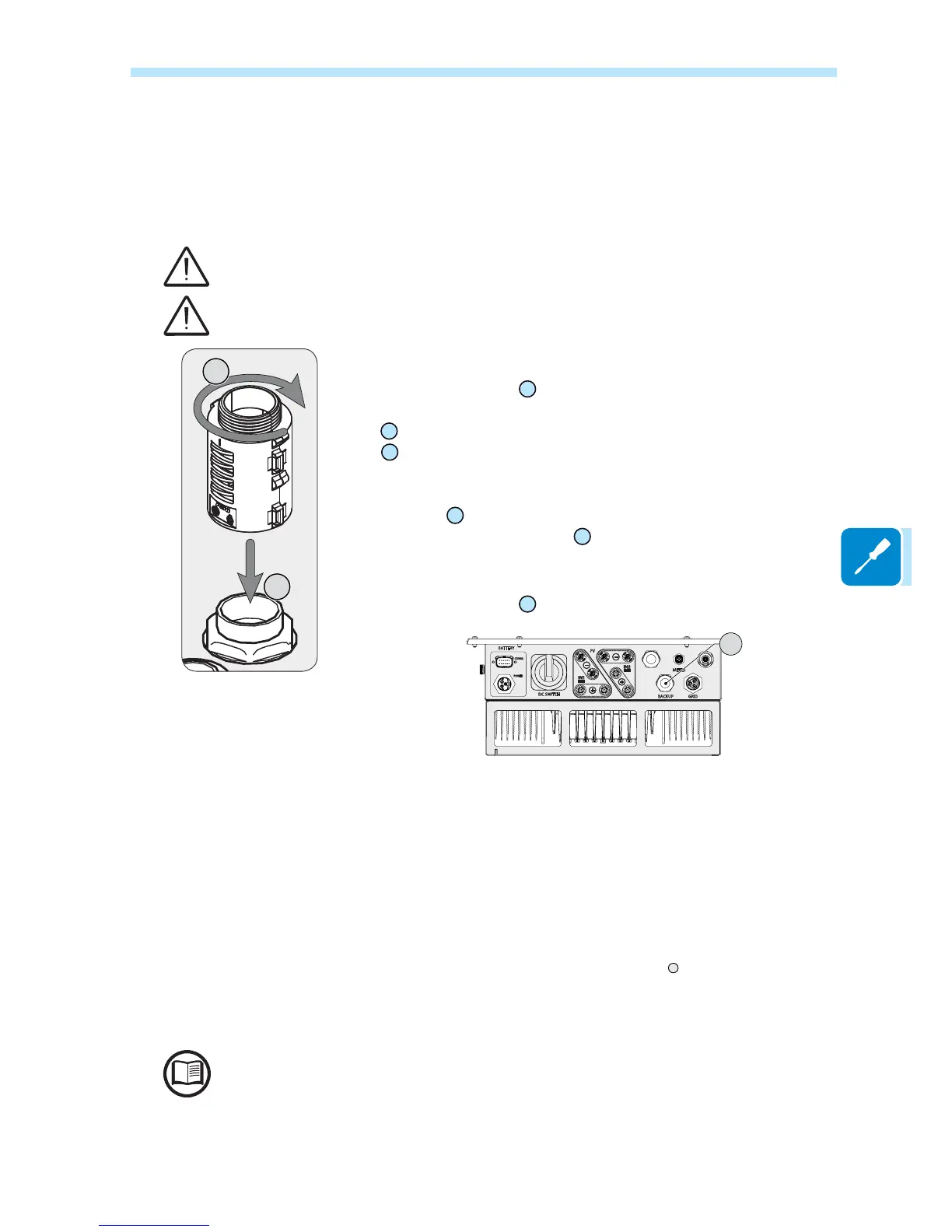
,QVWDOOWKH¿OWHUVXSSOLHGZLWKWKHLQYHUWHURQWKHLQWHUQDOVLGHRI$&RXWSXW
(BACKUP) cable gland
16
(side inside the REACT2-UNO).
The installation is carried out:
-
a
SRVLWLRQWKH¿OWHURQWKHLQWHUQDOVLGHRIWKHFDEOHJODQG
-
b
6FUHZWKH¿OWHURQWKHWKUHDGRIWKHFDEOHJODQG
Insert the backup cable into the REACT2 using the AC output (BACKUP)
cable gland
16
(M25 with toroid) and make the connections to the AC output
(BACKUP) screw terminal block
42
.
Use a properly sized tripolar cable and check the tightness of the AC output
(BACKUP) cable gland
16
at the end of the installation.
PV
BATTERY
DC SWITCH
GRIDBACKUP
METER
POWER
COMM.
16
The REACT2 system is equipped with an AC BACKUP output that can
be activated in different 2 ways:
- Backup Mode: AUTO
Automatic activation in case of loss of main (blackout).
- Backup Mode: External Control
An External command/signal is used for activating the output (Com-
munication and control signal terminal block
16
, terminal 1-3).
The selection of the backup mode is performed during the commissio-
ning wizard.
See the “REACT2-Backup output use” document on the ABB site for more information



 To Next Page