Commissioning
System Manual
84
1 2a
2b
3
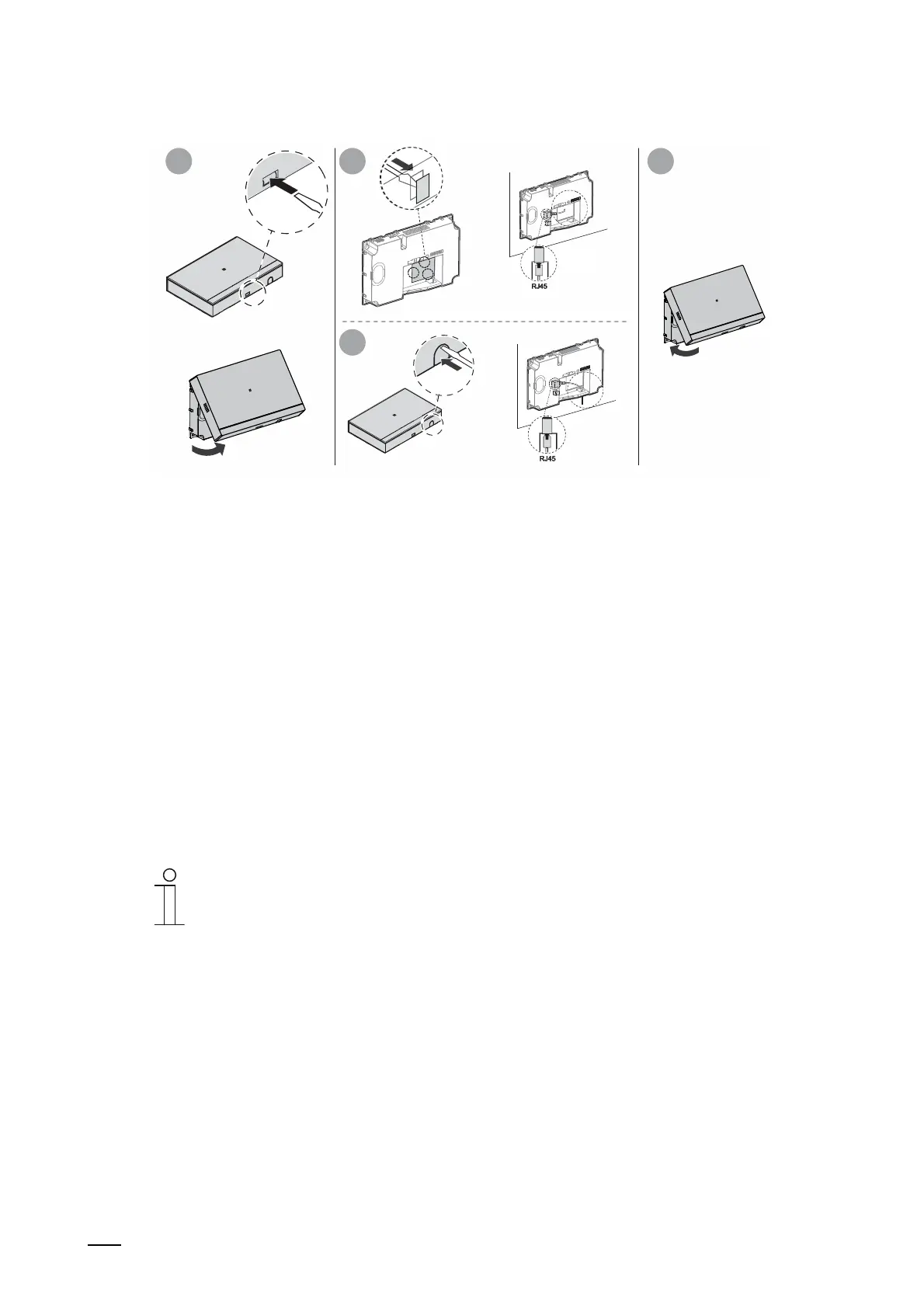
Fig. 59: LAN cable on the "Smart Access Point"
Use the following steps to boot up the "Smart Access Point":
1. Connect the LAN cable with the "Smart Access Point".
2. Remount the cover of the "Smart Access Point".
– Attention: The "Smart Access Point" cannot be put into operation if the cover is
removed.
3. Connect the LAN cable with the PoE switch and thereby connect the power supply.
– As soon as the "Smart Access Point" is supplied with voltage via the PoE switch, the
device boots up automatically.
– The LED lights up permanently white during the automatic boot up.
– The LED lights up permanently white before the initial commissioning is finished and
also after the boot up.
– The PC can be connected with the "Smart Access Point".
Notice
LED (white / red) / Access Point mode
– Normally the "Smart Access Point" switches directly into the Access Point
Mode after the boot-up (the LED lights up permanently red). In this mode it is
not possible to access the"Smart Access Point" via LAN because of the
security of the system. Since access per WLAN is necessary for initial
commissioning, the "Smart Access Point" switches into the Access Point
Mode only after initial commissioning. The active connection is then
automatically disconnected.















 To Next Page