To Set Cycle Smulaon Mode
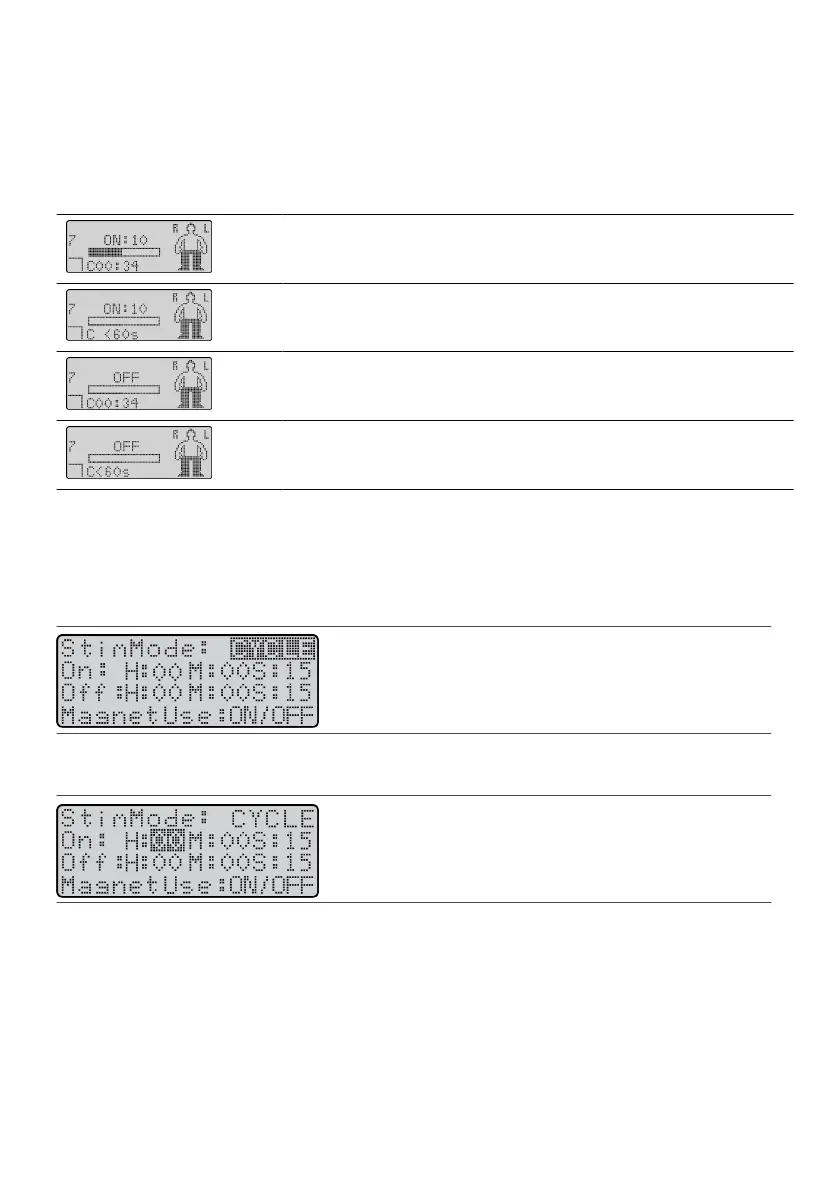
Cycle mode allows the physician to set intervals for therapy that cycle between on and o. The cycling of the
therapy enables baery conservaon and smulaon renement. When a program is set to cycle mode, the
leer C is displayed on the Operaonal Display screen with informaon about the “on” or “o” me
remaining.
Table 4. Descripons of the Operaonal Display screens in cycle mode
Operaonal Display Screen Descripon
Smulaon is cycled on and more than a minute of smulaon me remains
(displayed in hours and minutes).
Smulaon is cycled on with less than a minute remaining.
Smulaon is cycled o and more than a minute remains in the o phase
(displayed in hours and minutes).
Smulaon is cycled o with less than a minute remaining in the o phase.
To set the smulaon mode to cycle:
1.
From the Program screen, press the Balance key unl it highlights the SmMode eld. The SmMode
1.
screen appears.
2. Press the Amplitude Increase key unl CYCLE appears in the SmMode eld.2.
Figure 64. Select CYCLE in the SmMode eld
3. Press the Balance key to highlight the On eld.3.
Figure 65.
Highlight the On eld
NOTE: Cycle mode can provide up to 24 hours of “on” me and 24 hours of “o” me.
4. Press a Scroll key to highlight the desired me eld (H for hours, M for minutes, or S for seconds), and4.
press the Amplitude Increase key or Amplitude Decrease key to increase or decrease the value.
5. Aer you nish seng all values for “on” me, press the Balance key to highlight the O eld.5.
6.
Follow step 4 to set the value for the “o” me.
6.
7. Press the Balance key to highlight the MagnetUse eld.7.
8. Press the Amplitude Decrease key to change the magnet mode.8.
27











 To Next Page