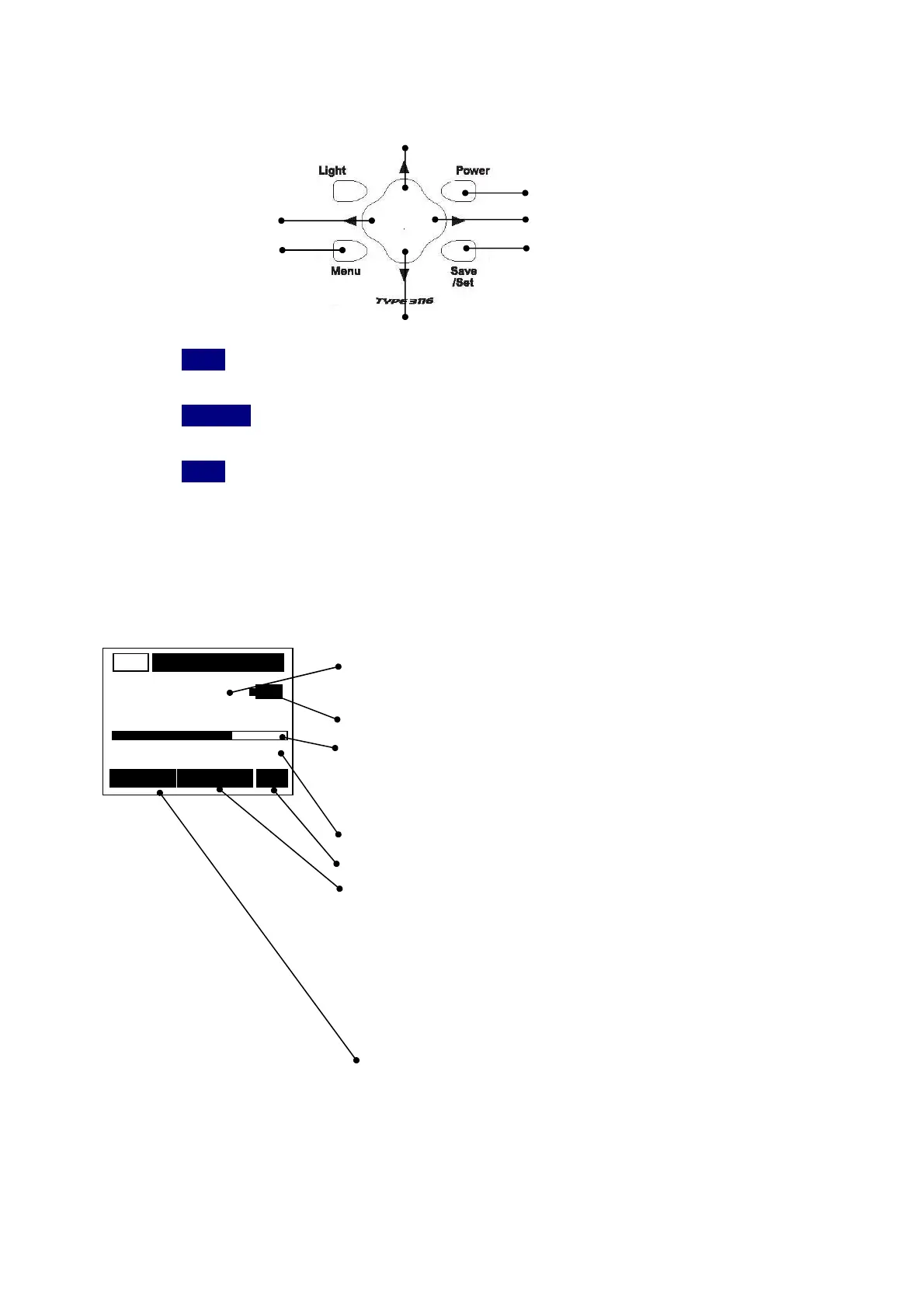
2.Panel Button operations and Function・Screen display explanation
2-1 Panel Button operations
④
①
⑦ ⑥
③ ②
⑤
①
Power
:Long-pressing this switch for 1 sec or more turns on the power.
Long-pressing it again turns off the power.
②
Save/Set
:Record at the time measurement, and the setting button used when
the Menu screen is operated.
③
Menu
:Press this button to set measurement conditions. Pressing it four times
returns to the standard screen.
④ ⑤ ⑥ ⑦ :They are object for cursor operation, such as measurement conditions,
such as the Mode / Range and change.
2-2 Standard screen display
Display data :Displays the current value in digital form.
Time interval of approx.2 second.
Battery remaining capacity
Bar :Displays the current instantaneous value.
With the bar, the display data value is displayed
at a time interval of approx.0.1 seconds.
Range display :20 ,200,2000
Measurement Mode:RMS, Peak
State display Nothing:Normal indication
Ov :flashing Exaggerated display
Hold :flashing Data maintenance
Memory :flashing Memory display mode
Save :flashing Turn off the light after
Cursor key choice.
The number display of record data
136.0
m/s
2
AC
000/000 RMS
0 Range 200



 To Next Page