EasyManua.ls Logo

ACT apricot - Page 253

ACT apricot
328 pages
Print Icon
To Next Page IconTo Next Page
To Previous Page IconTo Previous Page
Loading...
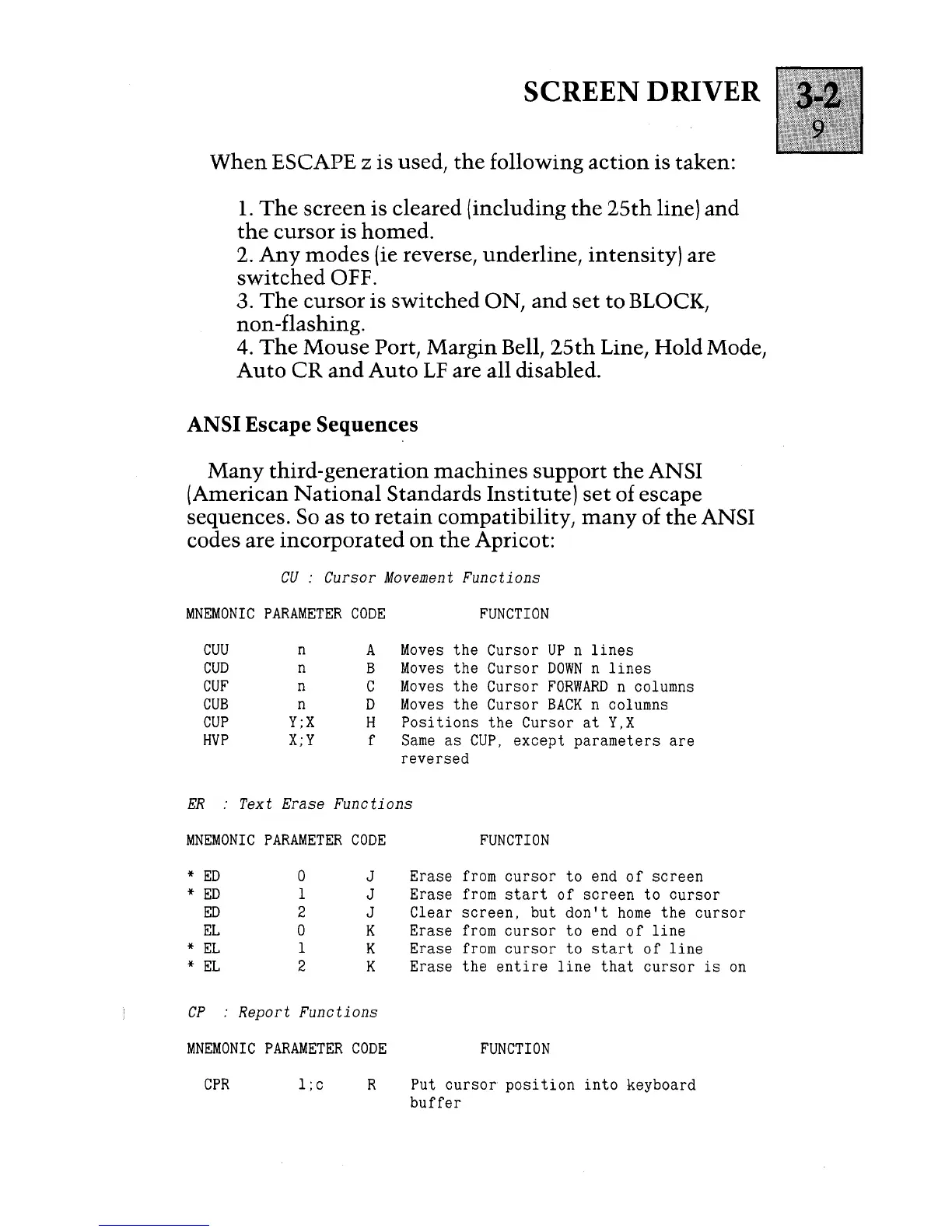
SCREEN DRIVER
When
ESCAPE z is used,
the
following
action
is taken:
1.
The
screen
is cleared (including
the
25th
line)
and
the
cursor
is
homed.
2.
Any
modes
(ie reverse, underline, intensity) are
switched
OFF.
3.
The
cursor
is
switched
ON,
and
set
to
BLOCK,
non
-flashing.
4.
The
Mouse
Port, Margin Bell,
25th
Line,
Hold
Mode,
Auto
CR
and
Auto
LF are all disabled.
ANSI Escape Sequences
Many
third-generation
machines
support
the
ANSI
(American
National
Standards
Institute)
set
of escape
sequences.
So
as
to
retain
compatibility,
many
of
the
ANSI
codes are
incorporated
on
the
Apricot:
CU
:
Cursor
Movement
Functions
MNEMONIC
PARAMETER
CODE
CUU
n
A
CUD
n
B
CUF
n
C
CUB
n
D
CUP
Y;X
H
HVP
X;Y
f
FUNCTION
Moves
the
Cursor
UP
n
lines
Moves
the Cursor
DOWN
n
lines
Moves
the Cursor
FORWARD
n columns
Moves
the Cursor
BACK
n columns
Positions
the Cursor
at
Y,X
Same
as
CUP,
except parameters
are
reversed
ER
:
Text
Erase
Functions
MNEMONIC
PARAMETER
CODE
*
ED
0
J
*
ED
1
J
ED
2
J
EL
0
K
*
EL
1
K
*
EL
2 K
CP
:
Report
Functions
MNEMONIC
PARAMETER
CODE
CPR
l;c
R
FUNCTION
Erase
from
cursor
to
end
of
screen
Erase
from
start
of
screen
to
cursor
Clear
screen,
but
don't
home
the
cursor
Erase
from
cursor
to
end
of
line
Erase
from
cursor
to
start
of
line
Erase the
entire
line
that
cursor
is
on
FUNCTION
Put
cursor
position
into
keyboard
buffer

Table of Contents

Other manuals for ACT apricot