EasyManua.ls Logo

ACT apricot - Page 262

ACT apricot
328 pages
Print Icon
To Next Page IconTo Next Page
To Previous Page IconTo Previous Page
Loading...
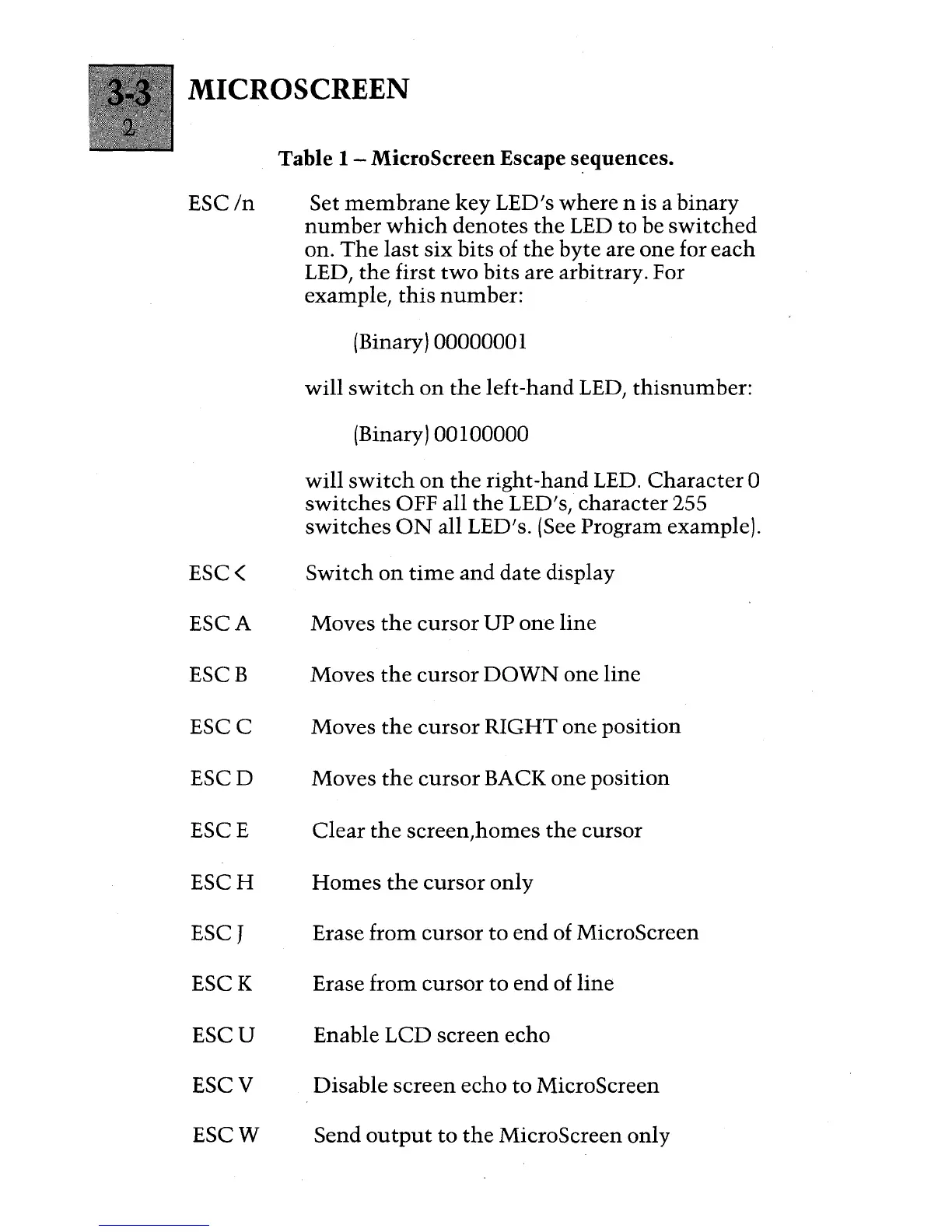
MICROSCREEN
ESC
In
ESC(
ESCA
ESCB
ESCC
ESCD
ESCE
ESCH
ESCT
ESCK
ESCU
ESCV
ESCW
Table 1 - MicroScreen Escape
s~quences.
Set
membrane
key
LED's
where
n is a
binary
number
which
denotes
the
LED to be
switched
on.
The
last
six
bits
of
the
byte
are
one
for
each
LED,
the
first
two
bits
are arbitrary. For
example,
this
number:
(Binary) 00000001
will
switch
on
the
left-hand LED,
thisnumber:
(Binary) 00 1 00000
will
switch
on
the
right-hand LED.
Character
a
switches
OFF all
the
LED's, character 255
switches
ON
all LED's. (See Program example).
Switch
on
time
and
date
display
Moves
the
cursor
UP
one
line
Moves
the
cursor
DOWN
one
line
Moves
the
cursor
RIGHT
one
position
Moves
the
cursor
BACK
one
position
Clear
the
screen,
homes
the
cursor
Homes
the
cursor
only
Erase
from
cursor
to
end
of MicroScreen
Erase
from
cursor
to
end
of
line
Enable LCD
screen
echo
Disable
screen
echo
to
MicroScreen
Send
output
to
the
MicroScreen only

Table of Contents

Other manuals for ACT apricot