Item Description
Disable Throughput Disables the Wi-Fi Monitoring throughput client service. For Wi-Fi monitor to work, this must be started.
Enable Throughput Activates the Wi-Fi Monitoring throughput client service. For Wi-Fi monitor to work, this must be started.
Device Target Select the corresponding controller’s MAC address in the
Device Target
list.
Ip Address Target Enter the corresponding controller’s IP address for its Wi-Fi interface in
Ip Address Target
.
Click to refresh the information in the
Device Target
list.
Start Starts graphing the monitored data
Clear Clears the graph
Throughput (Mbps) Transmit datarate to the target
Signal avg (dBm)
Current average received signal strength.
Note:
Signal strength is measured in negative units where the stronger the signal, the closer it is to zero. A weaker signal
strength will have a more negative number. For example, a receive signal strength of -35 dBm is much stronger than a
receive signal strength of -70 dBm.
RX rate (Mbps) Receiving data rate from the target
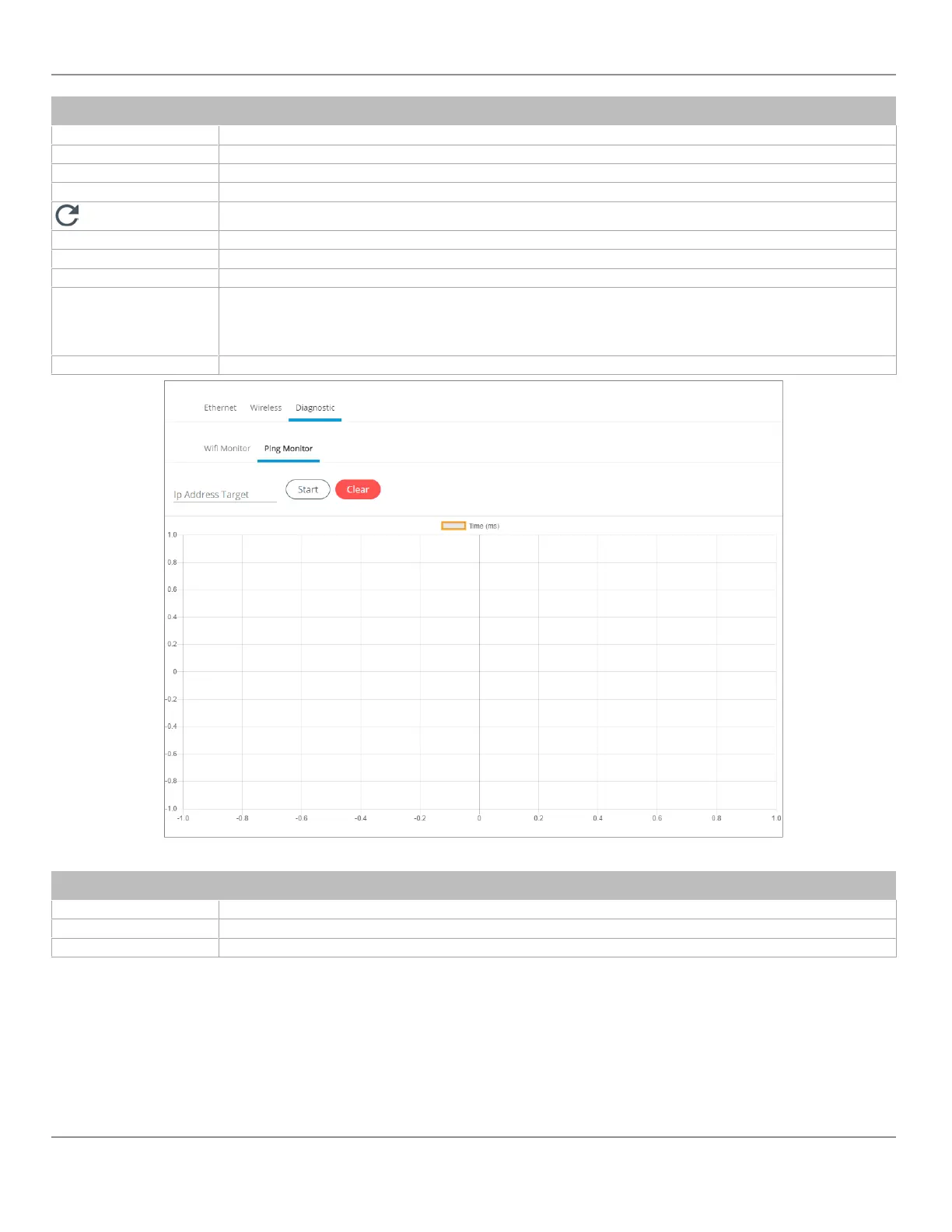
Figure35: Network Diagnostics – Ping Monitor
Item Description
Ip Address Target Enter the corresponding controller’s IP address for its Wi-Fi interface in
Ip Address Target
.
Start Starts graphing the monitored data
Clear Clears the graph
ECLYPSE Web Interface
46
nLight ECLYPSE


 To Next Page