Doc : AM220-001E Release: 1.5 updated : October 2014
SP10 – VERIFICATION SAMPLE CHECK
To assure perfect quality of measurements, the SP 10 instrument can be periodically checked with a
quality control sample with a known smoke point value. This procedure is part of quality assurance
procedure in most of laboratories.
To facilitate quality procedure, a verification fuel should be pre-programmed in the instrument memory
and linked with Up and Low control Limits (see section “Settings” for more details).
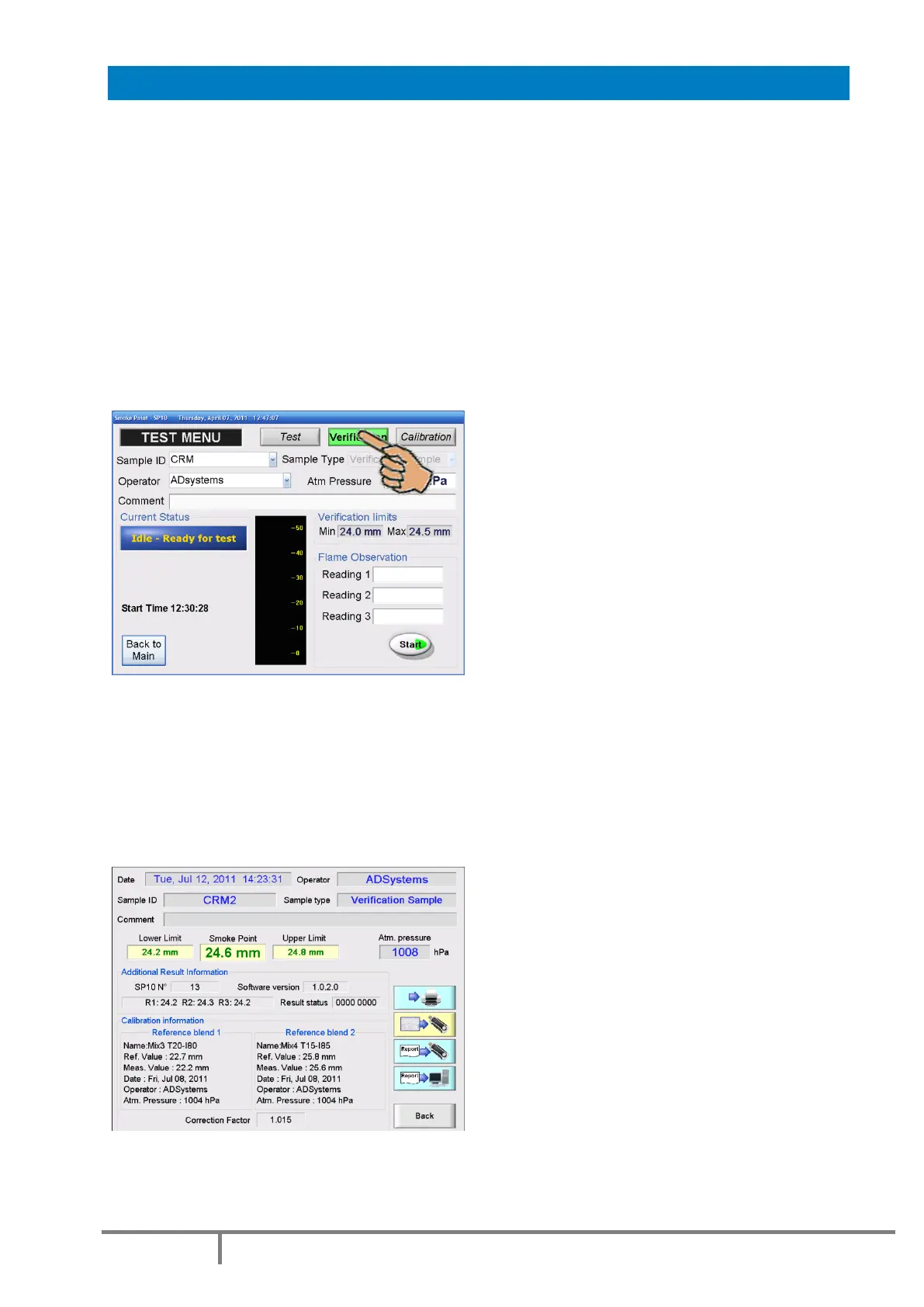
In “VERIFICATION” mode there is no possibility to enter Sample ID. The sample ID field is replaced with
the drop-down list and the operator selects the one to be used. The fuel type is automatically set to
“Verification Sample”.
Consequently, performing of the quality check is very easy:
Select in the Test menu the “VERIFICATION” mode and select the name of the control sample
Select the operator name from the drop-down list. Enter any comment if necessary.
Enter the atmospheric pressure in hPa
Prepare the candle with the selected verification fuel, place the candle on the conveyor and press START.
At the end of the test, the SP 10 reports the measured smoke point and shows the control limits.
All verification checks are stored in the result database. Reports can be easily retrieved by the fuel name.
Result is printed (if optional printer is connected) and stored on external storage device or LAN (if
connected).



 To Next Page