Doc : AM220-001E Release: 1.5 updated : October 2014
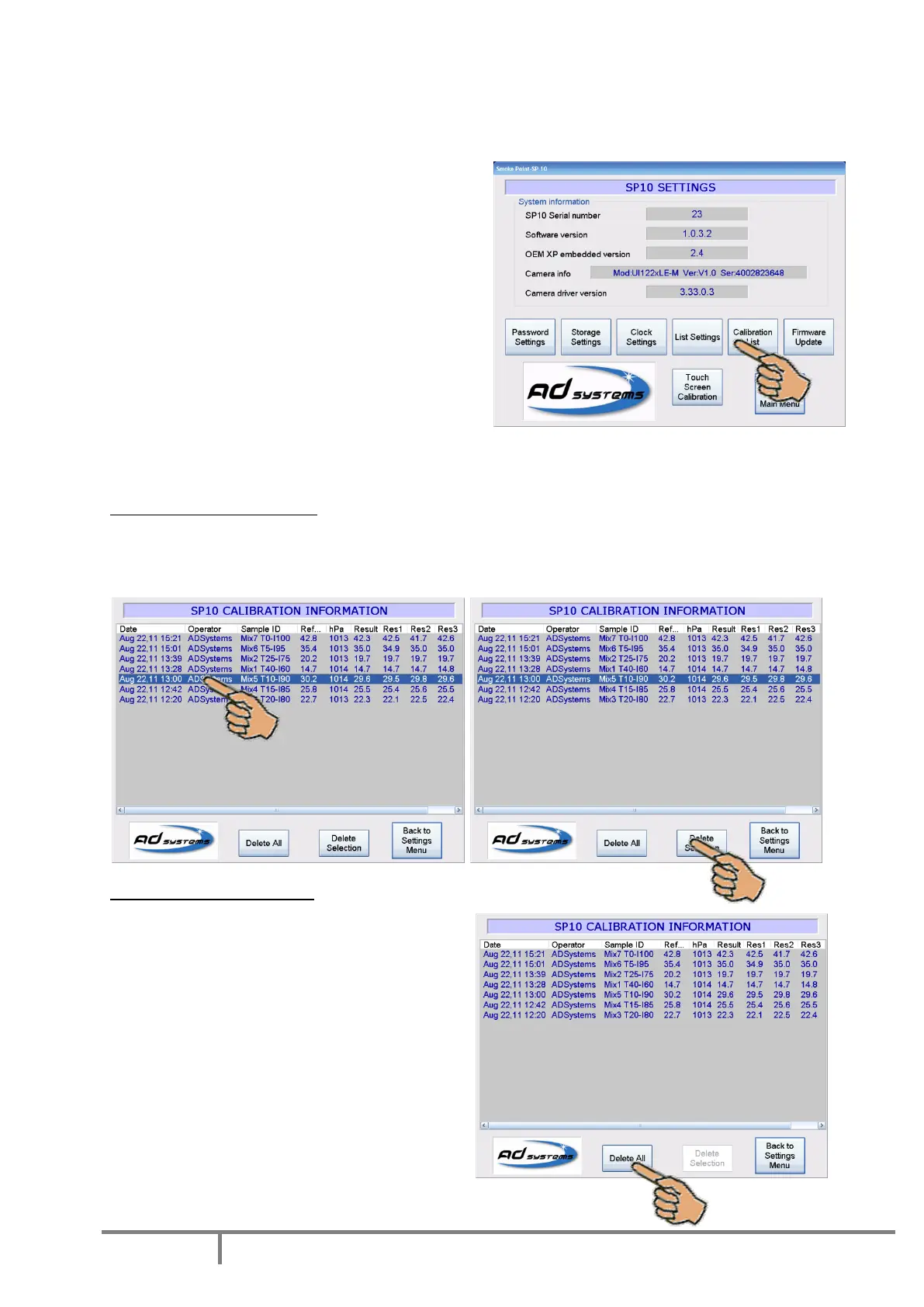
Calibration history visualization
All results obtained with reference blends are stored in the instrument memory. These results can be
viewed. Calibration information is very important for proper operation of the instrument and quality of
results. Access to Calibration List is password protected.
Press the “SETUP” button on the Main menu.
Select “Calibration List”.
Enter the password to see the data.
If the SP 10 calibration database is empty, the test is
not possible; the calibration should be performed
first.
Delete the calibration data
Normally the calibration database records should
not be deleted.
Nevertheless, there are two options in the SP10 enabling to delete the calibration record(s).
Delete one calibration record
If the calibration test is considered wrong, for example there is evident contamination of the reference
blend, it is possible to delete this record. Select the record and press “Delete Selection”.
Delete all calibration records
But in specific case, for example, in case of repair
of the instrument measuring system (camera,
lamp, frame), the calibration data will be no more
valid. After the repair, all calibration data need to
be deleted.
To reinitialize the calibration database, press
button “Delete All”. Confirm the operation.
The calibration should be redone before to run
any test.



 To Next Page