Doc : AM220-001E Release: 1.5 updated : October 2014
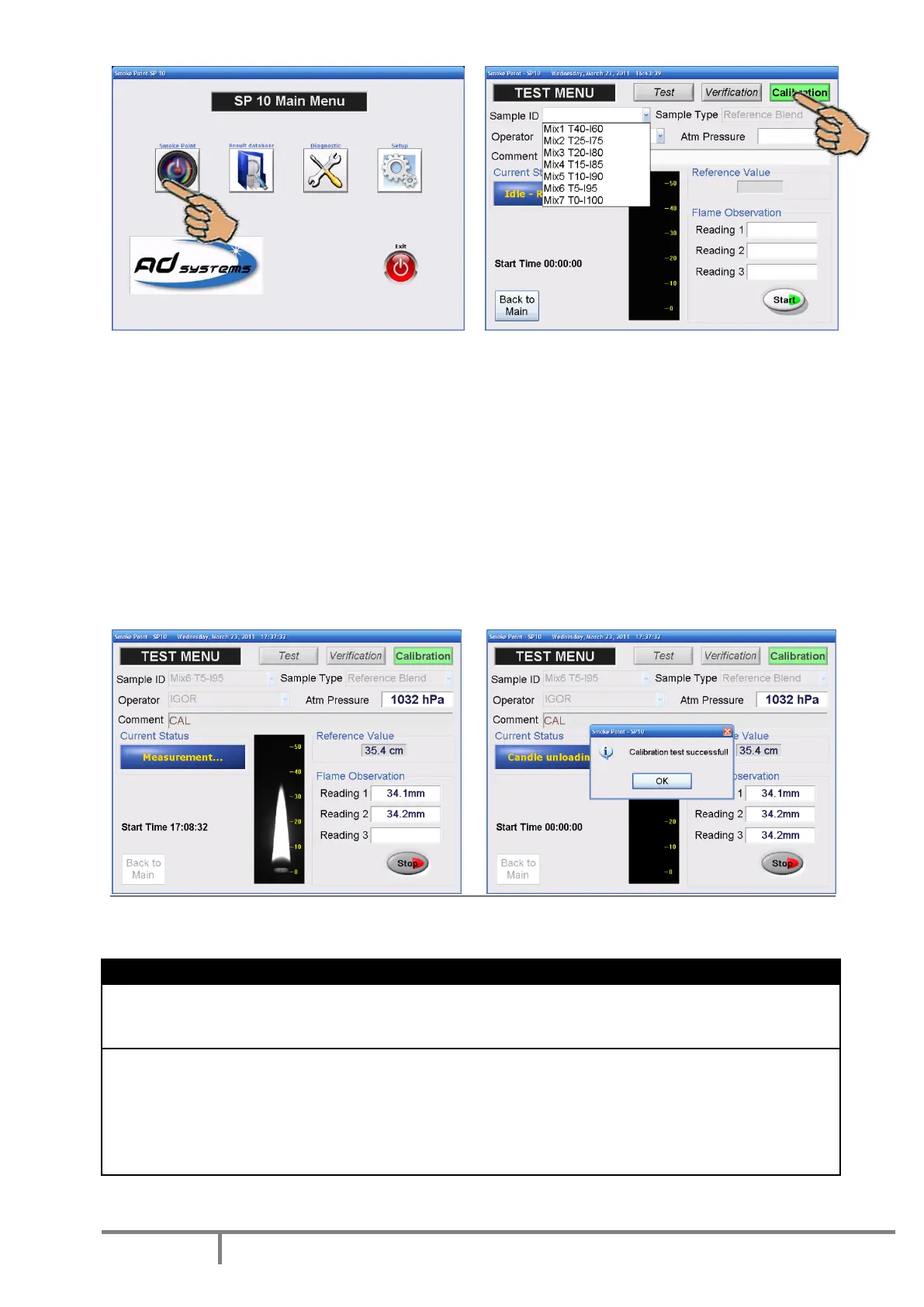
Select “CALIBRATION” mode by pressing the corresponding button on the top of the screen
Check that the instrument is in “Idle-Ready for test” status
In this mode there is no possibility to enter Sample ID. The sample ID field is replaced by the drop-down
list of pre-programmed reference fuels and the operator must select the one to be used.
The fuel type is automatically set to “Reference Blend”
Select the operator name from the drop-down list. Enter any comment if necessary.
Enter the atmospheric pressure in hPa read on the laboratory reference barometer
When all test information is entered, place the prepared candle on the conveyor and press “START”
button to initiate the measurement. The instrument will automatically perform the measurement.
At the end of the measurement, the SP10 displays a message.
Result on reference blend is within 2 mm of the reference value
Result of calibration test is stored in the instrument memory
into special calibration database
Calibration is not accepted
Result on reference blend is too much different from the
expected reference value for this blend (greater than 2 mm).
Result is rejected.
In that particular case, check the following :
Check that the candle contains the right product, the selected
one. Prepare the candle again and repeat the test
All successful calibrations done on the SP10 are memorized in non-volatile memory.



 To Next Page