Doc : AM220-001E Release: 1.5 updated : October 2014
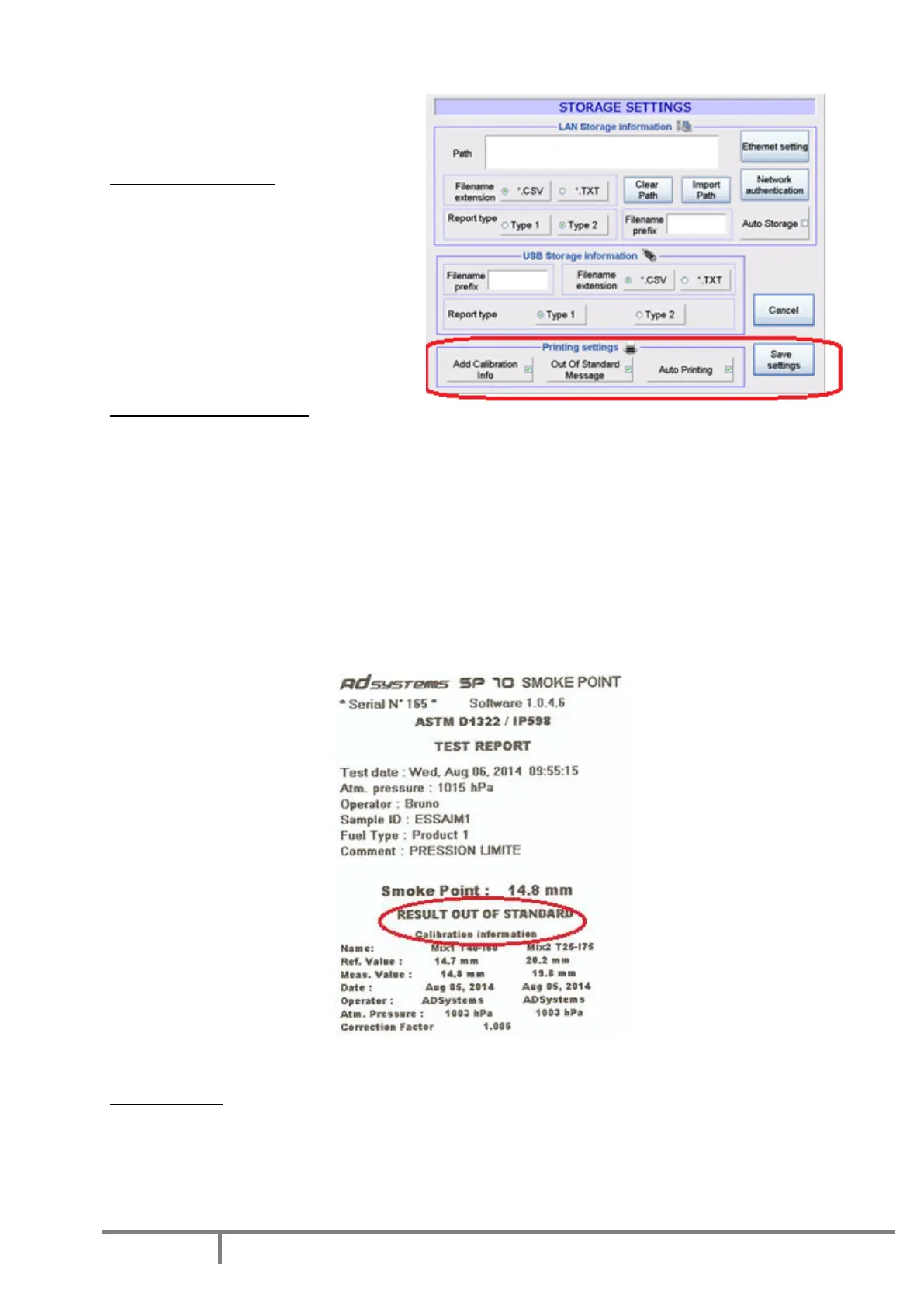
Printing settings
The printing modes or formats can be set
in the “Storage Settings” menu.
Add Calibration Info
By checking this box, all calibration details
will be printed with the result. This
information contains the measured values
of the two calibration mixes bracketing the
measured result. In addition, the
barometric pressure recorded during
calibration, the correction factor, the date
and the name of the operator are printed.
Out of Standard Message
When this box is checked, the message «OUT OF STANDARD» is printed if the result is not in accordance
with test method. These conditions are:
1. If one of 3 consecutive automatic measurements of smoke point is out of the tolerance (1 mm)
defined in the test method
2. If the result obtained with a verification sample is out of the specified limits
3. If the difference between the barometric pressure entered at the beginning of the test and the
barometric pressure at calibration differs by more than the limit defined in the standard (0.7 kPa).
These two options “Add Calibration Info” and “Out of Standard Message” can be selected together or
separately:
Printout example with message «RESULT OUT OF STANDARD» and Calibration Information
Auto Printing
When this box is checked, the result (with or without calibration info and/or Out of Standard message) is
automatically printed at the end of the test.



 To Next Page