Doc : AM220-001E Release: 1.5 updated : October 2014
Perform a TEST
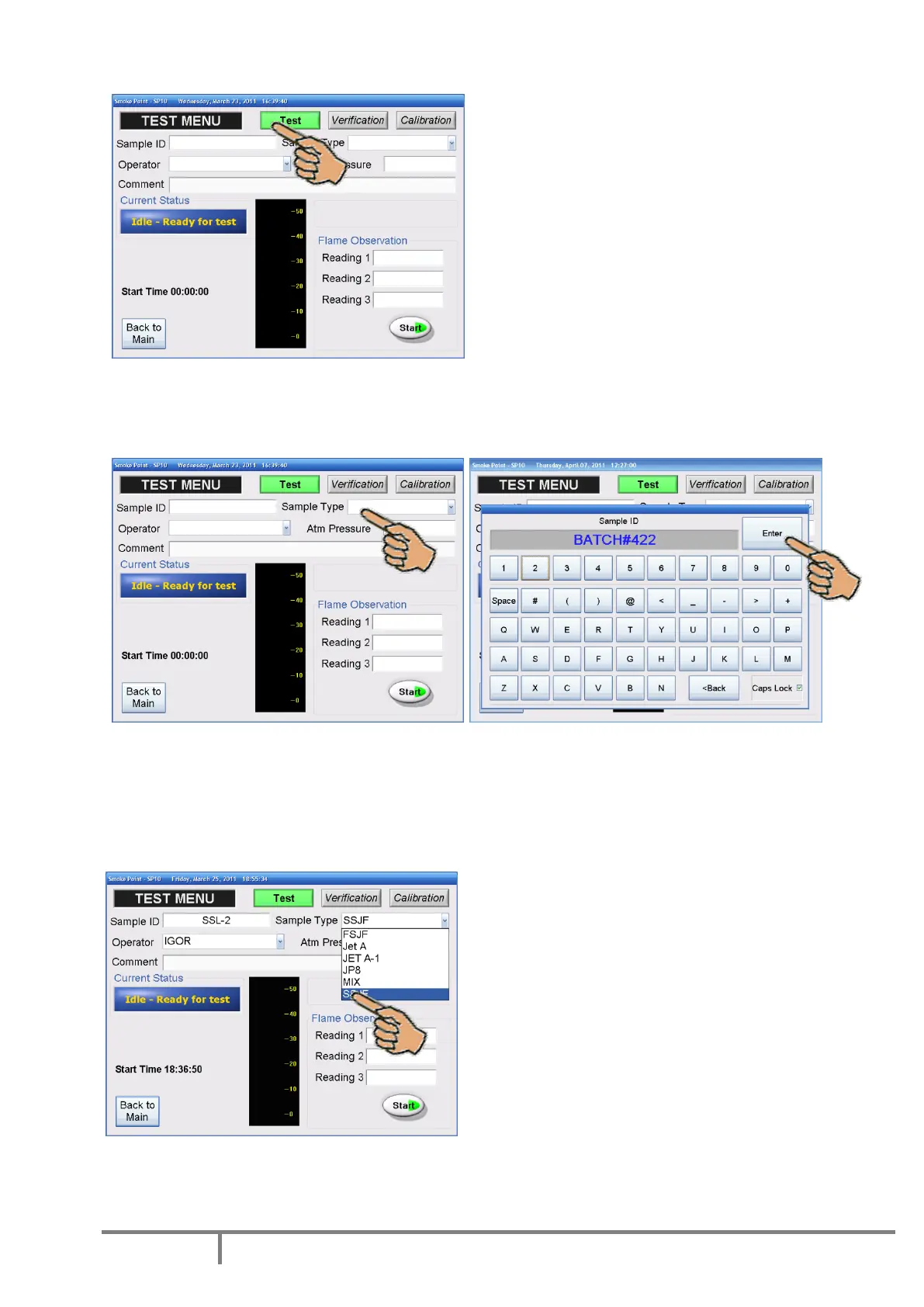
In order to initiate the measurement, the information described here after must be entered.
All fields are mandatory with exception of the “Comment” field which is optional.
Sample ID - identification of the fuel sample Maximum length for Sample ID field is 15 characters.
In order to make an entry, touch the highlighted sensitive area. The virtual keypad will appear allowing
you to type in the required information. Proceed in the same way to pop up the virtual keypad for the
other field entries. Please note that comma and dot are available without Caps Lock option.
Sample type – identification of the fuel type
Touch the arrow and select a name from the drop-
down list. Refer to the section “Set pre-programmed
lists” below in this manual about how to fill the list.
Operator – identification of the person performing
the test. Touch the arrow and select a name from the
drop-down list. Refer to the section “Set pre-
programmed lists” below in this manual about how to
fill the list.
Comment – This non mandatory field is used for
notes or comments; maximum 30 characters.



 To Next Page