Doc : AM220-001E Release: 1.5 updated : October 2014
DIAGNOSTIC
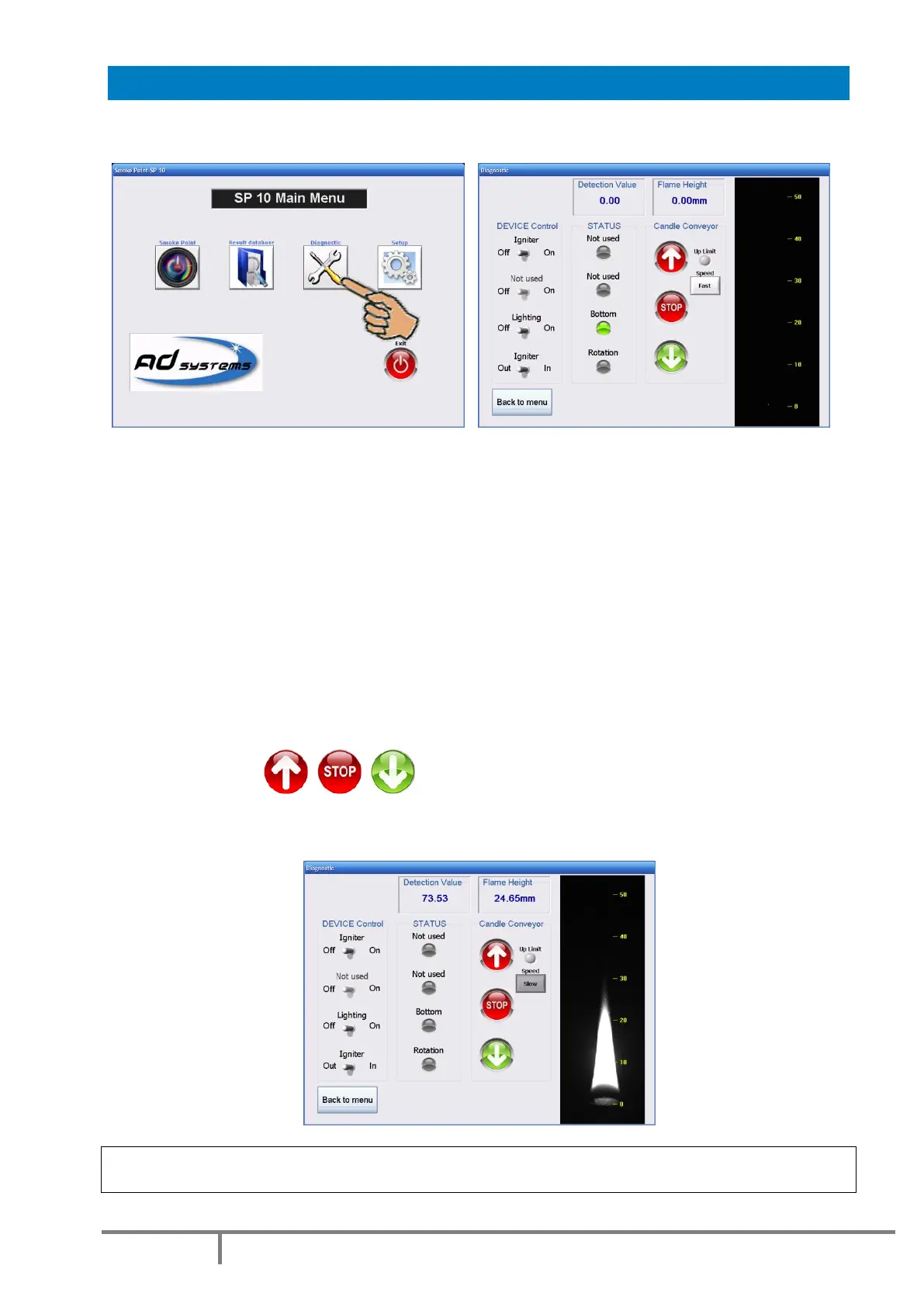
Use the “Diagnostic” button of the Main Menu to access to instrument diagnostic menu.
This menu dedicated to trained technical specialists allows checking of all SP 10 functions:
DEVICES control:
- Igniter: lights the candle igniter. It can be activated only if the igniter is in the operation position on
the top of wick. For safety reason the igniter glow time limited to 3 seconds.
- LED: lighting control
- Rotation: moves the igniter into operation position
STATUS
- Rotation: indicates that servo motor is in operation
- Bottom: indicates that the candle conveyor is its lowest position
CANDLE lift
Control buttons are used to command the candle conveyor movement.
Button “Test speed” allows switching between fast and slow movement speed.
The following screenshot shows the Diagnostic in progress.
The button “Back to Menu” allows leaving Diagnostic Menu.
CAUTION! Before leaving the diagnostic menu, the SP 10 checks if all devices are in their original position.
If not, the SP 10 puts all devices in its default idle position. This can take a few moments.



 To Next Page