Doc : AM220-001E Release: 1.5 updated : October 2014
STORAGE SETTINGS
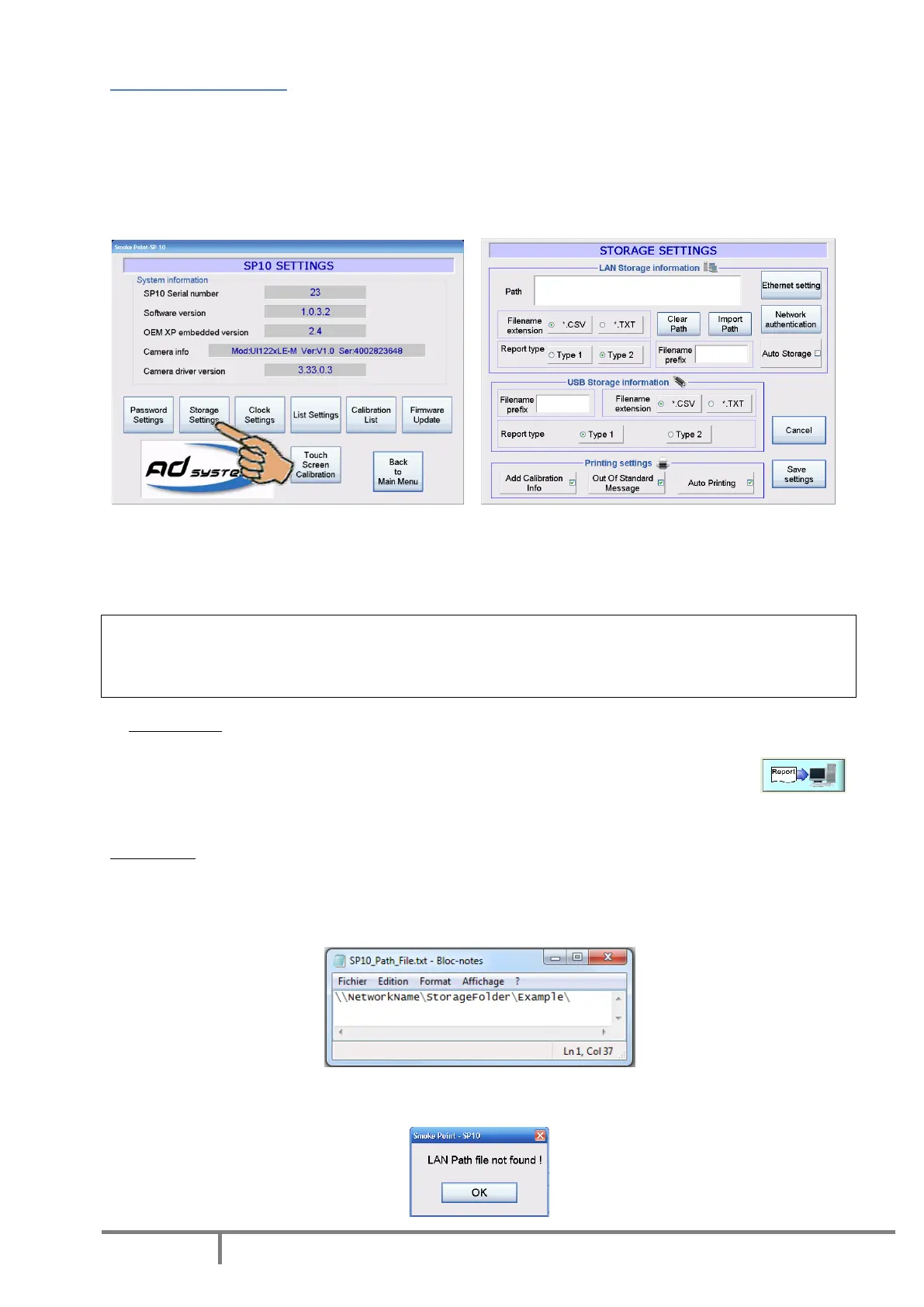
SP 10 results can be stored on USB storage device and/or send to Local Area Network (LAN) via Ethernet
link. To configure the storage on USB drive and/or Local Area Network (LAN), use the “Storage Settings”
button of the “SETUP” menu.
In order to prevent unauthorized changes, this menu is password protected.
Enter the password to access to the settings. The following options are available:
LAN data storage
The section “LAN Storage information” contains options to configure data transmission and storage in
Local Area Network (LAN).
Important!
Please contact your Network Administrator before modifying any settings related to local network
connection.
Auto Storage
If the “Auto Storage” box is checked, the instrument automatically sends the test report to the LAN. If
this box is unchecked, the report can be manually sent from the Report Screen by using
button.
Import Path
This option enables to import LAN path from a text file on USB memory. The text file must be named
SP10_Path_File.txt and included in AD Systems folder on the USB memory (i.e.:
H:\ADsystems\SP10_Path_File.txt). Key-in the Network path in the text file as follow:
This error message is displayed if the file with the LAN path is not found by the SP10:



 To Next Page