Chapter 11: Solving Problems ● 136
General Troubleshooting Tips
If you experience problems installing or using Adaptec Storage Manager, follow these
suggestions:
● Ensure that you are logged in to Adaptec Storage Manager at the
permission level you need
to perform the tasks you want. (See page 27 for more information.
)
● Ensure that all managed systems are powered on and that you are logged in to any remote
systems you want to manage. (See
page 32
for more information.)
● Check all cable connections.
● Try uninstalling and reinstalling Adaptec Storage Manager.
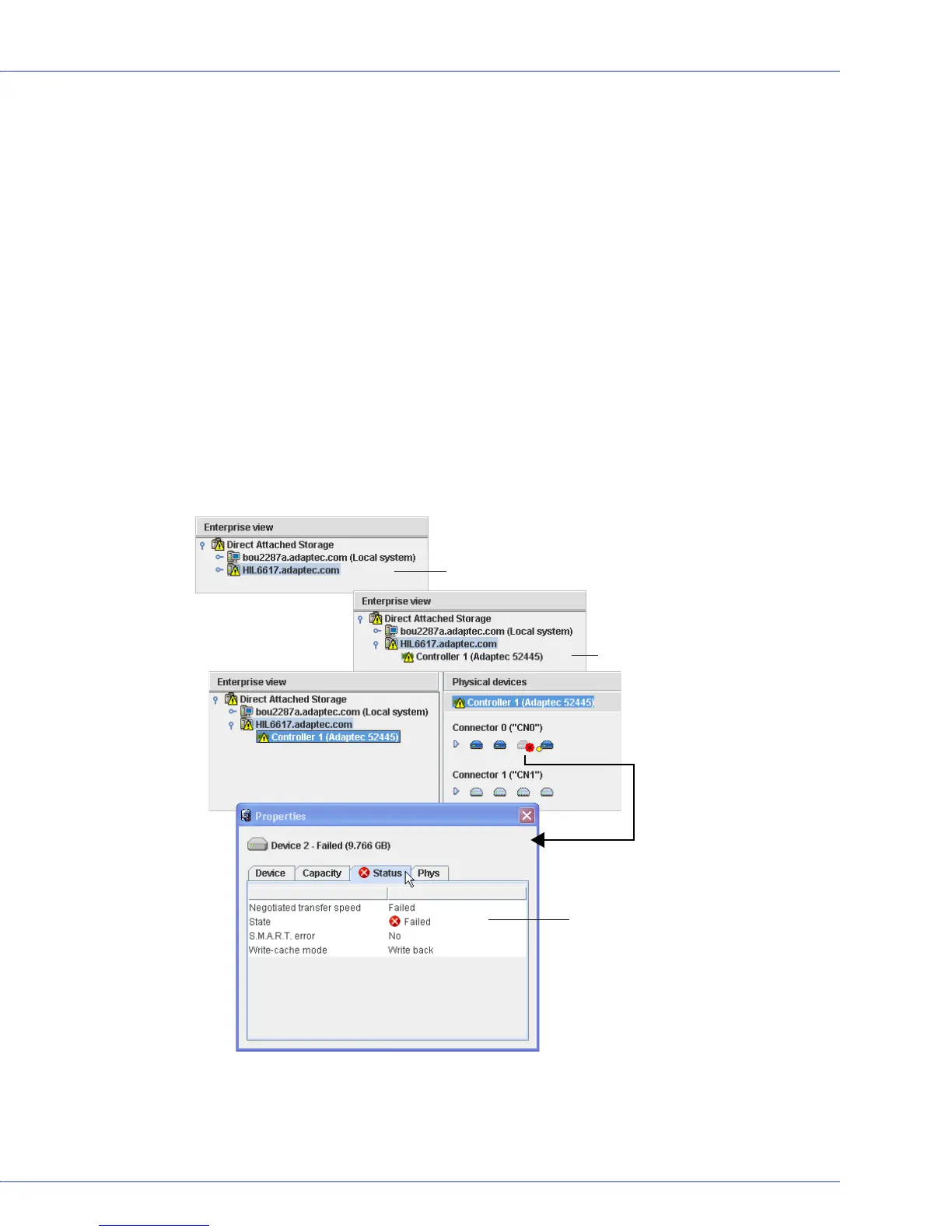
Identifying a Failed or Failing Component
When your are notified of a Warning- or Error-level event, use Adaptec Storage Manager’s
rapid fault isolation feature to quickly identify the source of the problem.
For instance, in this example, a disk drive has failed. To find the failed disk drive, follow the
yellow Error icons:
Error is on a remote system...
...on Controller 1...
...on Device 1.
Double-click Device 1 to open
the Properties window and
continue tracing the fault to its
source...
...a disk drive failure.



 To Next Page