Appendix D: Buttons and Icons At-a-Glance ● 169
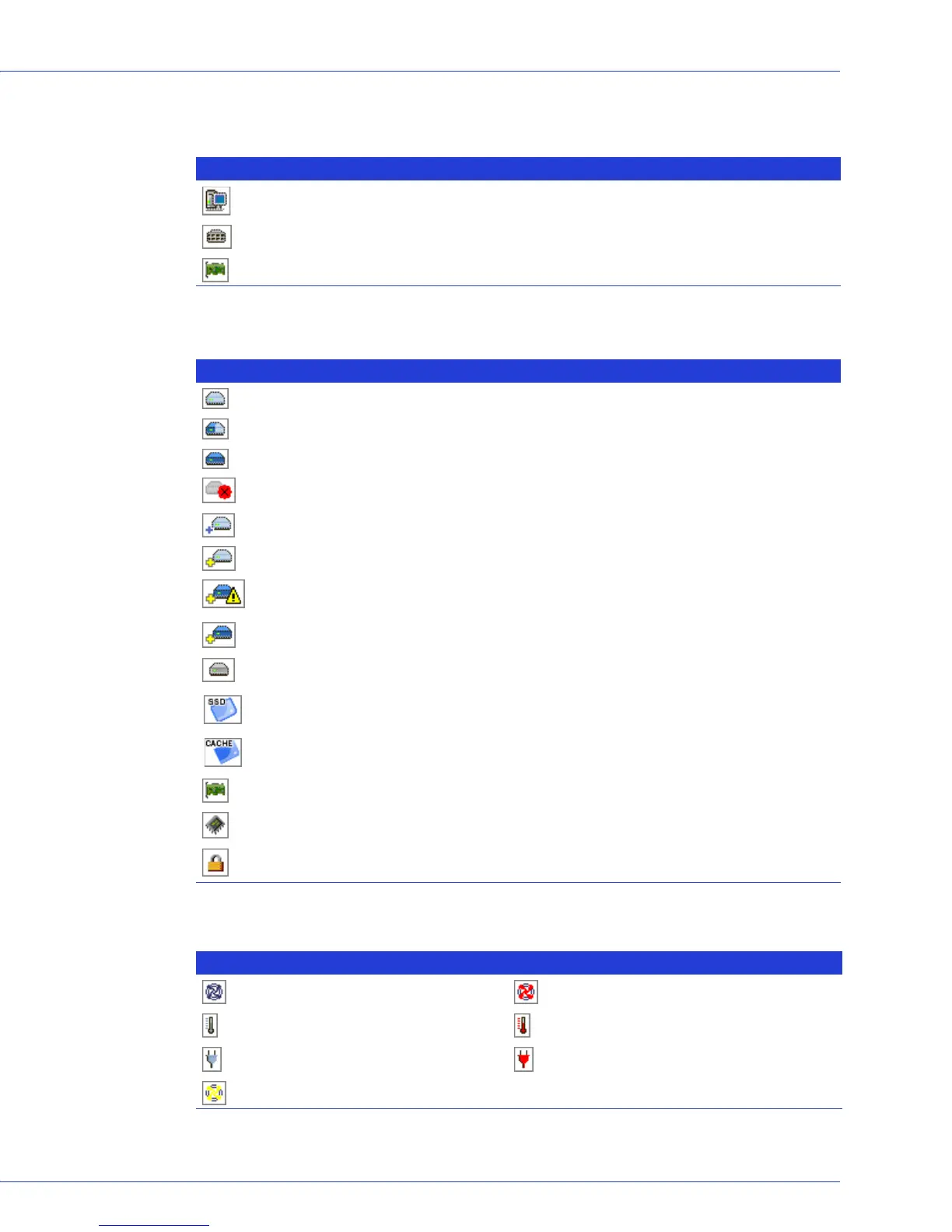
Enterprise View Icons
Icons in the Physical Devices View
Enclosure Status Icons
Icon Description
System with direct attached storage controller and directly attached disk drives or enclosures
Enclosure
Controller
Icon Description
Ready disk drive
Disk drive with free space
Disk drive with no free space
Failed disk drive
Healthy global or dedicated hot spare
Hot spare with error (see page 55 for more information)
Hot spare being built into logical drive after disk drive failure
Hot spare built into logical drive after disk drive failure
JBOD disk
Ready Solid State Drive (SSD), not part of any logical drive or MaxIQ pool
Solid State Drive assigned to MaxIQ pool
Controller
Enclosure Management Device
Locked upgrade feature that can be activated with a feature key (see page 125 for more
information)
Icon Description
Enclosure fan(s) — normal Enclosure fan(s) — error
Enclosure temperature — normal Enclosure temperature — error
Enclosure Power — normal Enclosure Power — error
Enclosure fan(s) — warning



 To Next Page