Chapter 3: Building Your Storage Space ● 32
UnixWare or OpenServer
To start the Agent, enter this command:
sh /opt/RaidMan/RaidAgnt.sh
When the Agent has started, a copyright message appears.
Note:
To have the Agent run automatically at system start-up, add this line to the /etc/inittab and
/etc/conf/init.d/kernel files:
nfra:12346:once:sh opt/RaidMan/RaidAgnt.sh
Solaris
To start the Agent, enter this command:
svcadm enable ADPTstor_agent
Logging into Remote Systems from the Local System
Once Adaptec Storage Manager or the Adaptec Storage Manager Agent (see page 14) is
running on all systems in your storage space, the next step is to log in to the remote systems
from the local system.
Once you have logged in to a remote system, it automatically appears in the Enterprise View
each time you start Adaptec Storage Manager on the local system. You can work with a remote
system’s controllers, disk drives, and logical drives as if they were part of your local system.
Note:
Adaptec Storage Manager has a wizard to help you manage the remote systems in your
storage space. The wizard simplifies the process of connecting to remote systems and adding them
to the Enterprise View. For more information, see Managing Remote Systems on page 127.
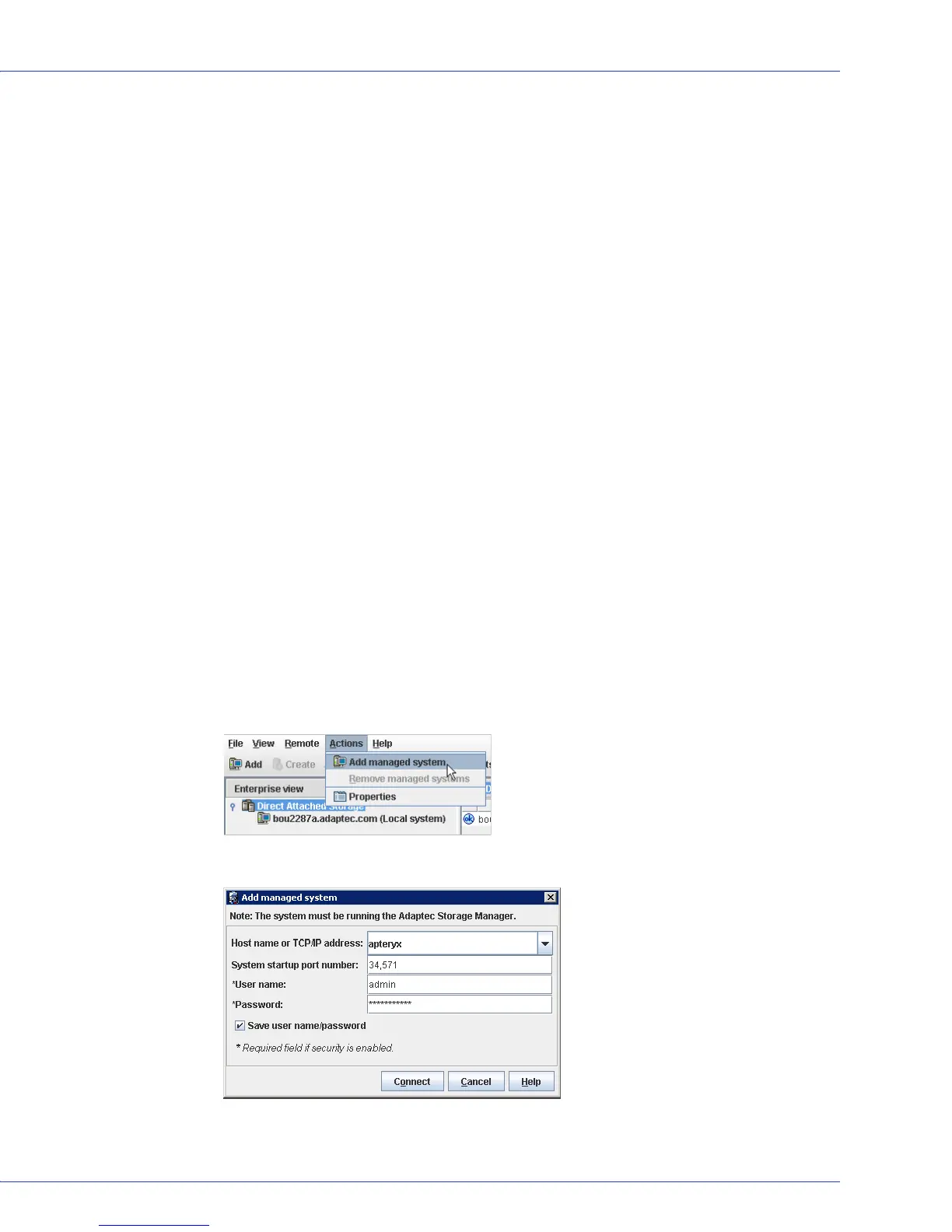
To log in to a remote system:
1 In the Enterprise View, select either Direct Attached Storage or the Local System.
2 From the Actions menu, select Add managed system.
The Add Managed System window opens.



 To Next Page