Chapter 8: Maintaining Physical Devices ● 92
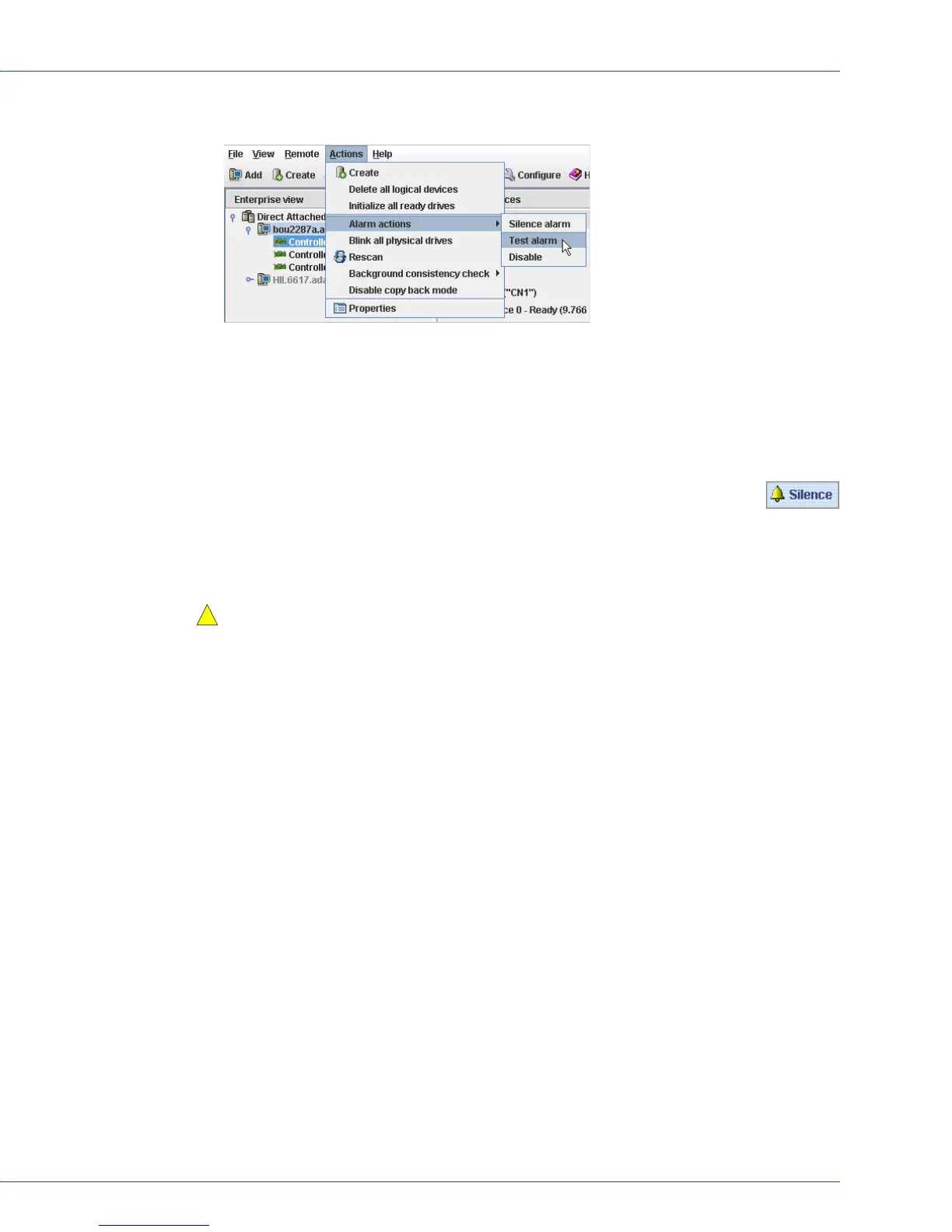
3 In the menu bar, click Actions, select Alarm actions, then click Test alarm.
The alarm sounds.
4 To stop the test, click OK.
Silencing a Controller Alarm
You can silence the alarm on a controller while you fix the problem.
To silence the alarm, click the Silence button (shown at right) in the main Adaptec
Storage Manager window.
Disabling a Controller Alarm
You can disable the alarm for a selected controller, if required.
Caution:
If you disable the alarm, no audible signal will sound when an error occurs on the
controller.
To disable a controller’s alarm:
1 In the Enterprise View, select the controller you want.
2
In the menu bar, click
Actions
, select
Alarm Actions
, then click
Disable
(shown in the figure
in Step 3 on page 92).
The alarm is disabled for that system.
Rescanning a Controller
After you connect a disk drive to or remove a ‘Ready’ (non-failed) disk drive from a controller,
Adaptec Storage Manager may not recognize the change until it rescans the controller.
To rescan a controller:
1 In the Enterprise View, click the controller.
2 In the menu bar, select Actions, then click Rescan.
Adaptec Storage Manager scans all the channels or ports on the controller you selected.
When the scan is complete, a report appears.
3 Click Done after you have reviewed the scan report.
!



 To Next Page