22
3.1.4 Disable activity tracking
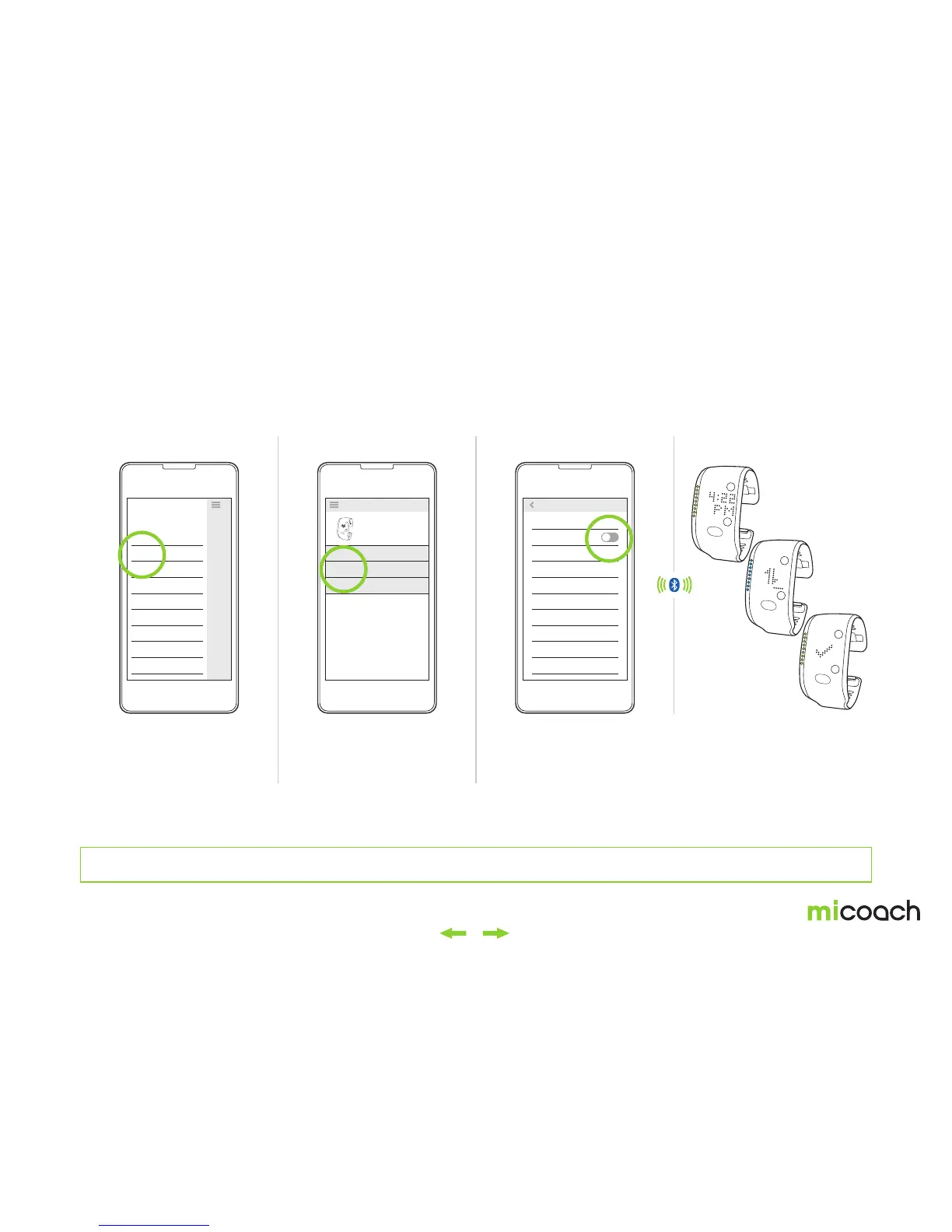
The FITSMART daily activity tracking feature can be disabled from the miCoach train & run app. Once disabled, the FITSMART will no longer track daily activity.
1. Select your FITSMART 2. Select device settings 3. Disable activity tracking 4. Sync Changes
From the train & run app
home screen, select
“Devices” from the drop-
down menu in the top left.
Select the “Settings” option
to disable activity tracking.
Toggle the activity tracking slider to the off position to disable.
Before you can disable daily activity tracking, you must first add your FITSMART to the train & run app. See section 2.3 Pairing & Syncing.
GO
Devices
Weekly goal
Training plan
Workout history
Stats
Shoes
Blog
WORKOUTS ON FITSMART
SETTINGS
TUTORIALS & GUIDES
MY DEVICES
FITSMART
OPTIONS
Activity Tracking
Clock
In-Workout Display
Laps/Splits
DEVICE INFORMATION
Firmware
Serial Number
SETTINGS


 To Next Page