9
2.2.3 Getting started with your FITSMART – out of the box setup
Turning your FITSMART on and setting the time
Your FITSMART can be used out of the box as a standalone unit or in combination with your smart phone and the miCoach train & run app. The first time you turn on your FIT
SMART, the time will need to be set.
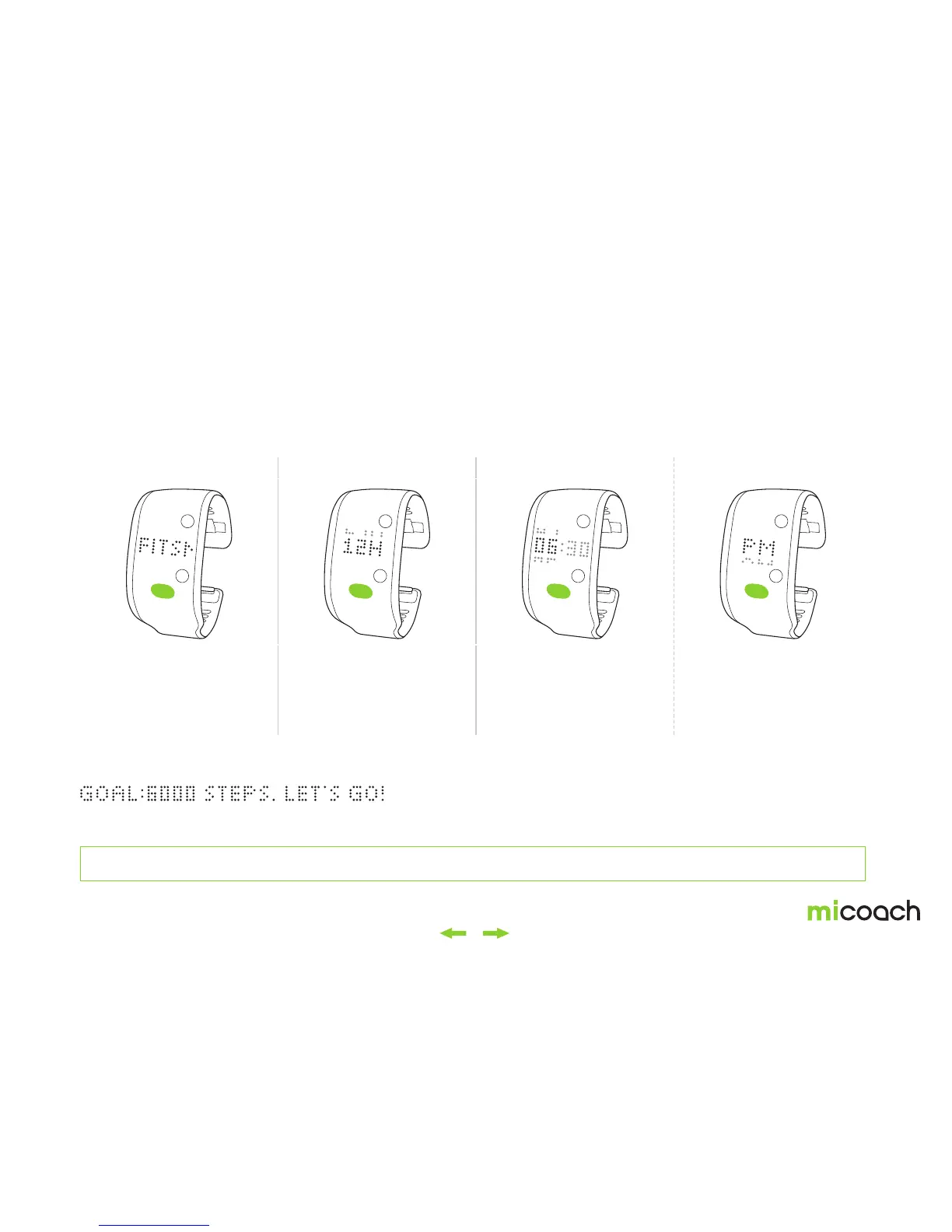
1. Power on (boot) 2. Select time format 3. Set the time
4. Initial Step Goal
Short press the center
button to turn on your FIT
SMART.
Note: If you do not see “FITSMART”
scroll across your screen and instead
see a Bluetooth® pairing screen, please
see section 2.3 Pairing & Syncing.
Short press the center
button to set the time. First
you must select either a 12
hour or 24 hour time format.
Use the side buttons to
select the appropriate hour
and minute. Use the center
button to confirm.
If you have selected a 12
hour format, the next step
is to select either AM or PM.
Press the center button to
confirm your selection.
Once you have set the time you will see your initial activity step goal of 6000 steps scroll across the
screen. Press the center button to dismiss this message.
The time format can be adjusted later with the train & run app, see section 2.2.5. Your activity tracking goal can also be adjusted later with the train & run app, see section 3.1.2


 To Next Page