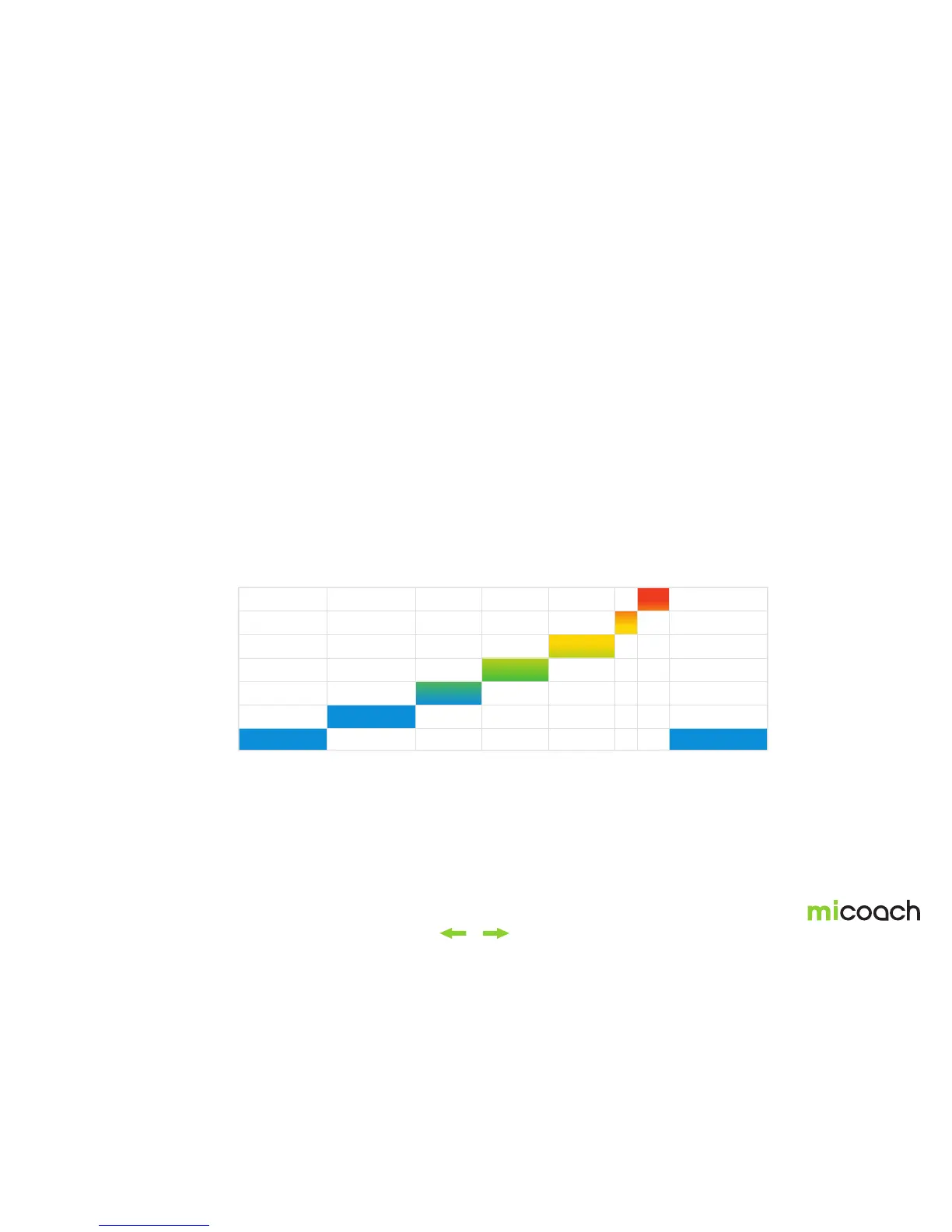
Effort Level
Time
90%
80%
70%
60%
50%
40%
10%
00:00 02:00 04:00 05:30 07:00 08:30 09:00 09:45 12:00
41
4. Special workouts
4.1 Assessment Workout (to calibrate speed, distance and heart rate zones)
Completing an Assessment Workout is recommended to get most out of your FIT
SMART. The Assessment Workout is a 12-minute workout progressing in intensity.
The data recorded during the Assessment Workout is used to:
• adjust your personal miCoach Zones to your fitness level.
• calibrate your FITSMART’s internal accelerometer to enhance the
accuracy of the distance and speed data recorded.
In order to calibrate the internal accelerometer, it’s necessary to complete the
Assessment Workout with a mobile device equipped with the miCoach train & run
app, as the GPS signals are used to adjust the internal sensor. If you complete the
Assessment Workout without a mobile device, only your personal miCoach Zones
will be adjusted.
Detailed instructions for the Assessment Workout are available on the miCoach
train & run app. Calibrating your zones and the accelerometer are recommended
to ensure proper speed and distance tracking, resulting in an enhanced user
experience and coaching.


 To Next Page