43
4.1.2 Completing an Assessment Workout with your FITSMART
Once added to your FITSMART, the Assessment Workout is located under the MY TRAINING PLAN menu*.
*The MY TRAINING PLAN menu option will not be visible until a training plan, single workout, or assessment
workout has been synced from the train & run app. See section, 3.2.1.
**The Assessment Workout must be added to your FITSMART from the train & run app. See the previous section 4.1.1
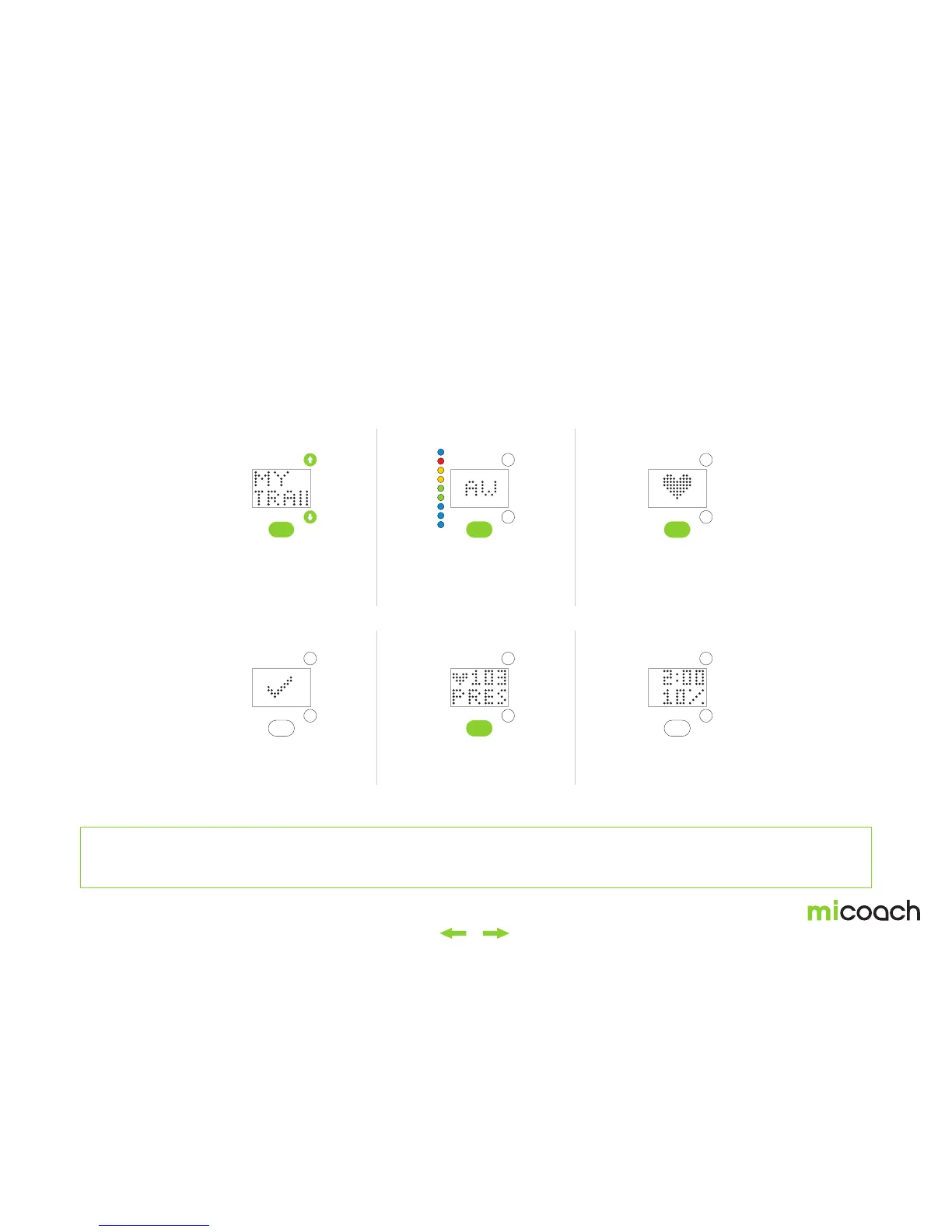
1. My Training Plan
4. Heart rate detected
2. Assessment Workout
5. Start
3. Heart rate detection
6. 10% zone
Your FIT SMART will begin
searching for your heart
rate.*
*Press center button to cancel
heart rate detection.
Walk at 10% effort for 2
minutes. A countdown is
shown.
Select the Assessment
Workout called “AW”
from the list of Coached
Workouts.**
Press the center button
to start the Assessment
Workout.
The Assessment Workout
can be found under the My
Training Plan menu.
Once your heart rate is
detected, a confirmation
screen is shown for 1 second.


 To Next Page