53
6. Additional information
6.1 Software update
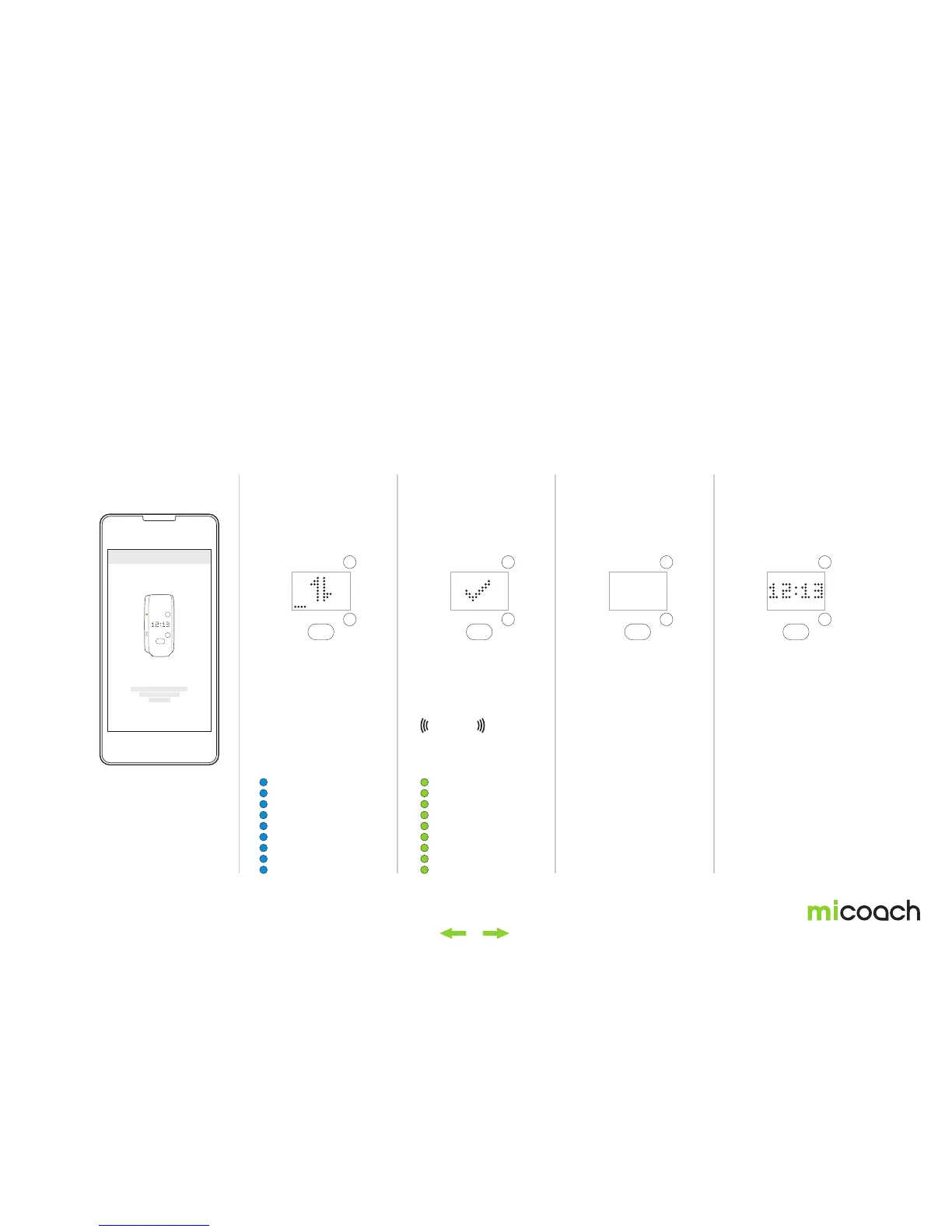
One important feature of the FITSMART is that you can update the software via the miCoach train & run app. Software updates ensure that you always have the latest functions
and features in order to get the most out of your FITSMART.
1. Sync FITSMART with
the train & run app.
2. Software download 3. Software download
completed
5. Automatic start4. Automatic power off
When a FIT SMART
software update
is available it will
automatically be
transferred to your device
during synchronization
with the train & run app.
The syncing animation is
shown during software
download.
After successfully
syncing, the FIT SMART
powers off automatically.
Once the software is
updated, your FITSMART
will restart and show the
time screen.
Color: green
Repeats: 3 times (blinking)
Color: blue
Solid light
Duration: 0.2s. Repeats: 1 time.
Vibration
FIRMWARE UPDATE


 To Next Page